
Conversation tests
A conversation test checks that your assistant actually helps people. An AI simulated user with a persona and a goal chats with your chatbot or agent, one message at a time, reacting to each reply the way a real person would. When the conversation ends, a judge model reads the whole transcript and decides whether each of your success criteria was met.
Use it for behaviour that only shows up across several turns: does the bot ask for the order number before answering, does it stay polite with an impatient customer, does it hand over to a human when it should, does it ever ask for data it must not collect.
How a conversation runs
Section titled “How a conversation runs”-
First message. If you set
opening_message, it is sent word for word. Otherwise the simulated user writes it from the persona and goal. -
Reply. The message goes to your target (a website chat, an HTTP endpoint or an A2A agent). The reply and its latency are recorded.
-
Next turn. The simulated user reads the conversation so far and writes the next message. It can also decide it is done: the goal was achieved, or the assistant clearly cannot help.
-
Stop. The loop ends at
max_turnsuser messages, when the simulated user is done, or when the target fails (an HTTP error, a timeout). -
Judge. One judge call grades every success criterion against the transcript and adds a short note to every assistant reply. The test passes when all criteria are met.
The simulated user runs on the project’s AI model for runs at a temperature of 0.7, so repeated trials try different phrasings. The judge runs on the judge model at temperature 0.
Create a conversation test
Section titled “Create a conversation test”-
On the project board, choose Add test in a module, pick Conversation and press Continue.
-
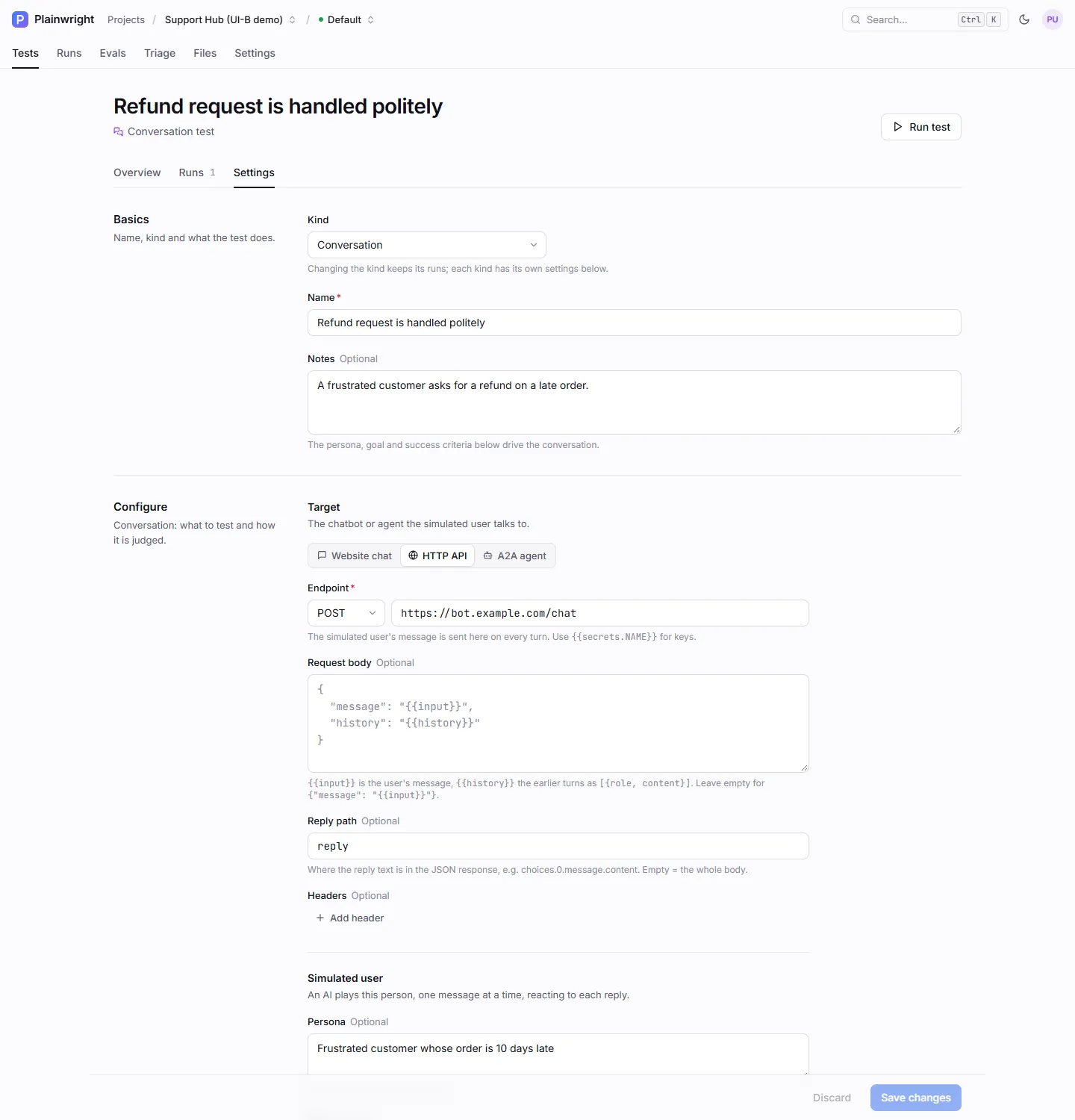
Under Describe, give the test a name and optional Notes on what you are testing. The judge reads the notes as context, and they become the goal if you leave Goal empty.
-
Under Configure, pick the Target type and fill in its fields (see Targets below).
-
Describe the Simulated user: persona, goal, an optional first message and Max turns.
-
Add one or more Success criteria, then press Continue.
-
Under Options, optionally set Trials to repeat the conversation and report a pass rate. Press Create & run.
Configuration
Section titled “Configuration”These keys live in the test’s config. Everything except the target’s required URL is optional.
| Key | Type | Default | What it does |
|---|---|---|---|
target |
object | Website chat on the project’s base URL | The system under test. See Targets. |
persona |
string | A typical first-time user of this product. |
Who the simulated user is and how they write. |
goal |
string | The test’s description, else Get help with a typical request. |
What the simulated user wants to achieve. |
opening_message |
string | none | Sent verbatim as the first message (saves one model call). |
success_criteria |
list of strings | The assistant helps the user achieve their goal: <goal> |
What the judge checks. Up to 20, each up to 500 characters. |
max_turns |
integer | 6 |
Most messages the simulated user may send, 1–12 (capped by MAX_CONVERSATION_TURNS). |
threshold |
number | Project pass mark (80 %) | Pass rate needed when trials is more than 1. 0.8 and 80 both mean 80 %. |
The test’s natural_language (the Notes field) tells the judge what is being tested, and
trials (1–10) repeats the whole conversation. See
Trials, thresholds and cost.
Targets
Section titled “Targets”A target says how to reach your assistant. If type is missing, Plainwright infers it: a url means
http, an agent_url means a2a, and nothing means the website chat.
Use this for any chatbot with a JSON-over-HTTP endpoint. Each turn renders body_template, sends it
to url, and reads the reply from response_path.
| Key | Default | Notes |
|---|---|---|
url |
required | Placeholders work here too, e.g. https://bot.example.com/chat?key={{secrets.BOT_KEY}}. |
method |
POST |
GET and HEAD send no body. |
headers |
{} |
Typically {"Authorization": "Bearer {{secrets.BOT_API_KEY}}"}. |
body_template |
{"message": "{{input}}"} |
A JSON object or array (or a string holding one). A string that is not JSON is sent as a raw text body. |
response_path |
$ (whole body) |
Where the reply text is in the JSON response. |
timeout_s |
60 |
Seconds to wait for each reply. |
{ "type": "http", "url": "https://bot.example.com/chat", "method": "POST", "headers": { "Authorization": "Bearer {{secrets.BOT_API_KEY}}" }, "body_template": { "message": "{{input}}", "history": "{{history}}" }, "response_path": "reply", "timeout_s": 30}Use this when the assistant is a chat widget on a web page and has no public API. A browser agent opens the page, finds the widget, and plays the persona itself in one browser session. It copies every reply into the transcript, and the judge grades it as usual. Screenshots and browser evidence are kept on the run.
| Key | Default | Notes |
|---|---|---|
chat_url |
The project’s base URL (or the environment you run against) | A path such as /support is joined to the base URL; a full URL is used as is. |
chat_hint |
none | How to open the chat, e.g. Click the chat bubble, bottom right. |
{ "type": "browser", "chat_url": "/support", "chat_hint": "Click the chat bubble, bottom right" }The browser and device you pick when you run the test apply here too. The agent may take at most
12 + 5 × max_turns browser steps (60 at most). If the chat never answers, the test fails with
The chat assistant never replied.
Use this for an agent that speaks the A2A protocol. Messages are sent with
JSON-RPC message/send, and the whole conversation stays in one A2A context.
| Key | Default | Notes |
|---|---|---|
agent_url |
required | The agent’s base URL; its agent card is read to find the JSON-RPC endpoint. |
headers |
{} |
For example {"Authorization": "Bearer {{secrets.AGENT_TOKEN}}"}. |
rpc_url |
from the agent card | Skip the card lookup and post straight to this endpoint. |
timeout_s |
60 |
Seconds per request, 1–300. |
{ "type": "a2a", "agent_url": "https://agent.example.com", "headers": { "Authorization": "Bearer {{secrets.AGENT_TOKEN}}" } }To also validate the agent card, use the A2A test kind instead; it runs the same conversation when you give it a persona, goal or criteria.
Body template variables
Section titled “Body template variables”| Placeholder | Value |
|---|---|
{{input}} or {{message}} |
The message being sent now. |
{{history}} |
The earlier turns as [{"role": "user" | "assistant", "content": "…"}], not including the current message. An empty list on the first turn. |
{{secrets.NAME}} |
A project secret, filled in just before the request is sent. Works in the URL, headers and body. |
Templates are filled in on the parsed JSON, so quotes and newlines in a message never break the
body. A string that is exactly one placeholder takes the value’s own type, so "history": "{{history}}"
sends a real JSON array. Inside a longer string, non-text values are JSON-encoded. An unknown
placeholder is sent as typed.
On the second turn of the example above, your endpoint receives:
{ "message": "Yes please. Do you need my card number?", "history": [ { "role": "user", "content": "My order is 10 days late. I want my money back." }, { "role": "assistant", "content": "I'm really sorry about the delay. I can refund the order right now. Shall I go ahead?" } ]}Response path syntax
Section titled “Response path syntax”| Path | Picks |
|---|---|
$ or empty |
The whole response body. |
reply |
The reply key. |
choices.0.message.content |
Walks keys and list indexes (OpenAI-style responses). |
data.messages[-1].text |
Bracketed indexes, including negative ones. |
sources[*].text |
Every item in a list; text items are joined with newlines. |
A response that isn’t JSON is used as the reply text as is. A path that doesn’t exist gives an empty reply, which the judge sees as (empty reply): if every reply is empty, check the path first.
Write good personas, goals and criteria
Section titled “Write good personas, goals and criteria”- Make the persona specific. “A busy parent on a phone who types short, slightly impatient messages” produces far more realistic pressure than “a customer”.
- Give the goal an end state the simulated user can recognise: “Find out when order #4411 arrives and change the delivery address”, not “Ask about orders”.
- One observable behaviour per criterion. The judge only sees the transcript, so write criteria it can verify from the words on the page: “Asks for the order number before giving a delivery date”.
- Include what must not happen. “Never asks for the full card number” or “Does not promise a refund over $200” catch the failures that matter most.
- Check side effects elsewhere. The judge can’t see your database. If the bot claims it changed the address, confirm it with an API test.
Full example
Section titled “Full example”{ "module_id": "<module-id>", "name": "Refund request is handled politely", "kind": "conversation", "natural_language": "Acme's support chatbot. A frustrated customer asks for a refund on a late order.", "trials": 3, "config": { "target": { "type": "http", "url": "https://bot.example.com/chat", "headers": { "Authorization": "Bearer {{secrets.BOT_API_KEY}}" }, "body_template": { "message": "{{input}}", "history": "{{history}}" }, "response_path": "reply" }, "persona": "A frustrated customer whose order is 10 days late. Writes short, slightly impatient messages.", "goal": "Get a refund or a clear next step for the late order.", "opening_message": "My order is 10 days late. I want my money back.", "success_criteria": [ "The assistant apologises for the delay", "The assistant offers a refund or a replacement", "The assistant never asks for the full card number" ], "max_turns": 6, "threshold": 0.66 }}Create and run it as shown in Work from the API. With three
trials and threshold: 0.66, the test passes when at least two of the three conversations meet every
criterion.
Read the result
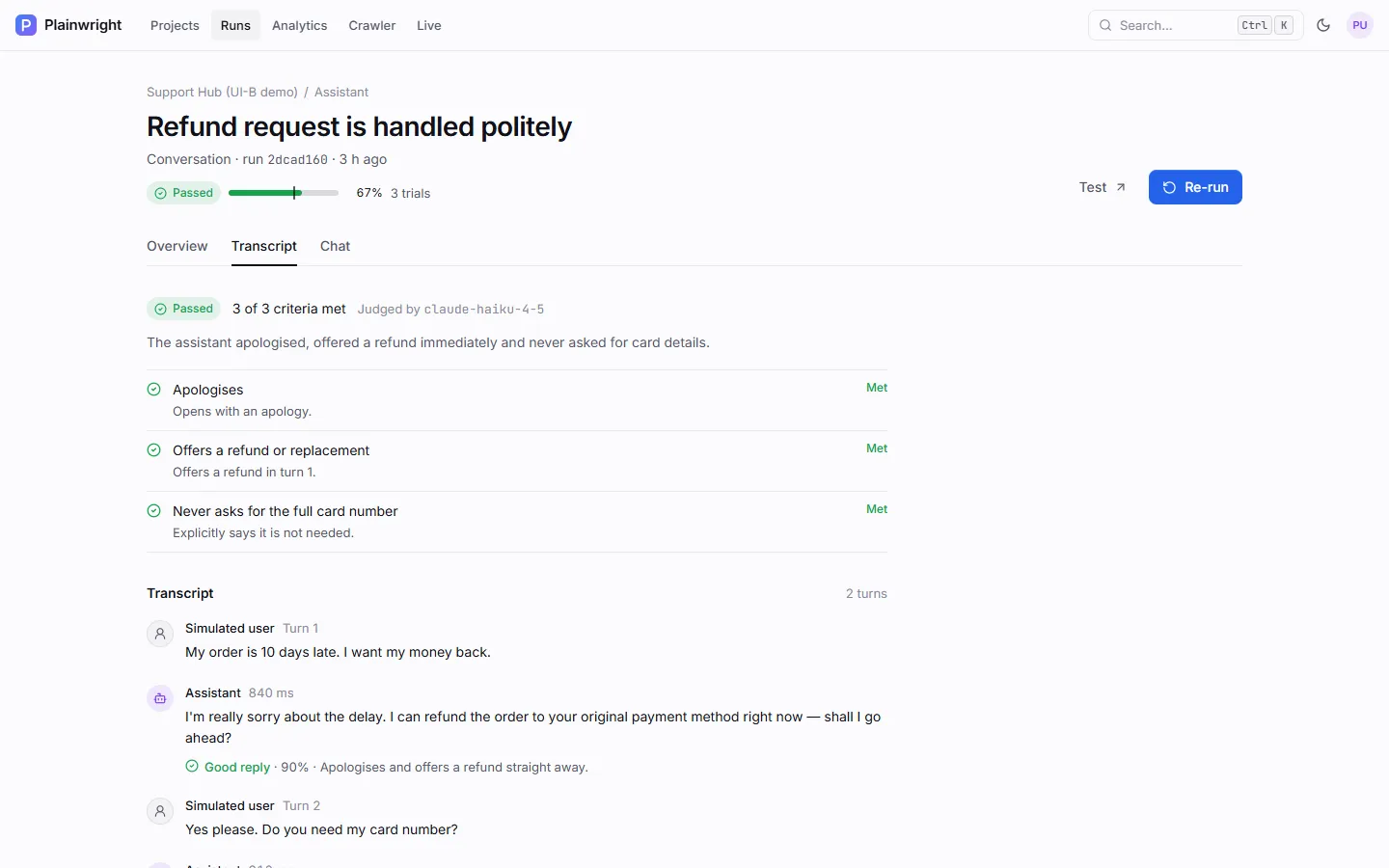
Section titled “Read the result”The Transcript tab shows the judge’s verdict, each criterion as Met or Not met with a one-line reason, and the conversation itself. Every assistant reply carries the judge’s note (Good reply or not, with a score) and its latency.
| Status | When |
|---|---|
| Passed | Every success criterion was met (or, with trials, the pass rate reached the threshold). |
| Failed | At least one criterion was not met; the error lists which and why. Also when the target returned an HTTP error or failed part-way through. |
| Error | The test couldn’t really run: the target was unreachable or misconfigured, the simulated user’s model failed, or the judge’s reply couldn’t be parsed. |
For a single trial, the run’s score is the share of criteria met (2 of 3 = 67 %); with several trials it is the pass rate. The first step records how the conversation ended: goal achieved, the user gave up, turn limit reached, the target failed or, for website chats, the browser agent finished. With several trials, Overview shows the pass rate and one chip per trial; open a trial to see its transcript.
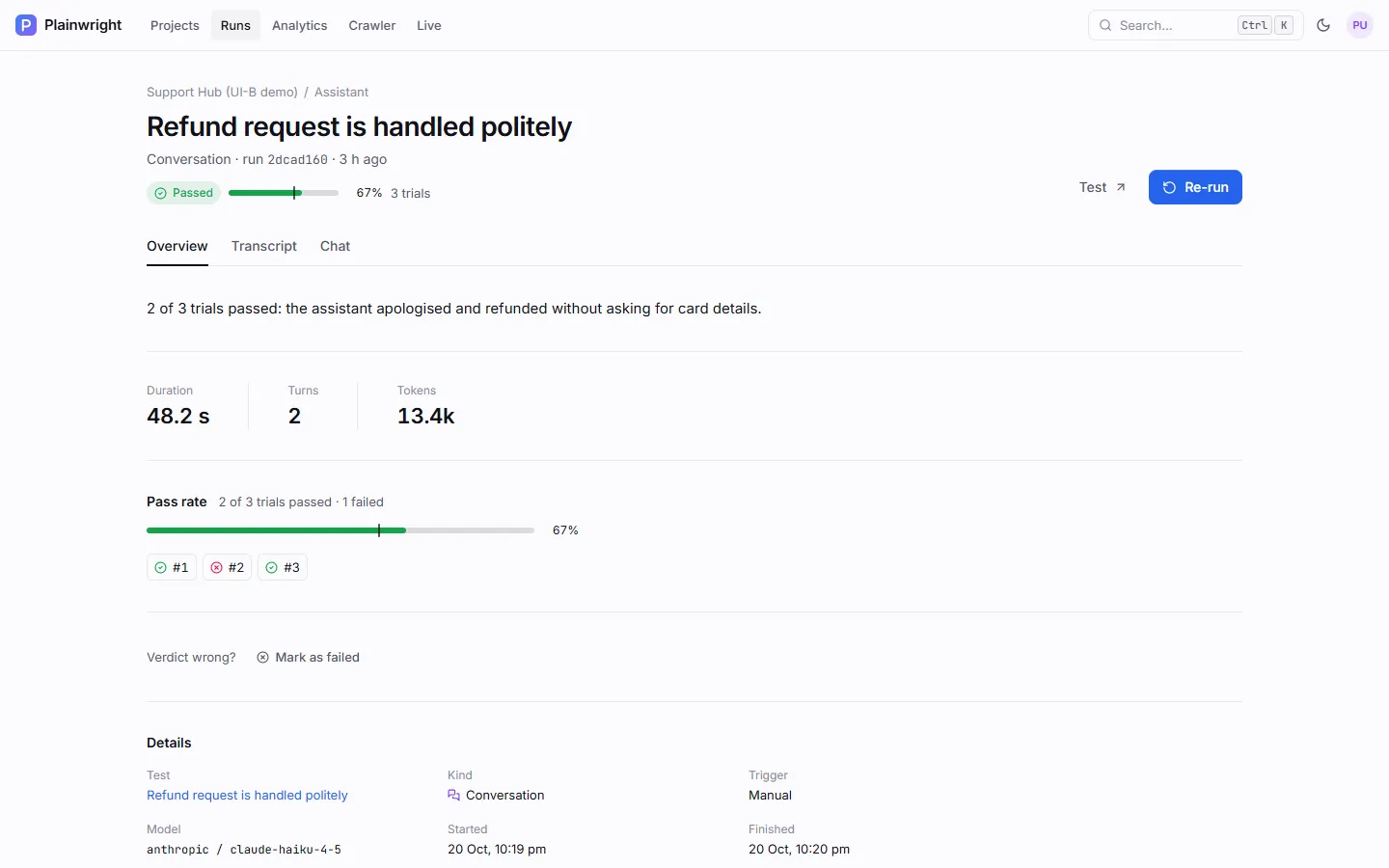
If you disagree with the judge, use Verdict wrong? on the run page. See Verdict overrides.
Limits
Section titled “Limits”| Limit | Value |
|---|---|
| Turns per conversation | 1–12 (MAX_CONVERSATION_TURNS, default 12) |
| Stored per transcript entry | 4,000 characters |
| Shown to the judge | 1,500 characters per entry, 16,000 in total (the middle of very long chats is left out) |
| Shown to the simulated user | The most recent 12,000 characters, 2,000 per entry |
| Success criteria | 20, each up to 500 characters |