
Team and roles
Projects are shared by inviting people and giving each one a role. The role decides what they can see and change in that project, and nothing else: access is always per project.
| Role | In short |
|---|---|
| Viewer | Sees tests, runs, results, Triage and Analytics. Can’t change anything. |
| Editor | Writes and runs tests, and handles day-to-day work: secrets, saved logins, environments, files, datasets, triage. |
| Admin | Everything an editor can do, plus project settings, alerts, integrations, members and the CI secret. |
| Owner | The person who created the project. Every admin right, plus deleting the project. There is one owner per project. |
What each role can do
Section titled “What each role can do”| Action | Viewer | Editor | Admin | Owner |
|---|---|---|---|---|
| See tests, runs, evidence, Triage, Evals, Analytics, chat threads | ✓ | ✓ | ✓ | ✓ |
| See secret and saved-login names (never values) | ✓ | ✓ | ✓ | ✓ |
| Create, edit, delete and run tests and modules; Run all; Rerun failed | ✓ | ✓ | ✓ | |
| Quarantine tests, override verdicts, approve visual baselines | ✓ | ✓ | ✓ | |
| Analyze root causes, send chat messages, file issues | ✓ | ✓ | ✓ | |
| Manage secrets, saved logins, environments, project files and datasets | ✓ | ✓ | ✓ | |
| Use the Crawler, templates and imports to create tests | ✓ | ✓ | ✓ | |
| Change project settings: name, URL, retries, pass mark, run and judge models | ✓ | ✓ | ||
| Change alerts and send test alerts | ✓ | ✓ | ||
| Connect, test and disconnect integrations | ✓ | ✓ | ||
| Invite and remove members, change roles | ✓ | ✓ | ||
| See and rotate the CI webhook secret; see the full alert webhook URL | ✓ | ✓ | ||
| Delete the project | ✓ |
The API enforces the same rules on every endpoint. Someone without access to a project gets
404 Project not found, so they can’t tell it exists; someone with too low a role gets 403.
Invite someone
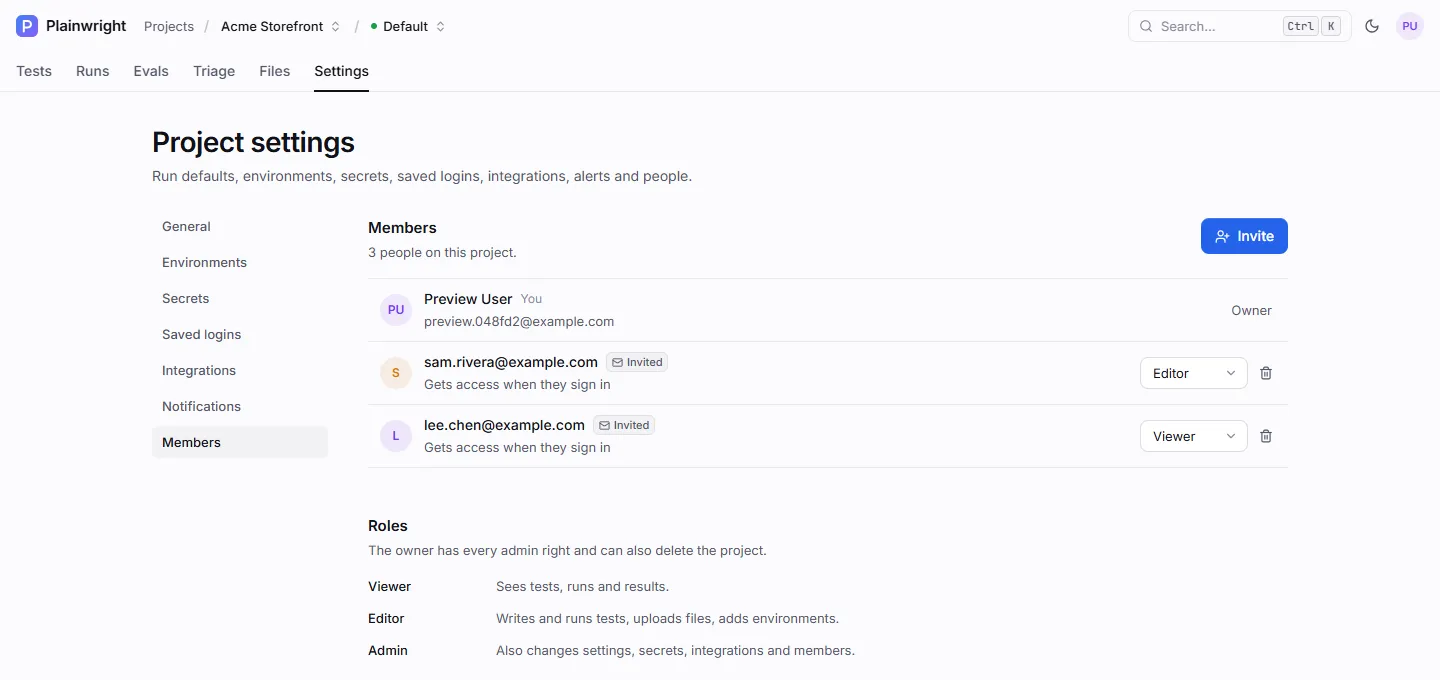
Section titled “Invite someone”- Open the project’s Settings → Members (or the Team page from your avatar menu, and pick the project). You need the admin role.
- Click Invite, enter their email address, choose Viewer, Editor or Admin, and send.
- If the person already has an account with a confirmed email address, they get access at once. Otherwise they appear as Invited until they have an account and have confirmed that address.
Anyone can register an account with any address, so an invitation only attaches to an account that has proved it receives mail there. An address counts as confirmed after any of these:
- the person clicks the confirmation link emailed when they register (or re-sent from Settings → Profile);
- they sign in with Google or GitHub, and the provider reports the address as verified;
- they complete a password reset sent to that address;
- an operator confirms it on the server with
python -m app.cli verify-email <email>.
Email addresses are compared without regard to case, so Sam@Acme.example and sam@acme.example
are the same invitation. See
Confirming email addresses.
Plainwright emails an invitation link when the server has SMTP configured (see
Sign-in and email). Without SMTP, the app says so, and you tell
the person yourself. Without SMTP there’s also no confirmation email, so a password-only account can
only confirm its address through Google or GitHub sign-in, or when an operator runs the
verify-email command above.
To change a role, pick a new one in the member’s row. Nobody can change their own role or the owner’s. To remove someone, or cancel an invite, use the trash icon and confirm. Removal takes effect on their next request, and someone removed from the last project they belonged to is also signed out of every session.
Members API
Section titled “Members API”| Endpoint | Role | Body |
|---|---|---|
GET /api/projects/{project_id}/members |
viewer | Returns the owner and every member or invite |
POST /api/projects/{project_id}/members |
admin | {"email": "sam@acme.example", "role": "editor"} |
PUT /api/projects/{project_id}/members/{member_id} |
admin | {"role": "viewer"} |
DELETE /api/projects/{project_id}/members/{member_id} |
admin | none |
curl -fsS -X POST "$PLAINWRIGHT_URL/api/projects/$PROJECT_ID/members" \ -H "Authorization: Bearer $PLAINWRIGHT_TOKEN" -H "Content-Type: application/json" \ -d '{"email": "sam@acme.example", "role": "editor"}'{ "id": "0b6f…", "user_id": null, "email": "sam@acme.example", "name": null, "role": "editor", "status": "invited", "created_at": "2026-10-20 18:02:11.418204", "pending_reason": "no_account", "emailed": false}status is active once the invitation has attached to an account, and emailed says whether an
invitation email went out. An invite that is still pending carries pending_reason: no_account
(nobody has registered the address yet) or email_unverified (an account exists but hasn’t confirmed
the address). The owner appears in the list with "id": "owner" and can’t be changed or removed.
Inviting the owner, or someone who is already a member or invited, returns 400.
Each project in GET /api/projects/ also carries my_role, your own role on it.