
MCP servers
An MCP test checks a Model Context Protocol server the way an AI client will use it. Plainwright connects, lists the tools, and runs a contract check on every tool (no model needed). Then an AI agent carries out your plain-English test using the server’s real tools, and reports whether each call did what you expected.
Use it for an MCP server you build or depend on: catch a tool that lost its description or schema before clients start calling it wrongly, and check that the tools actually return the right data.
How an MCP test runs
Section titled “How an MCP test runs”-
Connect to
server_urlover Streamable HTTP or the legacy SSE transport and complete the MCPinitializehandshake. -
List tools with
tools/list, following pagination. -
Check the contract of every tool (see below). This step uses no tokens.
-
Exercise the tools. Unless the test is contract-only, an agent on the project’s AI model for runs gets the server’s tools as functions named
target__<tool>, follows your test description, and reads every result. It reports a verdict with one step per check. -
Disconnect, ending the session on the server.
Create an MCP test
Section titled “Create an MCP test”-
On the project board, choose Add test in a module, pick MCP server and press Continue.
-
Under What should the agent do with the server’s tools?, describe the test, for example: Search for “invoices”, open the first result with
get_pageand check it has a total. -
Under Configure, enter the Server URL, pick a Transport, and add an
Authorizationheader if the server needs one, using a secret such asBearer {{secrets.MCP_TOKEN}}. -
Under Checks, choose whether contract problems fail the test, whether to run the contract check only, and the Max tool calls. Then press Continue and Create & run.
Configuration
Section titled “Configuration”| Key | Type | Default | What it does |
|---|---|---|---|
server_url |
string | required | The endpoint your MCP clients use, such as https://mcp.example.com/mcp or …/sse. Secrets work here. |
transport |
string | auto |
auto, streamable_http or sse. http and streamable mean streamable_http. |
headers |
object | {} |
Sent on every request, for example {"Authorization": "Bearer {{secrets.MCP_TOKEN}}"}. |
strict_contract |
boolean | true |
Contract problems fail the test. With false they are reported but not enforced. |
contract_only |
boolean | false |
Skip the agent: connect, list and check only. No tokens are used. |
max_steps |
integer | 20 |
Most tool calls the agent may make, 1–30. |
The test’s description (natural_language) is what the agent does. Leave it empty, or set
contract_only, for a contract check on its own.
Transports
Section titled “Transports”transport |
How it connects |
|---|---|
streamable_http |
The current MCP transport. Every JSON-RPC message is a POST to one endpoint; replies come back as JSON or as an event stream. The session is carried in the Mcp-Session-Id header. Plainwright asks for protocol version 2025-06-18. |
sse |
The legacy transport. A long-lived GET stream announces the URL to post messages to. |
auto |
Tries Streamable HTTP first and falls back to SSE. When the URL ends in /sse, SSE is tried first. |
For SSE, Plainwright finds the stream from your URL: a URL ending in /sse is used as is, a URL
ending in /mcp uses its sibling /sse, and any other URL gets /sse appended. The run’s
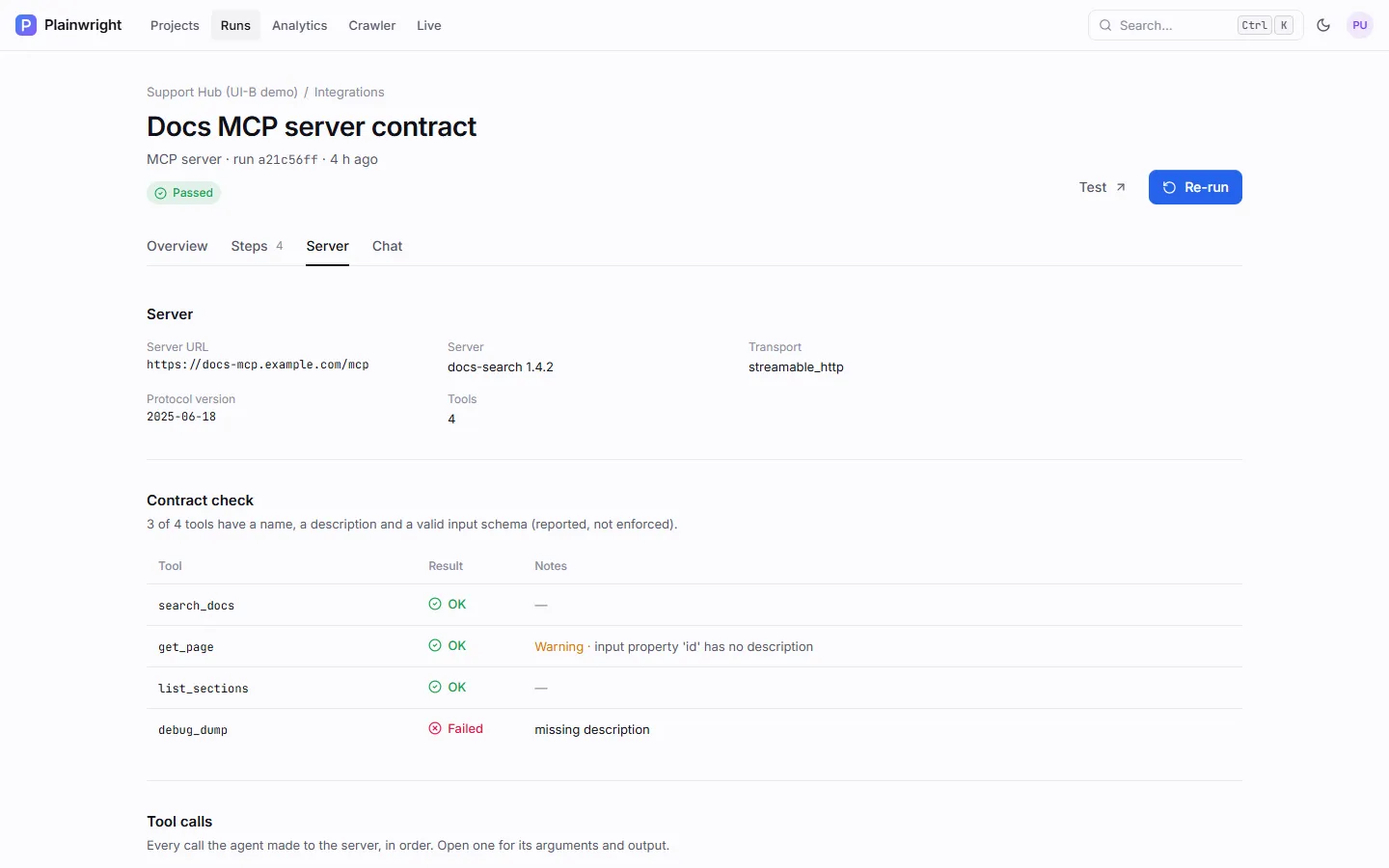
Server tab shows which transport connected.
A few behaviours worth knowing:
- Expired sessions. If a Streamable HTTP server answers 404 to a request that carries a session, it is treated as an expired session: Plainwright initialises a new one and retries once.
- Redirects. Up to three redirects on the first request are followed (a common case is
/mcpredirecting to/mcp/). Every hop passes the same outbound checks, and a redirect to another origin drops your configuredheaders, so a token is never sent to a different server. Server URLs in logs and errors are shortened: no user name, password or query string. - Authentication. A 401 or 403 fails at once with a hint to add an
Authorizationheader; there is no transport fallback in that case.
The contract check
Section titled “The contract check”Every tool from tools/list is checked for what an AI client needs to call it correctly. Problems
fail the test when strict_contract is on; warnings never do.
| Check | Severity |
|---|---|
The tool entry is a JSON object with a non-empty name |
Problem |
It has a non-empty description |
Problem |
inputSchema exists, is an object and has "type": "object" |
Problem |
properties, when present, is an object |
Problem |
required, when present, is a list of names that all exist in properties |
Problem |
outputSchema, when present, passes the same schema checks |
Problem |
| No two tools share a name | Problem |
| The server lists at least one tool | Problem |
The name is 1–128 letters, digits, _, - or . |
Warning |
| The description is at least 12 characters | Warning |
Every parameter declares a type (type, $ref, anyOf, oneOf, allOf, enum or const) |
Warning |
| Every parameter has a description | Warning |
The run’s scores.contract is the share of tools with no problems (3 of 4 = 0.75).
Write the tool test
Section titled “Write the tool test”The agent reads your description and decides which tools to call. Write it as checks on real results:
Call search_docs with the query "rate limits". Check that at least one result is returned and thateach result has a title and a URL. Then call get_page with the first result's id and check thepage mentions "429".The agent is told to call only the tools the test needs, to fix its own argument mistakes and retry once, and never to call tools that delete, send, pay or otherwise change real data unless the test explicitly asks. A tool result marked as an error counts as a failure unless your test expects it.
Examples
Section titled “Examples”No model calls, so it is free to run on every commit.
{ "module_id": "<module-id>", "name": "Docs MCP server contract", "kind": "mcp", "natural_language": "", "config": { "server_url": "https://docs-mcp.example.com/mcp", "transport": "auto", "contract_only": true }}{ "module_id": "<module-id>", "name": "Docs search returns real pages", "kind": "mcp", "natural_language": "Call search_docs with \"rate limits\" and check at least one result has a title and a URL. Then call get_page with the first result's id and check the page mentions 429.", "config": { "server_url": "https://docs-mcp.example.com/mcp", "transport": "streamable_http", "headers": { "Authorization": "Bearer {{secrets.MCP_TOKEN}}" }, "strict_contract": true, "max_steps": 10 }}Create and run either as shown in Work from the API.
Read the result
Section titled “Read the result”The Server tab shows the server’s name and version, the transport and protocol version used, the number of tools, the contract check per tool (with problems and warnings), and every tool call the agent made, in order. Open a call to see its arguments, output and timing. Steps has one entry for the connection, the tool listing, each tool’s contract, and each check the agent reported.
| Status | When |
|---|---|
| Passed | Connected, the contract check passed (or isn’t enforced), and the agent’s checks passed. |
| Failed | The server was unreachable or refused the handshake, tools/list failed, the contract has problems and strict_contract is on, or the agent’s checks failed. |
| Error | No server URL, a URL that isn’t allowed, an unknown transport, or the agent itself errored (for example it hit the tool-call limit). |
Limits
Section titled “Limits”| Limit | Value |
|---|---|
| Request timeout | MCP_TARGET_TIMEOUT_S (default 60 s) per request |
| Reply size | 8 MB per JSON-RPC reply |
| Tool list | 20 pages of tools/list |
| Tools offered to the agent | The first 100 |
| Tool calls recorded on the run | 60 (arguments up to 1,000 characters, output up to 800) |
Secret values in headers and arguments are filled in only when a request is sent; the agent, the run
record and the tool-call log only ever show ••••.