
Jira, Linear and GitHub
Connect an issue tracker to a project to do two things:
- File failures as issues. A failed run, or a whole failure cause in Triage, becomes an issue with the error, steps, AI explanation and a link back to the run.
- Turn issues into tests. Paste an issue (or, for Jira, a JQL search) and the AI drafts plain-English tests from it.
Connections are per project. Each tracker has its own credentials, stored encrypted.
Connect a tracker
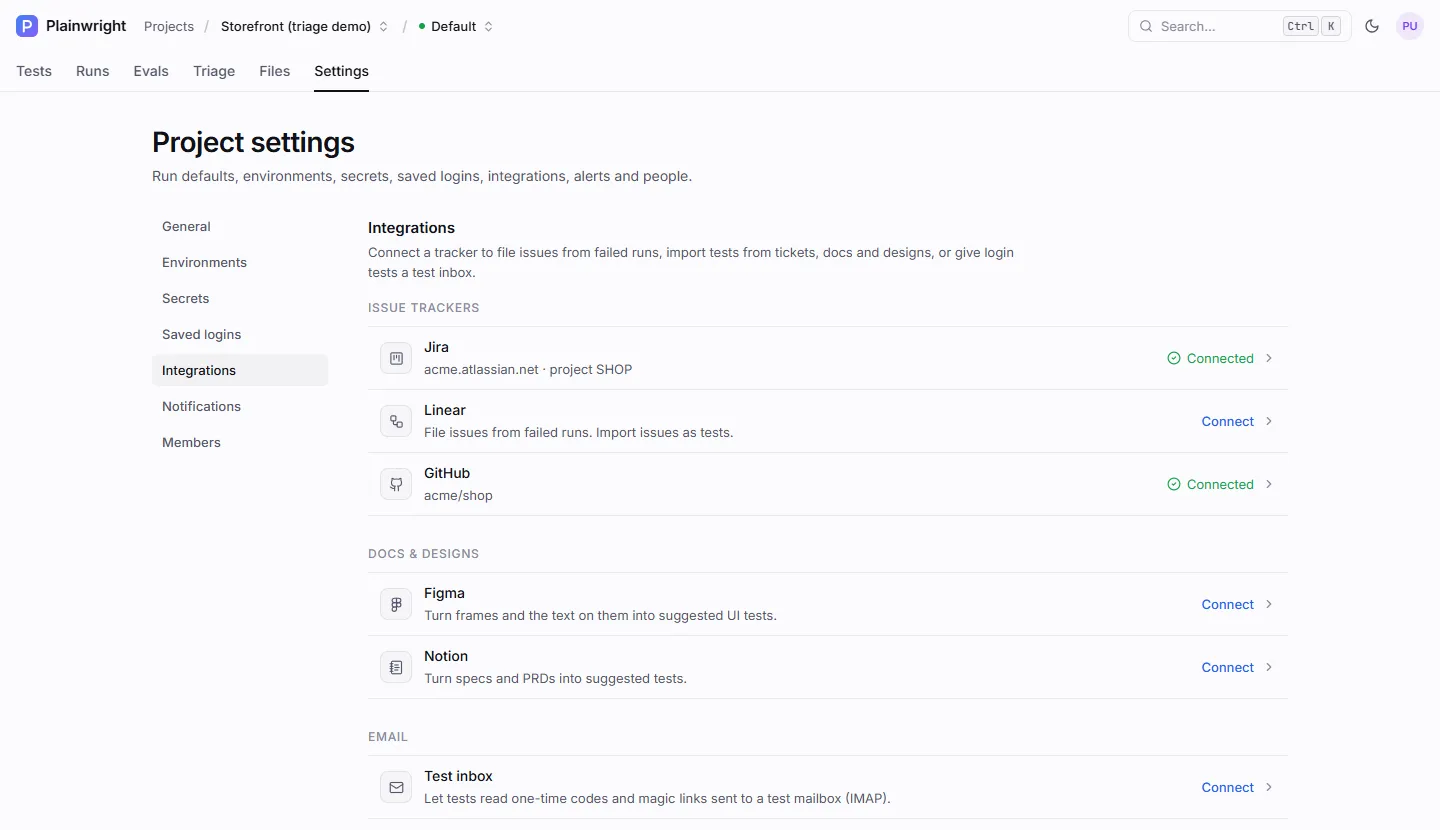
Section titled “Connect a tracker”- Open the project’s Settings → Integrations. You need the admin role.
- Click Jira, Linear or GitHub under Issue trackers.
- Fill in the fields (below) and click Test connection. Plainwright checks the credentials with the tracker and tells you what it found.
- Click Connect (or Save when editing).
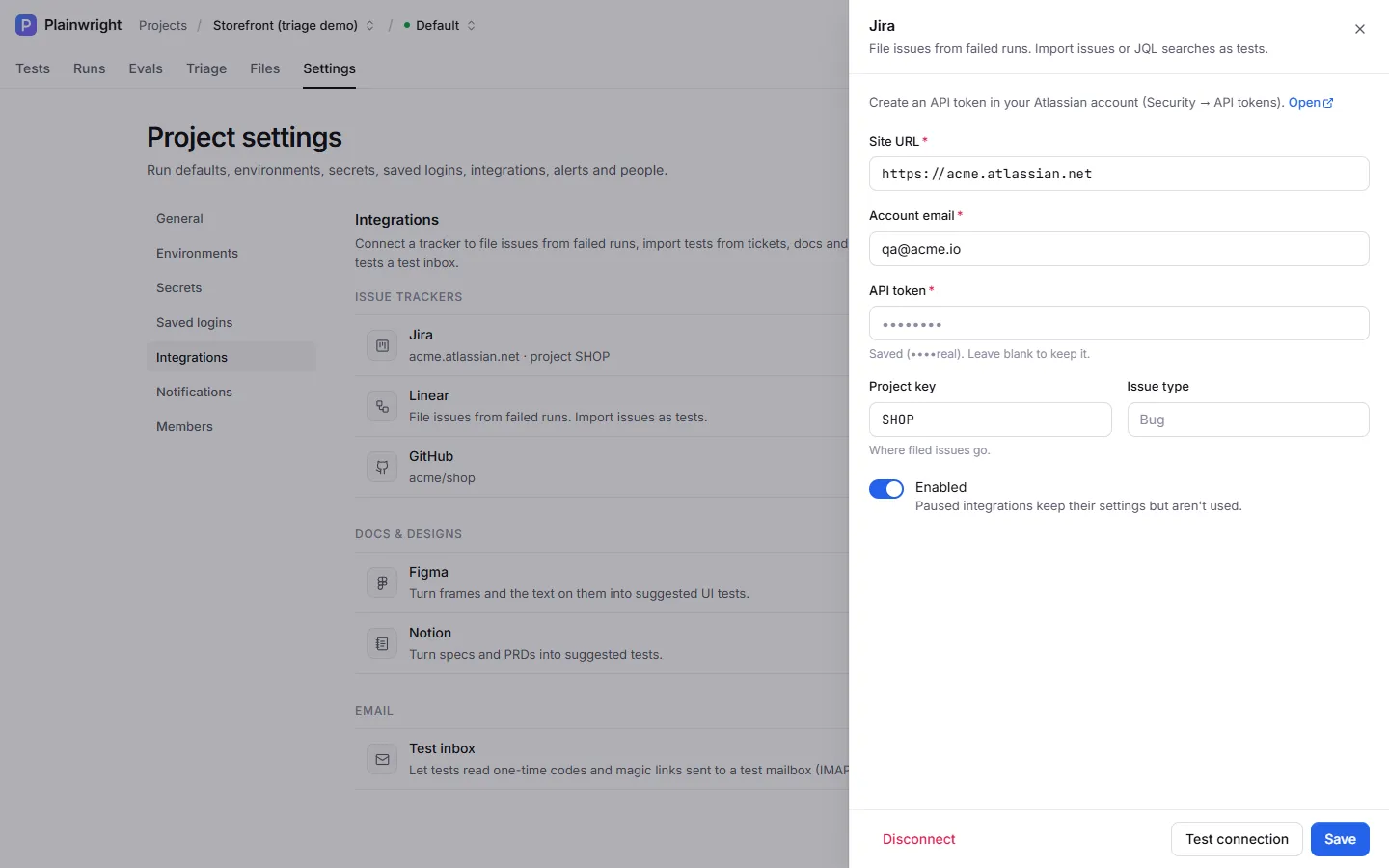
Jira Cloud, using the REST API v3.
| Field | Required | Notes |
|---|---|---|
| Site URL | Yes | https://<your-site>.atlassian.net |
| Account email | Yes | The Atlassian account the token belongs to |
| API token | Yes | Create one in your Atlassian account under Security → API tokens |
| Project key | To file issues | Where filed issues go, such as SHOP. Upper-cased for you. |
| Issue type | No | Default Bug |
Test connection calls /rest/api/3/myself and, if you gave a project key, checks the project
exists. Filed issues get the label plainwright.
| Field | Required | Notes |
|---|---|---|
| API key | Yes | A personal API key from Linear’s Settings → Security & access (lin_api_…). OAuth tokens (lin_oauth_…) also work. |
| Team key | To file issues | The team that receives issues: a key such as ENG, or a team ID |
Test connection reads your user and organisation and, if you gave a team, checks it exists.
| Field | Required | Notes |
|---|---|---|
| Repository | Yes | owner/name. A full repository URL is accepted too. |
| Access token | Yes | A fine-grained personal access token with Issues: read and write on the repository |
| Labels | No | Comma-separated labels added to filed issues. Default plainwright. |
| API URL | No | Only for GitHub Enterprise Server, such as https://github.example.com/api/v3. Default https://api.github.com. |
Test connection reads the repository and warns you when issues are turned off on it.
Edit, pause or disconnect
Section titled “Edit, pause or disconnect”- Saved secrets are never shown again. The field says Saved (••••). Leave blank to keep it; type a new value only to replace it. Passwords are always fully masked; for tokens of 16 or more characters, admins also see the last 4 characters.
- Changing the server address needs the secret again. If you change the site URL, API URL, host or port of a saved connection, type the token or password again too: Plainwright never sends stored credentials to a new address. Saving without it fails with “Re-enter the token / password when changing the server address”, and Test connection reports the same without contacting the new address.
- The Enabled switch pauses a connection without deleting it. A paused tracker can’t receive issues or be imported from.
- Disconnect deletes the connection and its stored credentials.
File failures as issues
Section titled “File failures as issues”With a tracker connected, a File issue button appears on failed runs and in the Triage drawer for each failure cause. Plainwright files one issue per cause and reuses it afterwards, and it removes project secrets and the tracker’s credentials from the text first. What goes into the issue, and the de-duplication rules, are described in Triage and issues.
To file without clicking, turn on Auto-file issues for new failure clusters in Settings → Notifications and pick the tracker. Each new failure cause then gets one issue automatically; see File issues automatically.
Turn issues into tests
Section titled “Turn issues into tests”- In a module, click New test, then Import (or use Crawler → issue or design).
- Pick the tracker and paste a reference (formats below).
- Click Suggest tests. One AI call reads the issue and drafts up to five tests.
- Review the drafts, untick any you don’t want, choose the module if asked, and click Add N tests.
The drafts are created as Web UI tests. Each one records where it came from (source is jira,
linear or github, and source_ref is the issue URL), so you can trace a test back to its
requirement.
| Tracker | You can paste | What is read |
|---|---|---|
| Jira | An issue key (SHOP-142), an issue URL, or a JQL query (project = SHOP AND labels = checkout, optionally prefixed jql:) |
Summary, type, status, labels, description and the last 5 comments. A JQL search reads up to 10 matching issues, without comments. |
| Linear | An issue ID (ENG-123) or URL |
Title, status, labels, description and up to 10 comments |
| GitHub | #123, 123, owner/repo#123, or an issue or pull request URL |
Title, state, labels, body and up to 10 comments |
The text sent to the AI is capped at 12,000 characters, and project secret values in it are
replaced with ••••. The project’s base URL is included, so the drafts know which app they test.
Use the API
Section titled “Use the API”| Endpoint | Role | Does |
|---|---|---|
GET /api/integrations/project/{project_id} |
viewer | Every kind with configured, enabled, masked config and capabilities |
PUT /api/integrations/project/{project_id}/{kind} |
admin | Save {config, enabled}; masked values keep the stored secret |
POST /api/integrations/project/{project_id}/{kind}/test |
admin | {ok, message}. Send {"config": {...}} to test unsaved values. |
DELETE /api/integrations/project/{project_id}/{kind} |
admin | Disconnect |
POST /api/connectors/preview |
editor | Fetch a source and draft tests (one AI call) |
POST /api/crawler/create |
editor | Create the drafts you picked |
kind is one of jira, linear, github, figma, notion or imap.
# Connect Jira (admin)curl -fsS -X PUT "$PLAINWRIGHT_URL/api/integrations/project/$PROJECT_ID/jira" \  -H "Authorization: Bearer $PLAINWRIGHT_TOKEN" -H "Content-Type: application/json" \  -d '{"enabled": true, "config": {"base_url": "https://acme.atlassian.net", "email": "qa@acme.example",       "api_token": "'"$JIRA_API_TOKEN"'", "project_key": "SHOP", "issue_type": "Bug"}}'
# Draft tests from an issue (editor, one AI call)curl -fsS -X POST "$PLAINWRIGHT_URL/api/connectors/preview" \  -H "Authorization: Bearer $PLAINWRIGHT_TOKEN" -H "Content-Type: application/json" \  -d '{"project_id": "'"$PROJECT_ID"'", "kind": "jira", "ref": "SHOP-142", "count": 5}'
count is 1–10 (default 5). The preview returns the source and the drafts:
{ "source": { "kind": "jira", "ref": "SHOP-142", "title": "SHOP-142: Pay with a saved card", "url": "https://acme.atlassian.net/browse/SHOP-142", "excerpt": "SHOP-142: Pay with a saved card …" }, "suggestions": [ { "name": "Pay with a saved card", "description": "…", "complexity": "medium", "flow": "checkout", "natural_language": "Sign in as a customer with a saved card, add a product to the cart, choose the saved card and pay. Check that the receipt page shows an order number.", "kind": "ui", "source": "jira", "source_ref": "https://acme.atlassian.net/browse/SHOP-142" } ]}Create the ones you want by passing them, unchanged, to the crawler’s create endpoint:
curl -fsS -X POST "$PLAINWRIGHT_URL/api/crawler/create" \ -H "Authorization: Bearer $PLAINWRIGHT_TOKEN" -H "Content-Type: application/json" \ -d '{"module_id": "'"$MODULE_ID"'", "suggestions": [ …the suggestion objects… ]}'Limits
Section titled “Limits”- Jira support targets Jira Cloud (REST v3 and the
/rest/api/3/search/jqlsearch). Jira Server and Data Center aren’t specifically supported. - Linear’s OAuth flow isn’t built in; paste a token.
- Requests to trackers time out after 20 seconds and don’t follow redirects.