
Analytics
The Analytics page answers four questions across every project you can access: Are tests passing? Are AI scores holding up? Which tests are unreliable? What is this costing in tokens? Open it from the top navigation (Analytics).
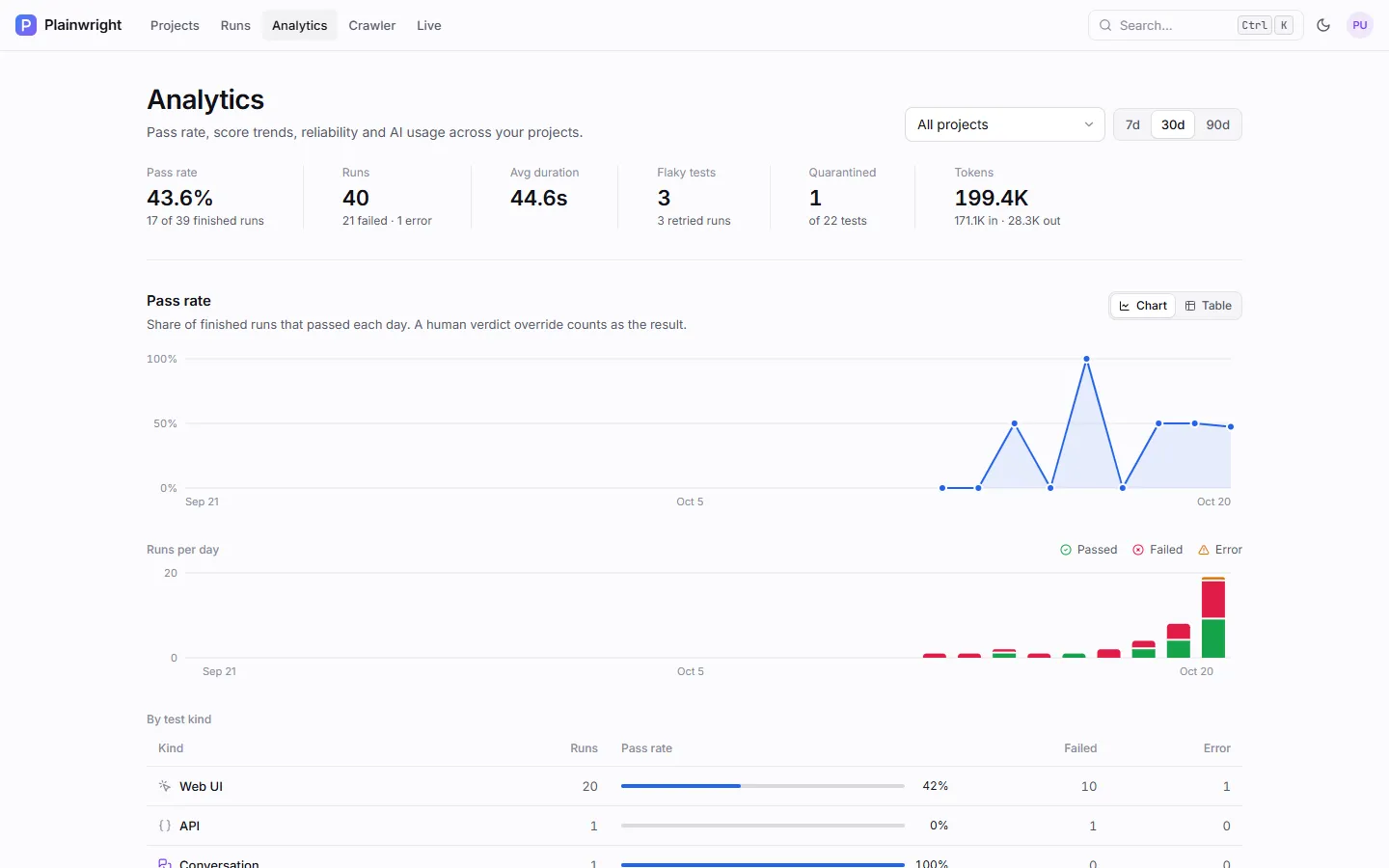
Filters
Section titled “Filters”- Project: All projects or one project.
- Window: 7, 30 or 90 days. The API accepts 1–365.
Both are kept in the page URL, so a link opens the same view. Every chart has a Table view with the same numbers, and the charts’ tooltips work from the keyboard.
What each section shows
Section titled “What each section shows”Summary
Section titled “Summary”| Stat | Meaning |
|---|---|
| Pass rate | Passed runs as a share of finished runs (passed, failed or error) |
| Runs | All runs in the window, with failed and errored counts |
| Avg duration | Mean run time of runs that recorded one |
| Flaky tests | Tests with a flaky run in the window, and how many runs were retried |
| Quarantined | Quarantined tests, out of all tests |
| Tokens | Input plus output tokens across all runs |
Pass rate
Section titled “Pass rate”A daily pass-rate line, runs per day stacked by status (passed, failed, error), and a table by test kind with runs, pass rate, failures and errors.
Score trends
Section titled “Score trends”For scored tests (LLM evals, RAG evals, red teaming and quality checks, plus multi-trial runs), one tab per kind shows the average score per day with the pass mark as a dashed line, a sparkline per metric, and a table of tests with their latest and average score. Tests below their pass mark are listed first; click one to see its run-by-run history. See Judges and scores.
Reliability
Section titled “Reliability”Counts of flaky tests, runs that passed on retry, quarantined tests, quarantined failures (kept out of gates and alerts) and blocked runs (stopped by a CAPTCHA or bot wall), then a list of flaky and failing tests with their pass rate and signals. The list marks a test flaky with the same rule as Triage, which also counts pass/fail flips; see Retries and flaky tests. The Flaky tests count above it only counts tests that passed on a retry or mixed trial results.
AI usage
Section titled “AI usage”Tokens per day, an Estimated cost total, and a table by provider and model with runs, input and output tokens, their share of the total and the estimated cost.
How results are counted
Section titled “How results are counted”- Effective status. A human verdict override counts as the run’s result everywhere on this page.
- Every attempt is a run. A failed attempt followed by a passing retry counts as one failed and one passed run in the pass rate, and the test counts as flaky.
- Days are UTC. Daily series are zero-filled, so days without runs show as gaps or zeros.
- Access. Only projects you are a member of are included, whatever your role.
Other places with numbers
Section titled “Other places with numbers”| Page | Shows |
|---|---|
| Projects home | A 14-day pass-rate sparkline per project |
| A project’s Evals tab | Latest score and trend per eval test |
| A project’s Triage tab | Open failure causes, flaky and quarantined tests |
Live (/telemetry) |
Runs in progress, queued, and today’s runs and tokens |
For server-level metrics (queue depth, workers, run durations by kind) use Prometheus; see Monitoring.
Use the API
Section titled “Use the API”All endpoints take days (default 30, clamped to 1–365) and an optional project_id, and need a
user token.
| Endpoint | Returns |
|---|---|
GET /api/analytics/overview |
Totals, pass rate, duration, tokens, reliability counts, and by_kind |
GET /api/analytics/trends |
A daily series of total, passed, failed, error, tokens and pass rate |
GET /api/analytics/flakiness?limit=20 |
Tests ranked by instability, with flips, flaky runs and mixed trials (limit up to 200) |
GET /api/analytics/usage |
Tokens (and cost when recorded) by provider and model |
GET /api/analytics/scores |
Score series per kind and metric, and per-test score history (up to 20 points) |
curl -fsS "$PLAINWRIGHT_URL/api/analytics/overview?days=7&project_id=$PROJECT_ID" \ -H "Authorization: Bearer $PLAINWRIGHT_TOKEN"{ "days": 7, "total_runs": 40, "passed": 17, "failed": 21, "error": 1, "running": 0, "pending": 1, "pass_rate": 43.6, "avg_duration_ms": 44600, "input_tokens": 171100, "output_tokens": 28300, "total_tokens": 199400, "tests": 22, "quarantined_tests": 1, "quarantined_failed": 2, "flaky_tests": 3, "flaky_runs": 3, "retried_runs": 3, "blocked_runs": 0, "by_kind": [{ "kind": "ui", "runs": 20, "passed": 9, "failed": 10, "error": 1, "pass_rate": 45.0 }]}Pass rates are percentages (0–100). Scores in /scores are fractions (0–1).