
Test files and uploads
Many flows need a file: a CV for a job application, an avatar, a CSV import, a PDF invoice. Upload those files to the project once. Every UI test in the project can then attach them to upload fields, and you refer to them in plain English: “upload the resume”.
The same files serve API tests: an uploaded OpenAPI or Swagger spec
(.json, .yaml or .yml) can be picked as the test’s spec.
Upload a file
Section titled “Upload a file”-
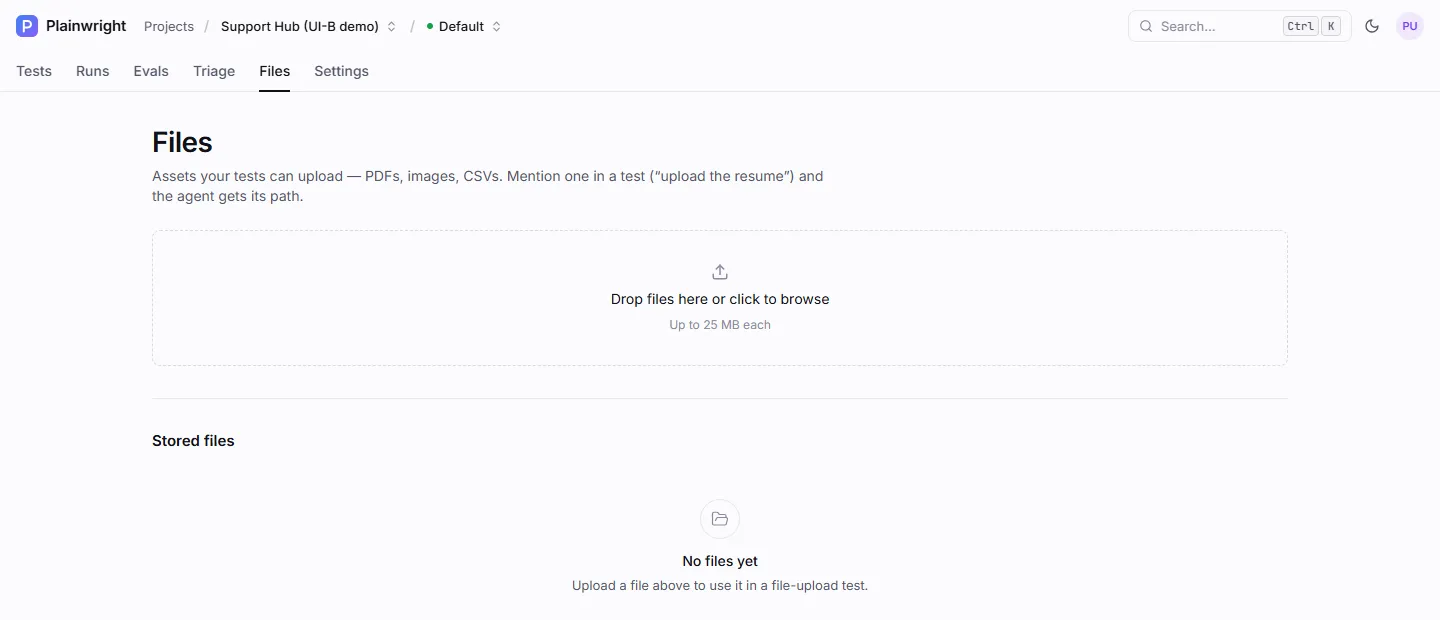
Open the project and go to the Files tab.
-
Drop files onto the upload area, or click it to browse. Each file can be up to 25 MB.
-
The file appears under Stored files with its size and its path, for example
/test-files/<project-id>/resume.pdf. Use the copy button if you want the exact path.
You need the editor role to upload or delete files. Viewers can see the list.
File names are made safe on upload: everything except letters, digits, ., _ and - becomes _, so
My CV (final).pdf is stored as My_CV__final_.pdf. Uploading a file with the same name replaces the old one.
Use a file in a test
Section titled “Use a file in a test”Mention the file in the description by name or by what it is:
Go to /careers/frontend-engineer and click "Apply".Fill in the form with a realistic name and a unique email address.Upload the resume (resume.pdf) in the "CV" field and submit.Verify the page says the application was received.How the agent finds it: when a UI test runs, Plainwright lists every file in the project at the end of the
prompt, with its full path, and tells the agent to use one of those exact paths when it uploads. The agent clicks the
upload field and calls browser_file_upload with the path. It never reads the file’s contents.
Uploads are confined to the run’s own project. A path must name a file directly inside
/test-files/<project-id>/ of the project the test belongs to (a bare file name such as resume.pdf is looked up
there too). Another project’s files, paths with .., files in the root of the folder and files that don’t exist are
refused with “File upload refused: …”, and the agent sees that error.
Where files live
Section titled “Where files live”Files are stored on disk under TEST_FILES_DIR (default /test-files), one folder per project. In the Compose
setup that folder is ./test-files next to docker-compose.yml, mounted into the containers that need it:
Directorytest-files/
Directory2e52323e-1ec8-49d3-993b-61bb7c7e0ea9/ one folder per project id
- resume.pdf
- avatar-square.png
- openapi.yaml
| Container | Mount | Why |
|---|---|---|
backend |
read-write | saves uploads and deletes files |
worker |
read-only | lists the files into the test prompt |
the three playwright-mcp services |
read-only | the browser reads the file when it uploads it |
The path the agent uses, /test-files/<project-id>/<name>, is the path inside the browser containers. That’s why
the folder must be mounted at the same place in all of them.
With the API
Section titled “With the API”# Listcurl -s "$PW/api/projects/PROJECT_ID/files" -H "Authorization: Bearer $TOKEN"
# Upload (multipart field "file")curl -s -X POST "$PW/api/projects/PROJECT_ID/files" \ -H "Authorization: Bearer $TOKEN" -F "file=@./resume.pdf"
# Deletecurl -s -X DELETE "$PW/api/projects/PROJECT_ID/files/resume.pdf" -H "Authorization: Bearer $TOKEN"Each file is returned as {"name", "path", "size_bytes"}. A file over 25 MB returns 413.
Good to know
Section titled “Good to know”- Deleting a file breaks the tests that upload it. They fail at the upload step until you add it again.
- Files are not secrets. They aren’t encrypted, and their names are sent to the model in every UI test prompt of the project. Don’t put credentials or personal data in files or file names; use the secrets vault for credentials.
- Only paths are shared with the model. The exception is an OpenAPI spec chosen in an API test, whose endpoint summary is added to that test’s prompt.
- The template “File upload” (in New test → From a template) gives you a ready-made upload test that asks for the upload page and the file name.