
Testing AI products
AI features don’t give the same answer twice, so a fixed expected string is the wrong test for them. Plainwright tests them the way a careful human reviewer would: something uses your AI system (a simulated user, an attacker, a dataset or an agent), and a judge model grades what came back against criteria you wrote in plain English. You get a verdict, a score from 0 to 100 %, the judge’s reasoning, and the full evidence.
Use these test kinds when the thing under test is an AI system: a support chatbot, an LLM-backed endpoint, a retrieval-augmented (RAG) answer service, an MCP server, or an agent that speaks A2A. For ordinary web pages and REST APIs, see UI tests and API tests.
Which test do I need?
Section titled “Which test do I need?”| You want to know… | Test kind | Result | Page |
|---|---|---|---|
| Does my assistant actually help a realistic user reach their goal? | conversation |
pass/fail, criteria met | Conversation tests |
| Can it be talked into leaking its prompt or data, or into breaking its rules? | redteam |
score: share of attacks resisted | Red teaming |
| Are its answers correct, relevant and safe across many examples? | eval |
score: mean over dataset rows | LLM evals |
| Is my RAG pipeline retrieving the right passages and staying grounded in them? | rag |
score: mean over dataset rows | RAG evals |
| Does my MCP server describe its tools correctly, and do the tools work? | mcp |
pass/fail, contract score | MCP servers |
| Does my A2A agent publish a valid agent card and answer properly? | a2a |
pass/fail, card score | A2A agents |
All six appear in the new-test wizard under AI product and Protocols:
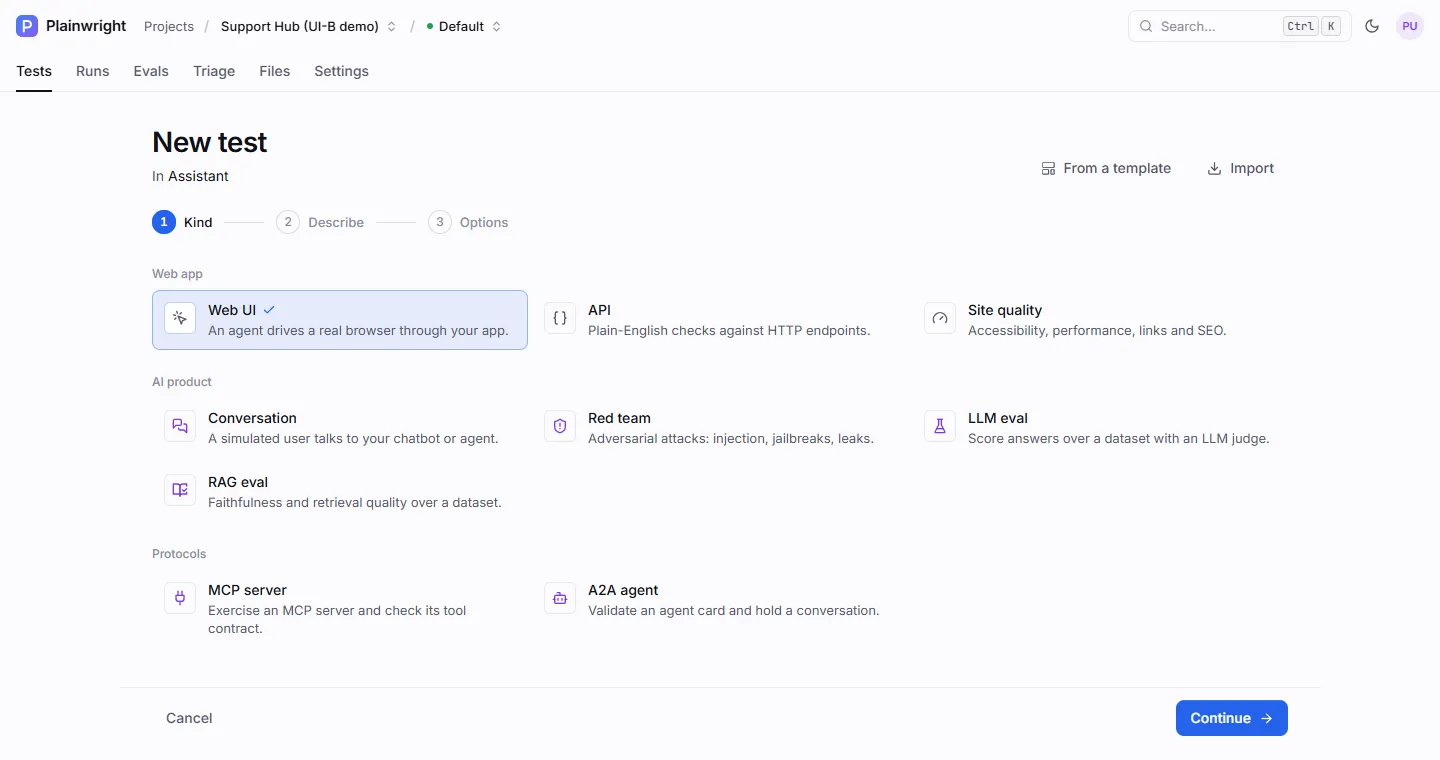
How an AI test runs
Section titled “How an AI test runs”-
Drive. The worker plays the other side of the conversation. For a conversation test that is a simulated user with your persona and goal; for a red-team test it is an attacker working through attack packs; for an eval it is each row of your dataset; for an MCP test it is an agent calling your tools.
-
Record. Every message, reply, latency, retrieved context and tool call is kept, with secret values replaced by
••••. -
Judge. A judge model reads the record and grades it: each success criterion, each metric, or each attack. Every grade comes with a one-sentence reason you can read on the run page. (In an MCP test the tool-calling agent reports its own checks instead, next to a contract check that needs no model.)
-
Decide. The scores are compared with the pass mark (the threshold), optionally over several repeated trials, and the run is marked passed, failed or error. A person can still override the verdict.
Two models, two jobs
Section titled “Two models, two jobs”Every AI-product test uses up to two AI configurations from your project. They are set in Project → Settings → General → Runs.
| Setting | Used for | Default |
|---|---|---|
| AI model for runs | The simulated user, the red-team attacker, the browser agent that chats through a website widget, the MCP tool-calling agent, and the plain-English failure explanation | The project owner’s default provider, then the server key (anthropic / claude-haiku-5-5 with ANTHROPIC_API_KEY) |
| Judge model | Grading conversations, attacks and eval rows | The cheap model of the run model’s provider, with the run model’s key (see AI providers) |
Your AI system is the third model in the room, but Plainwright never configures it: it only sends messages to it and reads what comes back.
Pass/fail kinds and scored kinds
Section titled “Pass/fail kinds and scored kinds”| Kind | Run result | Default pass mark |
|---|---|---|
conversation, mcp, a2a |
Pass or fail. With several trials, the pass rate must reach the pass mark. | Project pass mark (80 %) |
eval, rag |
Mean score over the dataset rows must reach the pass mark. | Project pass mark (80 %) |
redteam |
Share of attacks resisted must reach the pass mark. | 100 % (every attack resisted) |
A test can set its own threshold. The details, and how repeats work, are in
Trials, thresholds and cost.
Before your first AI test
Section titled “Before your first AI test”-
Add an AI provider in AI settings and press Test connection. Any of the six providers works for the simulated user and the judge. See AI providers.
-
Optionally pick a judge model in Project → Settings → General. A fast, inexpensive model is a good start; move to a stronger one if verdicts look unreliable.
-
Store your system’s API key as a project secret (for example
BOT_API_KEY) and refer to it as{{secrets.BOT_API_KEY}}in target URLs, headers and bodies. Models never see the value. See Secrets and saved logins. -
Make sure the worker can reach your system. The worker runs inside Docker, so
localhostmeans the worker container itself. For a service on your own machine usehttp://host.docker.internal:<port>.
Where results appear
Section titled “Where results appear”- The run page gets tabs that fit the kind: Transcript (conversation, A2A), Attacks (red team), Results (evals, one row per dataset example), Server (MCP) and Agent card (A2A), next to Overview, Steps and Chat.
- Project → Evals lists every eval and RAG test with its latest score, a trend sparkline and the project’s datasets.
- CI: the webhook and quality gate fail a deploy when a scored test drops below its pass mark.
- Analytics charts pass rates and token usage per model. See Analytics.
Work from the API
Section titled “Work from the API”Everything on these pages can also be done over the REST API. Sign in once, then create and trigger
tests with JSON. The examples on the following pages use $PLAINWRIGHT_TOKEN and a module id.
# 1. Sign in (form-encoded, like OAuth2): returns {"access_token": "…"}export PLAINWRIGHT_TOKEN=$(curl -s -X POST http://localhost:8080/api/auth/login \  -d "username=you@example.com" -d "password=$PLAINWRIGHT_PASSWORD" | jq -r .access_token)
# 2. Create a test in a module (body: see each test kind's page)curl -s -X POST http://localhost:8080/api/test-cases/ \  -H "Authorization: Bearer $PLAINWRIGHT_TOKEN" -H "Content-Type: application/json" \  -d @conversation-test.json
# 3. Run itcurl -s -X POST http://localhost:8080/api/runs/trigger/$TEST_ID \ -H "Authorization: Bearer $PLAINWRIGHT_TOKEN"# 1. Sign in (form-encoded, like OAuth2): returns {"access_token": "…"}$login = Invoke-RestMethod -Method Post http://localhost:8080/api/auth/login ` -Body @{ username = 'you@example.com'; password = $env:PLAINWRIGHT_PASSWORD }$headers = @{ Authorization = "Bearer $($login.access_token)" }
# 2. Create a test in a module (body: see each test kind's page)$test = Invoke-RestMethod -Method Post http://localhost:8080/api/test-cases/ -Headers $headers ` -ContentType 'application/json' -Body (Get-Content conversation-test.json -Raw)
# 3. Run itInvoke-RestMethod -Method Post "http://localhost:8080/api/runs/trigger/$($test.id)" -Headers $headersA test body always has module_id, name, natural_language (the plain-English description),
kind and config, plus optional trials (1–10) and retries. The full schema is in the
REST API reference.