
API tests
An API test (kind api) checks HTTP endpoints. You describe what the API should do. An AI agent sends real
requests with an http_request tool, reads the status codes, headers and bodies, chains calls together (create, then
read, then delete) and reports pass or fail with every request as evidence.
Use an API test for contract and behaviour checks: status codes, required fields, validation errors, auth rules, response times. There is no browser, so API tests are faster and use far fewer tokens than UI tests.
Create a user with POST /users using a unique email address and check the response is 201 with an id.Fetch it with GET /users/{id} and check the email matches.Delete it, then fetch it again and check the response is 404.Create an API test
Section titled “Create an API test”-
On the project board, click New test in a module and choose API.
-
Name the test and describe it under What should the API do?
-
Under Configure, set where the API lives and how to call it:
- Base URL (optional): an absolute URL such as
https://api.example.com/v1, or a path such as/api/v1that is appended to the project or environment URL. Leave it empty to use the project or environment URL as-is. - Default headers (optional): one
Name: valueper line, sent with every request. Use{{secrets.NAME}}for tokens. - OpenAPI spec (optional): a JSON or YAML spec from the project’s Files.
- Limits: request timeout and the maximum number of agent steps.
- Base URL (optional): an absolute URL such as
-
Click Create & run.
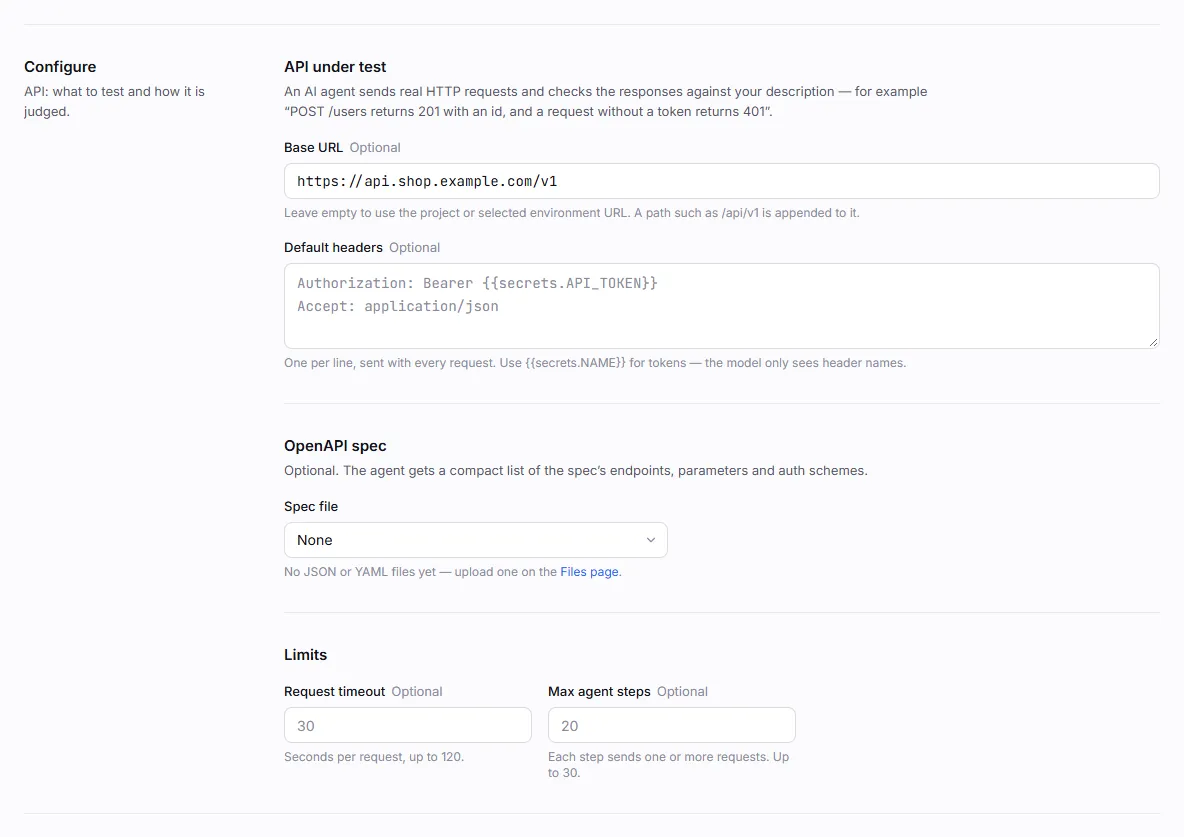
Configuration
Section titled “Configuration”The settings are stored in the test’s config:
{ "base_url": "https://api.example.com/v1", "headers": { "Authorization": "Bearer {{secrets.API_TOKEN}}", "Accept": "application/json" }, "openapi_file": "openapi.yaml", "timeout_s": 30, "max_steps": 20}| Key | Default | Description |
|---|---|---|
base_url |
project or environment URL | Absolute http(s):// URL, or a path appended to the project/environment URL. When empty and no project URL is set, the first absolute servers URL in the OpenAPI spec is used. |
headers |
{} |
Sent with every request. Values may contain {{secrets.NAME}}. |
openapi_file |
(none) | File name of an uploaded OpenAPI or Swagger spec (JSON or YAML). |
timeout_s |
30 |
Timeout per request in seconds, 1–120. |
max_steps |
20 |
Agent steps (model turns), 1–30. Each step can send one or more requests. |
The base URL is resolved in this order: an absolute base_url; a path base_url joined to the project or
environment URL; the project or environment URL; the spec’s first server.
The http_request tool
Section titled “The http_request tool”The agent calls http_request for every request. Knowing its options helps you write instructions it can follow
exactly.
| Argument | Description |
|---|---|
method |
GET, POST, PUT, PATCH, DELETE, HEAD or OPTIONS. Default GET. |
path |
Path resolved against the base URL, keeping the base’s own path: https://api.example.com/v1 + /users → https://api.example.com/v1/users. |
url |
A full URL instead of path. |
headers |
Extra headers for this request. Setting a default header to "" leaves it out, for example to check that a request without a token is rejected. |
query |
Query-string parameters. |
json |
A JSON body (object or array). |
body |
A raw text body. |
follow_redirects |
Follow 3xx redirects, up to 5 hops. Default false, so the agent can check the redirect itself. A redirect to another origin drops Authorization, Cookie, API-key headers and any header whose value came from a secret. |
Each result shows the agent:
- the status code and the elapsed time in milliseconds;
- a useful subset of response headers:
content-type,location,cache-control,etag,allow,retry-after,www-authenticate, CORS headers, request ids, rate-limit headers and a few more. Forset-cookie, only the cookie names are shown, never their values; - the body, pretty-printed when it is JSON and cut at 8 KB. Binary bodies are summarised.
Responses are streamed and read up to 5 MB; anything past that is dropped and the result says the response was truncated, so a huge or endless response can’t exhaust the worker’s memory.
An unexpected status code such as 500 is a result, not an error: the agent reports it as a test failure. Only
transport problems (DNS failure, refused connection, timeout, a blocked address) come back as tool errors.
Use your OpenAPI spec
Section titled “Use your OpenAPI spec”Upload your spec (openapi.json, openapi.yaml or a Swagger 2 file) on the project’s Files page, then choose
it under OpenAPI spec. Before the first step, the agent gets a compact summary of the spec:
- its title, version and servers;
- the auth schemes (API key header or query parameter, HTTP bearer or basic);
- one line per endpoint: method, path, summary, required query and header parameters, a brief body schema and the documented response codes.
The summary is capped at 12,000 characters; larger specs list as many endpoints as fit and note how many were left out. With a spec, short instructions work well: “Check that every documented GET endpoint under /orders returns 200 for an authenticated user.”
If the file is missing or can’t be parsed, the run continues without it and logs a message in the live view.
Secrets in requests
Section titled “Secrets in requests”Keep tokens and passwords in the secrets vault:
- Default headers. Values like
Bearer {{secrets.API_TOKEN}}are resolved before the run. The model is told only which header names are sent, never their values. - Bodies, paths and query strings. The model types the placeholder itself, for example
{"password": "{{secrets.ADMIN_PASSWORD}}"}. The real value is swapped in just before the request is sent. - Responses. If a secret value appears in a response, it is masked as
••••before the model sees it and in everything that is stored.
Results and evidence
Section titled “Results and evidence”The run’s Requests tab lists every request with its method, URL, status and time. Expand a row to see the request and response bodies (up to 50 requests per run, bodies cut at 2,000 characters, secret values masked).
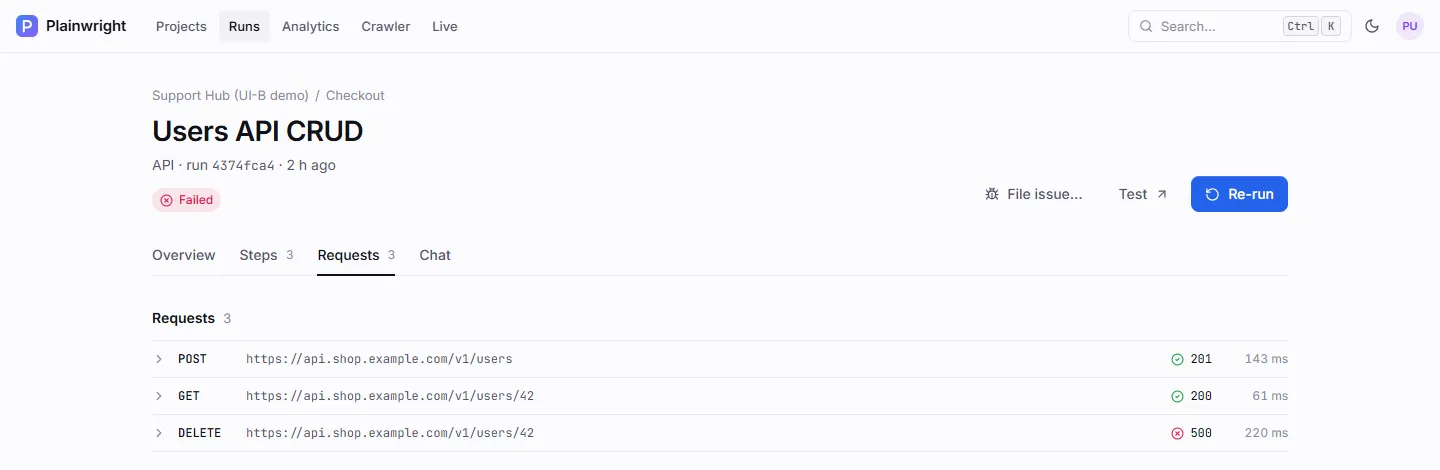
The Steps tab shows the agent’s own report, typically one line per request such as “GET /users/42 → 200, body has id and email”.
Server-side request safety
Section titled “Server-side request safety”API requests are sent from the Plainwright worker, so every URL is checked before it is called, including each redirect hop:
- only
httpandhttpsURLs are allowed; - cloud metadata and link-local addresses (such as
169.254.169.254andmetadata.google.internal) are refused; - loopback (
127.0.0.1,::1,localhost) and the stack’s own services (postgres,redis,backend,worker,scheduler,frontend,nginx, the browser services) are refused, by name and by address; - the Docker host is refused on the platform’s own ports (
3000,5432,5433,6379,8000,8080,8931); - host names are resolved, and refused when any address they resolve to is refused (turn the lookup off with
SSRF_DNS_CHECK=falseonly if DNS isn’t available).
Private network addresses such as 10.x or 192.168.x stay allowed, so internal staging APIs work.
ALLOW_INTERNAL_TARGETS=true turns everything but the scheme check off, for a trusted single-user install.
A blocked base URL fails the run as error before any AI call is made. See the
security model and configuration.
Create an API test with the REST API
Section titled “Create an API test with the REST API”This creates the test above (sign in first as shown in UI tests):
curl -s -X POST "$PW/api/test-cases/" \ -H "Authorization: Bearer $TOKEN" -H "Content-Type: application/json" \ -d '{ "module_id": "MODULE_ID", "name": "Users API CRUD", "kind": "api", "natural_language": "Create a user with POST /users, fetch it with GET /users/{id}, delete it and check a second GET returns 404.", "config": { "base_url": "https://api.example.com/v1", "headers": { "Authorization": "Bearer {{secrets.API_TOKEN}}" }, "timeout_s": 30 } }'API tests ignore the browser and device options. Retries, trials, quarantine, schedules and CI gates work the same as for UI tests. The project’s default retries apply to both UI and API tests.
Templates
Section titled “Templates”New test → From a template includes four API starters: Health check responds, CRUD lifecycle, Protected endpoint needs auth and Invalid input is rejected. See Crawler, templates and imports.