
Root cause and run chat
Every failed run already comes with a plain-English explanation. When you need more, two tools on the run page go deeper:
- Root cause reads everything recorded about the run and answers one question: is this an app bug, a test problem, the environment, or flakiness? It also suggests a fix.
- Chat lets you ask follow-up questions about the run, such as “how should I reword this test?”.
Both are on demand: nothing is analysed until someone clicks, and each click is one AI call.
Analyze a root cause
Section titled “Analyze a root cause”- Open a failed or errored run.
- In the Root cause section of Overview, click Analyze root cause.
- After a few seconds the analysis appears. Re-analyze replaces it with a fresh one, for example after you have added evidence by re-running.
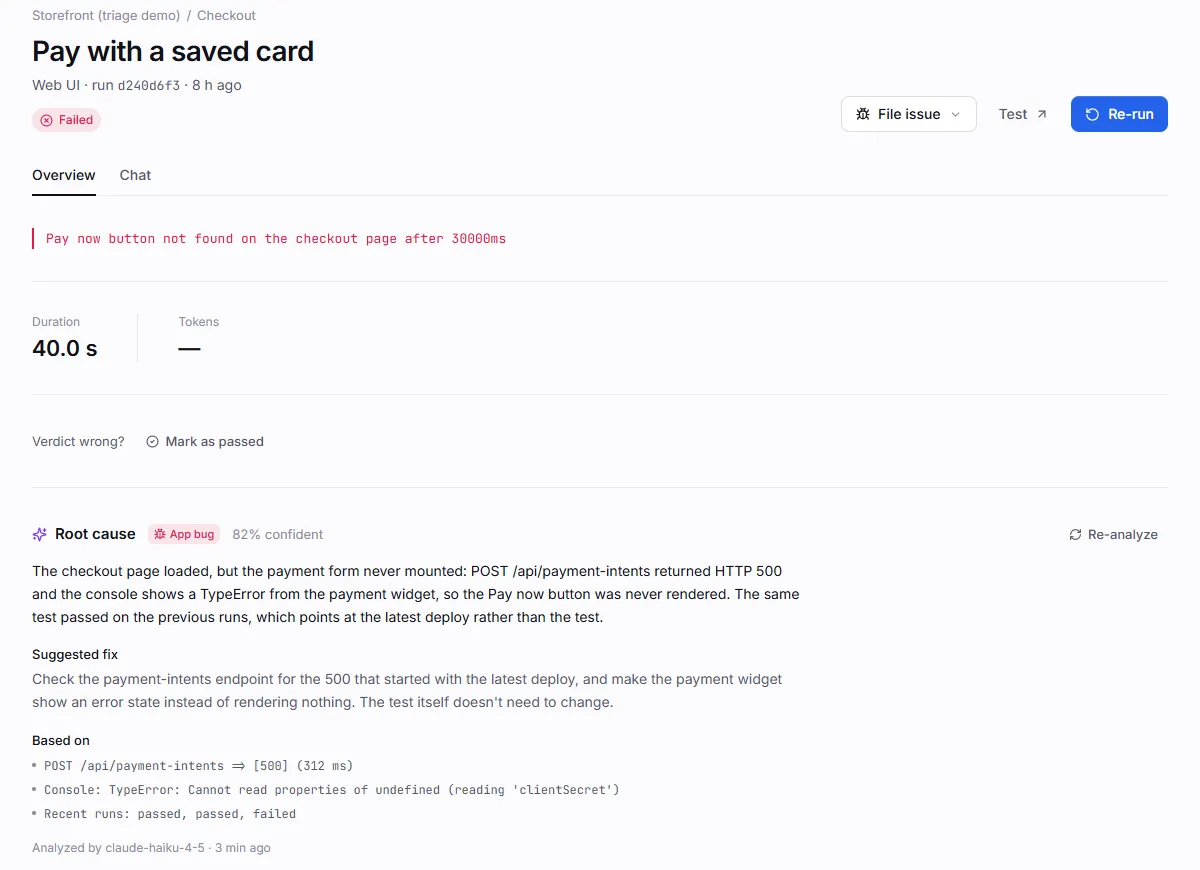
An analysis has:
| Field | Meaning |
|---|---|
| Category | One of the categories below. |
| Confidence | 0–100%, from the model. |
| Summary | Two or three sentences on what most likely happened. |
| Suggested fix | A concrete next step: what to fix in the app, or how to reword the test. |
| Based on | Up to four facts from the run that the model relied on. |
| Model and time | Which model produced it, and when. |
| Category | Label in the app | Meaning |
|---|---|---|
app_bug |
App bug | The application under test misbehaved: server errors, wrong or missing content, a broken flow. |
test_issue |
Test issue | The test is wrong: ambiguous or outdated wording, an expectation the app never promised, or the agent misread the page. |
environment |
Environment | Infrastructure rather than app logic: site unreachable, timeouts, bad credentials or secrets, rate limits, CAPTCHA, AI-provider or browser errors. |
flaky |
Flaky | Intermittent: the same test recently passed and failed without changes. |
unknown |
Unclear | Not enough evidence to decide. |
The analysis is saved on the run (root_cause), so everyone sees it. It also appears in the
Triage drawer for the run’s cause, and in any issue filed from
that cause afterwards.
What the model reads
Section titled “What the model reads”Plainwright builds a compact brief of the run, at most 14,000 characters:
- the test’s name, kind, description and assertions; the project and environment;
- status, attempt, browser and device, trigger, duration, flaky and blocked flags, score and threshold;
- the error, the existing explanation and any override note;
- the steps (long runs are shortened to the first 5 and last 20);
- failed tool actions, console errors and warnings, and failed network requests from the evidence;
- judge verdicts and failed criteria, metric scores, assertion results, the visual diff and the quality report;
- the last 12 turns of a transcript, and up to 5 failing eval rows;
- the last 8 runs of the same test.
Secret values are replaced with •••• before the brief leaves the server. The model answers with
up to 900 tokens.
Chat about a run
Section titled “Chat about a run”The Chat tab appears once the run has finished. Pick a starter question or type your own; Enter sends, Shift + Enter adds a line.
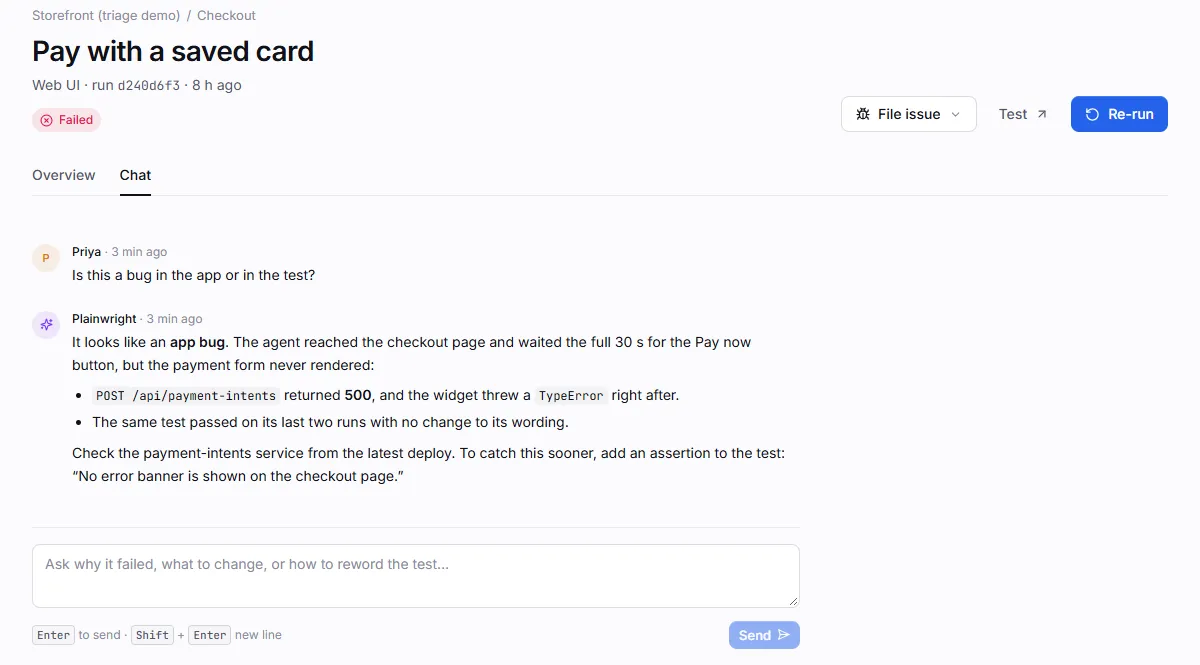
- Answers are grounded in the same run brief as the root cause, plus the root-cause analysis if there is one. The assistant is told to point at the step, error or request it relies on and to say what’s missing rather than guess.
- Each reply sends the brief, the last 10 messages of the thread and your question (up to 4,000 characters).
- The thread belongs to the run and is shared: everyone with access to the project sees it.
- A message is saved only when the reply succeeds. If the AI call fails, the thread is unchanged and your draft stays in the box, so you can retry.
Which model is used
Section titled “Which model is used”Root cause and chat use the project’s run model: the project’s own AI provider if it has one, otherwise the project owner’s default provider, otherwise the server’s fallback key. They don’t use the judge model. See AI providers.
Permissions
Section titled “Permissions”| Action | Role |
|---|---|
| Read an analysis or a chat thread | viewer |
| Analyze a root cause, send a chat message | editor |
Use the API
Section titled “Use the API”| Endpoint | Role | Returns |
|---|---|---|
POST /api/run-actions/{run_id}/root-cause |
editor | The analysis |
GET /api/run-actions/{run_id}/chat |
viewer | {messages: [...]} |
POST /api/run-actions/{run_id}/chat |
editor | {reply, messages} |
# Root cause (one AI call)curl -fsS -X POST "$PLAINWRIGHT_URL/api/run-actions/$RUN_ID/root-cause" \  -H "Authorization: Bearer $PLAINWRIGHT_TOKEN"
# Ask a question (one AI call)curl -fsS -X POST "$PLAINWRIGHT_URL/api/run-actions/$RUN_ID/chat" \ -H "Authorization: Bearer $PLAINWRIGHT_TOKEN" -H "Content-Type: application/json" \ -d '{"message": "Is this a bug in the app or in the test?"}'$h = @{ Authorization = "Bearer $env:PLAINWRIGHT_TOKEN" }Invoke-RestMethod -Method Post -Uri "$env:PLAINWRIGHT_URL/api/run-actions/$env:RUN_ID/root-cause" -Headers $hInvoke-RestMethod -Method Post -Uri "$env:PLAINWRIGHT_URL/api/run-actions/$env:RUN_ID/chat" ` -Headers $h -ContentType 'application/json' -Body '{"message": "Is this a bug in the app or in the test?"}'{ "summary": "The checkout page loaded, but the payment form never mounted: POST /api/payment-intents returned HTTP 500 …", "category": "app_bug", "suggested_fix": "Check the payment-intents endpoint for the 500 that started with the latest deploy …", "confidence": 0.82, "evidence": ["POST /api/payment-intents => [500] (312 ms)", "Recent runs: passed, passed, failed"], "model": "claude-haiku-5-5", "at": "2026-10-20T15:31:02.118Z", "usage": { "input": 4120, "output": 286 }}| Status | When |
|---|---|
400 |
Root cause on a run that didn’t fail; an empty chat message, or one over 4,000 characters. |
409 |
The run hasn’t finished yet. |
502 |
The AI provider failed, or returned something that couldn’t be read as an analysis. Try again or switch models. |