
CI webhook and gates
Every project has a CI webhook: one HTTP request that queues every active test in the project. The response points at a batch, and polling the batch tells you when the runs are done and whether the gate passed. Fail your pipeline when the gate fails, and a broken deploy never reaches users.
This works from any CI system that can run curl. For GitHub there is a ready-made workflow:
GitHub Actions.
How it works
Section titled “How it works”- Your pipeline deploys, then sends
POST /api/runs/webhook/{project_id}with the project’s secret in theX-Webhook-Secretheader. - Plainwright queues one run per active test in the project, all with the same
batch_id, and answers straight away with the run IDs and astatus_url. - Your pipeline polls
GET {status_url}with the same header, every 15 seconds or so. - While anything is still queued, running or about to be retried, the batch reports
"gate": "pending". When every test has a final result, it reports"pass"or"fail".
Get the webhook URL and secret
Section titled “Get the webhook URL and secret”Open the project’s Settings → General and scroll to Run from CI. Only owners and admins see this section.
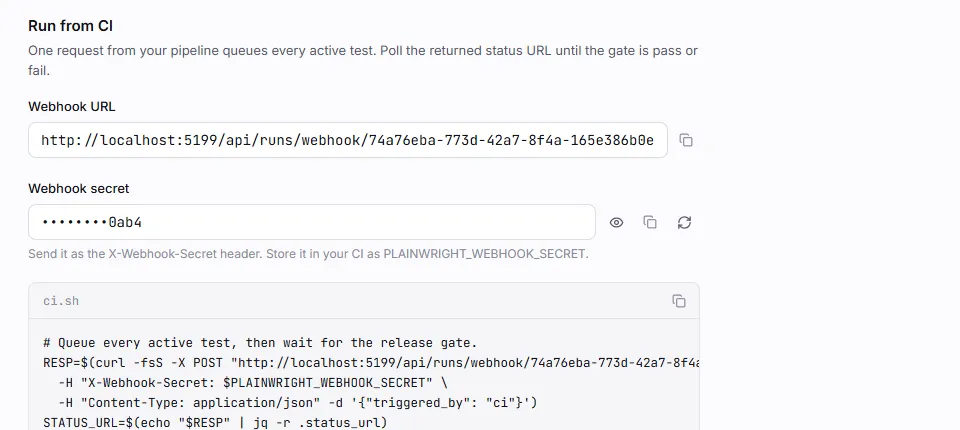
- Webhook URL is
https://<your-plainwright>/api/runs/webhook/<project_id>. - Webhook secret is shown masked. Use the eye button to reveal it and the copy button to copy
it. Store it in your CI as a secret, for example
PLAINWRIGHT_WEBHOOK_SECRET. - Rotate creates a new secret. The old one stops working immediately (the webhook answers
403), so update your CI secret at the same time. - The page also has a ready-made
ci.shthat triggers the batch and waits for the gate.
Trigger a batch
Section titled “Trigger a batch”curl -fsS -X POST "$PLAINWRIGHT_URL/api/runs/webhook/$PLAINWRIGHT_PROJECT_ID" \ -H "X-Webhook-Secret: $PLAINWRIGHT_WEBHOOK_SECRET" \ -H "Content-Type: application/json" \ -d '{"triggered_by": "ci · web@4f2a91c", "environment_id": "'"$PLAINWRIGHT_ENVIRONMENT_ID"'"}'The JSON body is optional. Leave out any field you don’t need, or send no body at all:
| Field | Default | Meaning |
|---|---|---|
triggered_by |
ci_webhook |
Free text shown as Triggered by on each run (up to 200 characters). Put the commit or pipeline here. |
environment_id |
project base URL | Run against one of the project’s environments, such as staging or a preview. Copy its ID from Settings → Environments. |
browser |
chromium |
chromium, firefox or webkit. Applies to browser tests. |
device |
desktop |
desktop, iphone, pixel or ipad. Applies to browser tests. |
{ "message": "Queued 12 runs", "run_ids": ["5a4a57eb-…", "d240d6f3-…", "…"], "batch_id": "9b1e0c7a4f2d4e8a8c3b6d5e4f3a2b1c", "status_url": "/api/batches/9b1e0c7a4f2d4e8a8c3b6d5e4f3a2b1c"}status_url is a path: prefix it with your Plainwright URL. If the project has no active tests,
run_ids is empty and there is nothing to wait for.
Wait for the gate
Section titled “Wait for the gate”curl -fsS "$PLAINWRIGHT_URL/api/batches/$BATCH_ID" \ -H "X-Webhook-Secret: $PLAINWRIGHT_WEBHOOK_SECRET"{ "batch_id": "9b1e0c7a4f2d4e8a8c3b6d5e4f3a2b1c", "status": "done", "gate": "fail", "threshold": 0.8, "project_id": "74a76eba-…", "project_ids": ["74a76eba-…"], "started_at": "2026-10-20 11:34:11.317318", "finished_at": "2026-10-20 11:38:02.104211", "runs": [ { "run_id": "d240d6f3-…", "test_case_id": "a4b07fe9-…", "name": "Pay with a saved card", "kind": "ui", "status": "failed", "effective_status": "failed", "score": null, "threshold": null, "quarantined": false, "attempt": 2, "is_flaky": false, "gate": "fail", "error_message": "Pay now button not found on the checkout page after 30000ms", "url": "https://plainwright.example.com/runs/d240d6f3-…" } ], "summary": { "total": 12, "passed": 10, "failed": 1, "quarantined_failed": 1, "pending": 0, "flaky": 1 }}| Field | Values |
|---|---|
status |
running while any run is pending; done when every run has a final result |
gate |
pending, pass or fail |
runs[].gate |
The same three values, per test |
threshold |
The project’s pass mark (Settings → General → Pass mark) |
runs[].url |
Link to the run page, built from APP_BASE_URL on the server |
The batch endpoint accepts either the webhook secret or a user token
(Authorization: Bearer …, at least viewer on the project).
Gate rules
Section titled “Gate rules”- Latest attempt per test. If a test was retried, only
its last attempt counts. A retry that passed replaces the failure (and counts towards
flaky). - Overrides win. A human verdict override is the result.
- Scored tests use their threshold. Evals, RAG evals, red-team and quality runs pass when their
scoreis at least the threshold the run was judged against. An errored scored run fails. See Trials, thresholds and cost. - Pass/fail tests use their status. Every other kind passes when its effective status is
passed. - Quarantined tests never fail the gate. Their failures are counted in
quarantined_failed(see Quarantine and re-run). - Retries count as pending. For 20 seconds after a run fails with retries left, the gate
reports it as pending, so CI never reads
failin the moment before the retry is queued.
The gate is fail if any non-quarantined test fails, otherwise pass.
A complete script
Section titled “A complete script”Save this as ci/plainwright.sh (it needs curl and jq), or use the PowerShell version on
Windows runners.
#!/usr/bin/env bash# Trigger every active test in a Plainwright project and fail when the gate fails.# Needs: PLAINWRIGHT_URL, PLAINWRIGHT_PROJECT_ID, PLAINWRIGHT_WEBHOOK_SECRET# Optional: PLAINWRIGHT_ENVIRONMENT_ID, PLAINWRIGHT_TIMEOUT_S (default 1800)set -euo pipefailBASE="${PLAINWRIGHT_URL%/}"AUTH="X-Webhook-Secret: $PLAINWRIGHT_WEBHOOK_SECRET"BODY=$(jq -n --arg by "ci · ${CI_COMMIT:-manual}" --arg env "${PLAINWRIGHT_ENVIRONMENT_ID:-}" \  '{triggered_by: $by} + (if $env == "" then {} else {environment_id: $env} end)')
RESP=$(curl -fsS -X POST "$BASE/api/runs/webhook/$PLAINWRIGHT_PROJECT_ID" \  -H "$AUTH" -H "Content-Type: application/json" -d "$BODY")COUNT=$(jq '.run_ids | length' <<<"$RESP")[ "$COUNT" -eq 0 ] && { echo "No active tests, nothing to gate."; exit 0; }STATUS_URL=$(jq -r .status_url <<<"$RESP")echo "Queued $COUNT runs · batch $(jq -r .batch_id <<<"$RESP")"
DEADLINE=$(( $(date +%s) + ${PLAINWRIGHT_TIMEOUT_S:-1800} ))while :; do  REPORT=$(curl -fsS "$BASE$STATUS_URL" -H "$AUTH")  GATE=$(jq -r .gate <<<"$REPORT")  [ "$GATE" != "pending" ] && break  jq -r '.summary | "… \(.passed) passed · \(.failed) failed · \(.pending) running"' <<<"$REPORT"  [ "$(date +%s)" -ge "$DEADLINE" ] && { echo "Timed out waiting for the gate."; exit 1; }  sleep 15done
jq -r '.runs[] | "\(.gate | ascii_upcase)\t\(.kind)\t\(.name)\t\(.url)"' <<<"$REPORT"jq -r '.summary | "\(.total) tests · \(.passed) passed · \(.failed) failed · \(.quarantined_failed) quarantined failures"' <<<"$REPORT"[ "$GATE" = "pass" ] || { echo "Plainwright gate failed."; exit 1; }echo "Plainwright gate passed."# Trigger every active test in a Plainwright project and fail when the gate fails.# Needs: PLAINWRIGHT_URL, PLAINWRIGHT_PROJECT_ID, PLAINWRIGHT_WEBHOOK_SECRET$ErrorActionPreference = 'Stop'$base = $env:PLAINWRIGHT_URL.TrimEnd('/')$headers = @{ 'X-Webhook-Secret' = $env:PLAINWRIGHT_WEBHOOK_SECRET }$body = @{ triggered_by = "ci: $env:CI_COMMIT" }if ($env:PLAINWRIGHT_ENVIRONMENT_ID) { $body.environment_id = $env:PLAINWRIGHT_ENVIRONMENT_ID }
$resp = Invoke-RestMethod -Method Post -Uri "$base/api/runs/webhook/$env:PLAINWRIGHT_PROJECT_ID" ` -Headers $headers -ContentType 'application/json' -Body ($body | ConvertTo-Json)if (-not $resp.run_ids -or $resp.run_ids.Count -eq 0) { Write-Host 'No active tests, nothing to gate.'; exit 0 }Write-Host "Queued $($resp.run_ids.Count) runs · batch $($resp.batch_id)"
$deadline = (Get-Date).AddSeconds(1800)do { Start-Sleep -Seconds 15 $report = Invoke-RestMethod -Uri "$base$($resp.status_url)" -Headers $headers Write-Host "… $($report.summary.passed) passed · $($report.summary.failed) failed · $($report.summary.pending) running"} while ($report.gate -eq 'pending' -and (Get-Date) -lt $deadline)
$report.runs | Format-Table gate, kind, name, url -AutoSizeif ($report.gate -ne 'pass') { Write-Host "Plainwright gate: $($report.gate)"; exit 1 }Write-Host 'Plainwright gate passed.'Other ways to start a batch
Section titled “Other ways to start a batch”The webhook runs the whole project. With a user token (Authorization: Bearer …, editor role)
you can start smaller batches, and every one returns a batch_id and status_url you can poll
the same way:
| Endpoint | Runs |
|---|---|
POST /api/modules/{module_id}/run |
Every active test in one module |
POST /api/modules/project/{project_id}/run-all |
Every active test in the project (same as the webhook) |
POST /api/reliability/project/{project_id}/rerun-failed |
Only tests whose latest run failed; add ?batch_id= to limit it to one batch |
All three take environment_id, browser and device as query parameters. See
API overview for getting a token.
Errors
Section titled “Errors”| Status | From | Cause |
|---|---|---|
403 Invalid secret |
webhook, batch | The secret is wrong or was rotated, or the batch ID doesn’t exist. For a batch, the secret must match every project in it. |
401 Not authenticated |
batch | Neither X-Webhook-Secret nor Authorization was sent. |
404 Project not found |
webhook | Wrong project ID. |
400 |
webhook | Unknown browser or device, or the environment belongs to another project. |
404 Environment not found |
webhook | Wrong environment_id. |
503 |
webhook | The job queue (Redis) is unavailable. Retry the request. |