
Environments
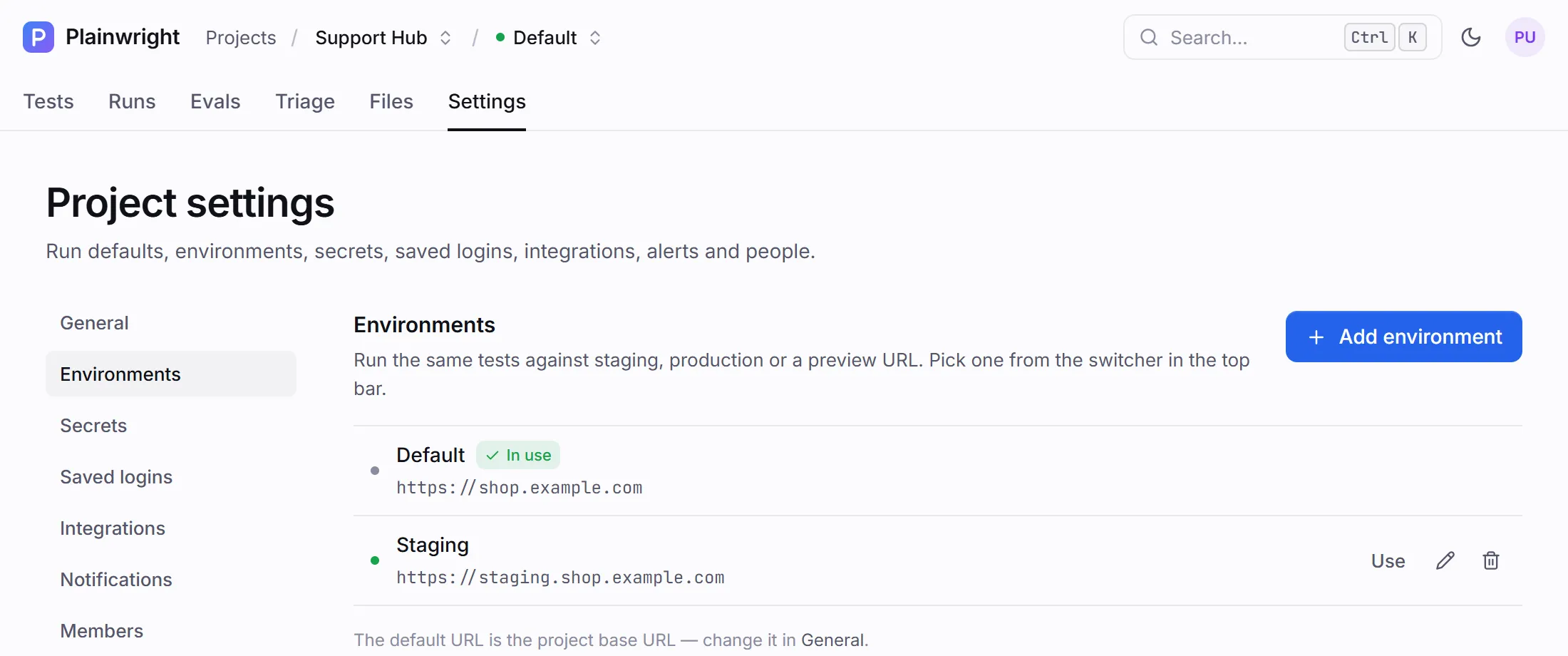
An environment is a named base URL for a project, such as Staging, Production or PR preview. Pick one and every run you start goes to that address instead of the project’s own base URL, without editing a single test. Use environments when the same app is deployed in several places and you want one suite to cover all of them.
Every project always has the Default environment: the project’s base URL from Settings → General. The ones you add sit next to it.
Add an environment
Section titled “Add an environment”You need the editor role or higher.
- Open the project’s Settings → Environments and click Add environment.
- Enter a Name, such as
Staging, and the Base URL, such ashttps://staging.example.com. Names must be unique in the project, and Default is reserved. - Save. The environment appears in the list and in the top-bar switcher.
Choose where runs go
Section titled “Choose where runs go”The environment switcher sits in the top bar, after the project name (Projects / Project / Default). Pick an environment there, or click Use next to it in Settings → Environments. The choice is remembered per project in your browser, and the one in use is marked In use.
These actions use the selected environment:
- Run test on a test page and Create & run in the wizard
- Re-run on a run page. With Default selected, it reuses the environment the original run used, and it always keeps the original browser and device
- a module’s ▷ button, Run all and Rerun failed on the board
- Run all tests in the command menu
- capturing a saved login
These don’t:
- Scheduled runs always use the project’s Default URL.
- The CI webhook uses the environment you name in its request body (see below).
Each run records its environment. Its trigger reads, for example, manual · Staging, and the run’s
details show the environment’s name.
What the environment changes
Section titled “What the environment changes”The environment replaces the project’s base URL wherever a test uses it.
| Kind | Effect of the environment |
|---|---|
| Web UI | The browser starts at the environment’s URL. Paths in the description, such as “go to /login”, are relative to it. |
| API | The API base: an empty base_url uses the environment’s URL, and a path such as /api/v1 is appended to it. An absolute base_url is used as is. |
| Site quality | Page paths such as /pricing are resolved against it. Absolute page URLs are used as is. |
| Conversation (website chat) | The chat page: an empty or relative chat_url is resolved against it. |
| LLM eval, RAG eval, red team and conversation over HTTP, MCP, A2A | No effect. These targets have their own absolute URLs in config. |
Run against an environment from CI
Section titled “Run against an environment from CI”The CI webhook takes the environment’s id in its JSON body. Look the id up once with
GET /api/environments/project/{project_id} (see below), then:
curl -fsS -X POST "$PLAINWRIGHT_URL/api/runs/webhook/$PLAINWRIGHT_PROJECT_ID" \ -H "X-Webhook-Secret: $PLAINWRIGHT_WEBHOOK_SECRET" -H "Content-Type: application/json" \ -d '{"environment_id": "'"$PLAINWRIGHT_ENVIRONMENT_ID"'", "triggered_by": "ci"}'The bundled GitHub Actions workflow reads the optional repository variable
PLAINWRIGHT_ENVIRONMENT_ID for this. See CI webhook and gates
and GitHub Actions.
Manage environments over the API
Section titled “Manage environments over the API”BASE=http://localhost:8080
# List and createcurl -s "$BASE/api/environments/project/$PROJECT_ID" -H "Authorization: Bearer $TOKEN"curl -s -X POST "$BASE/api/environments/project/$PROJECT_ID" \ -H "Authorization: Bearer $TOKEN" -H "Content-Type: application/json" \ -d '{"name": "Staging", "base_url": "https://staging.example.com"}'
# Run one test, or the whole project, against itcurl -s -X POST "$BASE/api/runs/trigger/$TEST_ID?environment_id=$ENV_ID" -H "Authorization: Bearer $TOKEN"curl -s -X POST "$BASE/api/modules/project/$PROJECT_ID/run-all?environment_id=$ENV_ID" \ -H "Authorization: Bearer $TOKEN"{ "id": "c3f1…", "project_id": "34bdb471-…", "name": "Staging", "base_url": "https://staging.example.com", "created_at": "2026-10-20 18:02:11.514212"}An unknown environment_id returns 404, and one from another project returns 400.
Update an environment with PUT /api/environments/{env_id} and remove it with
DELETE /api/environments/{env_id}.
Things to watch
Section titled “Things to watch”- Visual baselines are per test, browser and device, not per environment. If staging and production look different on purpose, keep visual regression to one environment.
- Deleting an environment keeps its past runs. If it was selected, the switcher goes back to Default.
- Private staging hosts work. An environment can point at any host the workers and browser
containers can reach, such as a staging server on your private network. The URL
guard only refuses cloud-metadata addresses and the stack’s own services (
postgres,redis,backend,worker,scheduler), unless an operator setsALLOW_INTERNAL_TARGETS=true. See Security model. - Names are checked by the app, not the API. The form rejects duplicate names and Default; the API accepts any name, so keep names unique when you create environments from scripts.