
Triage and issues
When ten tests fail because one API is down, you want to see one problem, not ten red rows. The Triage page groups a project’s recent failures by cause, tells you which causes are new, which are still failing and which have already been filed, and lets you file a cause to Jira, Linear or GitHub with the evidence attached, by hand or automatically.
Open Triage
Section titled “Open Triage”Open a project and choose the Triage tab.
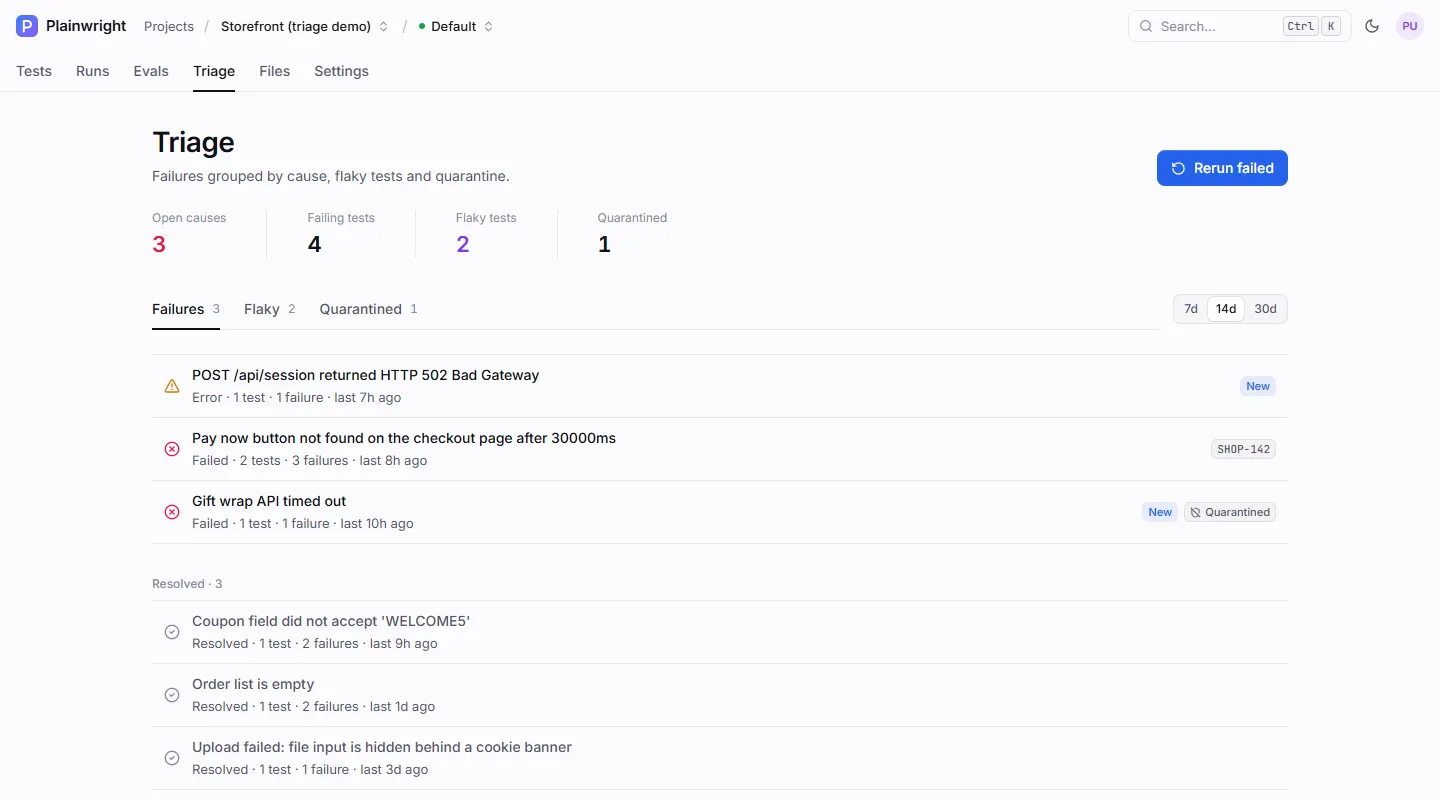
| Part of the page | What it shows |
|---|---|
| Open causes | Causes with at least one test whose latest run still fails with that cause. |
| Failing tests | Tests that are still failing with an open cause. |
| Flaky tests, Quarantined | The same lists as the Flaky and Quarantined tabs (see Retries and flaky tests). |
| 7d · 14d · 30d | The time window. The tab and window are kept in the URL, so you can share the view. |
| Rerun failed | Queues the tests whose latest run failed (see Quarantine and re-run). |
Each row on the Failures tab is a cause: its error, whether it is an error or a failure, how
many tests and failures it covers, and when it was last seen. Badges mark causes that are
New (first seen in the last 24 hours), already filed (the issue key, such as SHOP-142), or
affect only Quarantined tests. Causes whose tests all pass again move to Resolved.
Read a cause
Section titled “Read a cause”Click a row to open its details.
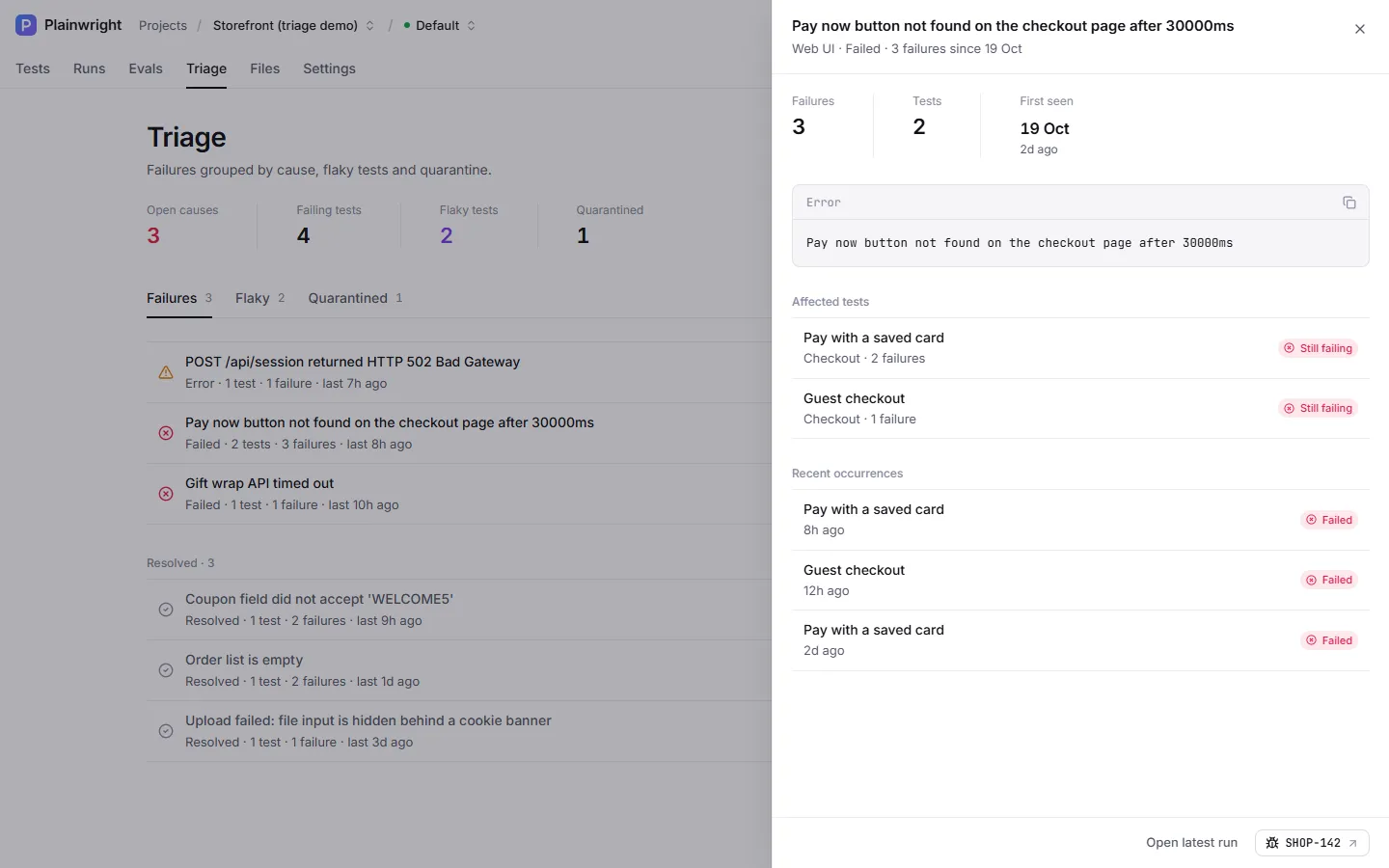
The drawer shows:
- the number of failures and tests, and when the cause was first seen (across all history, not just the window);
- the error, the AI explanation and, if someone ran one, the root-cause analysis;
- the affected tests, each marked Still failing or Passing now;
- the 10 most recent occurrences, each linking to its run;
- the filed issue, or a button to file one.
How failures are grouped
Section titled “How failures are grouped”- Every failed or errored run gets a failure signature when it finishes. Plainwright takes the error message (or the first failed step), replaces the parts that change between runs (IDs, numbers, timestamps, URLs, emails, element refs, quoted values), drops filler words, and hashes the result together with the test kind and status.
- Runs with the same signature form a group. A one-trial run and a five-trial run of the same failure share a signature, because the “Only 2/3 trials passed” prefix is ignored.
- AI-written error messages are worded differently each time, so groups of the same kind and status are merged when their words overlap enough (a Jaccard similarity of 0.6 or more).
A run’s effective status decides whether it counts: a run overridden to passed drops out of its cause. Grouping is computed every time you open the page, from the newest 5,000 finished runs in the window (up to 200 causes), so it always reflects the current data.
File an issue
Section titled “File an issue”Filing needs a connected tracker. Connect Jira, Linear or GitHub in Settings → Integrations first (an admin has to do this, see Jira, Linear and GitHub).
- Open the cause in Triage, or open a failed run.
- Click File issue. With one tracker connected it files straight away. With several, pick one from the menu.
- Plainwright creates the issue and links it. The issue key now shows on the cause in Triage and on the run.
You need the editor role. The button is hidden for viewers and for runs that didn’t fail.
What goes into the issue
Section titled “What goes into the issue”- Title:
<test name>: <first line of the error>, up to 200 characters. - Body (Markdown; Jira gets the same content converted to its document format):
- the test, kind, module and project; status, attempt, browser and device, time, environment and score;
- a link to the run (when
APP_BASE_URLis set on the server); - how often the cause has been seen and across how many tests;
- the test’s plain-English description;
- the error, the AI explanation, the root cause and suggested fix (when analysed);
- up to 40 steps with pass/fail marks;
- the first 12 characters of the failure signature.
Project secrets and the tracker’s own credentials are replaced
with •••• before anything is sent.
| Tracker | Lands in | Labels / type |
|---|---|---|
| Jira | The configured project key, which is required to file | Issue type from the config (default Bug), label plainwright |
| Linear | The configured team (key such as ENG, or a team ID), which is required to file |
None added |
| GitHub | The configured repository | Labels from the config (default plainwright) |
One issue per cause
Section titled “One issue per cause”Issues are de-duplicated per cause, across trackers. If any signature in the cause already has an
issue, File issue returns the existing one ("existing": true) instead of creating a
duplicate. Once a cause is filed in Jira, it can’t also be filed in GitHub.
File issues automatically
Section titled “File issues automatically”A project can file an issue for every new failure cause without anyone clicking File issue.
- Connect Jira, Linear or GitHub in Settings → Integrations (admin).
- Open Settings → Notifications and turn on Auto-file issues for new failure clusters.
- Choose the Tracker the issues go to, and click Save.
When a run finishes, Plainwright files an issue only if all of these hold:
- the run’s final status is failed or error, and no automatic retry of it is queued;
- the test isn’t quarantined;
- the failure’s cause has no issue yet, in any tracker.
Filing runs as a background job on the worker queue, so the worker must be running, and it never calls an AI model. The job checks the rules and the de-duplication again just before it files. The issue has the same title and body as a manual one, with secrets and tracker credentials removed. A tracker that rejects the request, or that has been paused or disconnected, makes the job give up quietly (the worker logs a warning), and the Notifications page warns when the chosen tracker is no longer connected.
Over the API, auto-filing is a project setting, saved with the project update (admin):
curl -fsS -X PUT "$PLAINWRIGHT_URL/api/projects/$PROJECT_ID" \ -H "Authorization: Bearer $PLAINWRIGHT_TOKEN" -H "Content-Type: application/json" \ -d '{"settings": {"auto_file_issue": {"enabled": true, "kind": "github"}}}'kind is jira, linear or github. Send "auto_file_issue": null, or "enabled": false, to
turn it off. Other keys in settings are kept.
Use the API
Section titled “Use the API”| Endpoint | Role | Returns |
|---|---|---|
GET /api/triage/project/{project_id}/clusters?days=14 |
viewer | The causes, newest open first. days is 1–90. |
GET /api/triage/runs/{run_id}/issue |
viewer | {project_id, signature, failed, issue, trackers, can_file} for one run |
POST /api/triage/runs/{run_id}/file-issue |
editor | {url, external_id, existing, kind, title} |
curl -fsS -X POST "$PLAINWRIGHT_URL/api/triage/runs/$RUN_ID/file-issue" \ -H "Authorization: Bearer $PLAINWRIGHT_TOKEN" -H "Content-Type: application/json" \ -d '{"kind": "github"}'Invoke-RestMethod -Method Post -Uri "$env:PLAINWRIGHT_URL/api/triage/runs/$env:RUN_ID/file-issue" ` -Headers @{ Authorization = "Bearer $env:PLAINWRIGHT_TOKEN" } -ContentType 'application/json' ` -Body '{"kind": "github"}'{ "url": "https://github.com/acme/shop/issues/481", "external_id": "acme/shop#481", "existing": false, "kind": "github", "title": "Pay with a saved card: Pay now button not found on the checkout page after 30000ms"}A cluster in the clusters response looks like this (trimmed):
{ "signature": "dff113ff22cd…", "signatures": ["cf2e6b085814…", "dff113ff22cd…"], "kind": "ui", "status": "failed", "title": "Pay now button not found on the checkout page after 30000ms", "count": 3, "tests": [{ "name": "Pay with a saved card", "count": 2, "still_failing": true, "last_status": "failed" }], "first_seen": "2026-10-19T09:12:40", "last_seen": "2026-10-20T11:34:11", "is_new": false, "open": true, "quarantined_only": false, "sample_run_id": "d240d6f3-…", "issue": { "kind": "jira", "external_id": "SHOP-142", "url": "https://acme.atlassian.net/browse/SHOP-142" }, "explanation": null, "root_cause": null}Errors when filing
Section titled “Errors when filing”| Status | Cause |
|---|---|
400 |
kind is not jira, linear or github; the run didn’t fail; the run has no failure details; the tracker isn’t connected or is paused; the tracker config is missing the project key or team. |
404 |
The tracker says the project, team or repository doesn’t exist. |
502 |
The tracker rejected the request or couldn’t be reached. The message never includes your credentials. |