
Sign-in and email
Out of the box, people sign in with an email address and password, and nothing is emailed. Two optional additions make a team install much easier to run:
- Google and GitHub sign-in. Each provider’s button appears on the sign-in page once its client id and secret are set.
- SMTP email. Needed for password-reset and email-confirmation links, and used for project invitations and failure alerts.
Both are configured on the server with environment variables; there’s nothing to switch on in the app.
Google and GitHub sign-in
Section titled “Google and GitHub sign-in”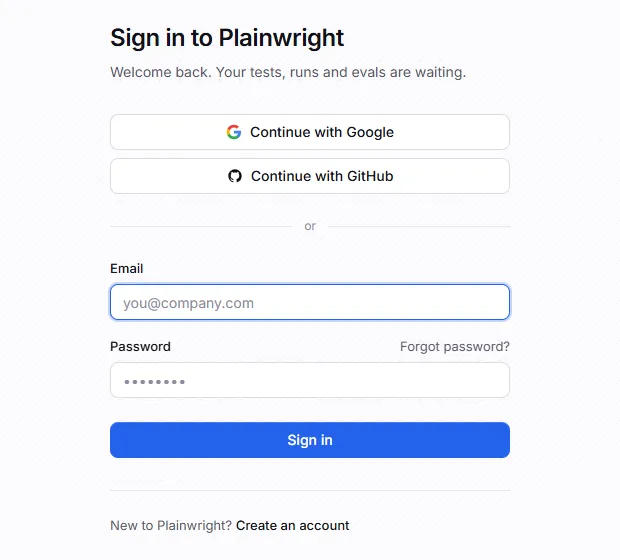
Sign-in uses the OAuth authorization-code flow. The provider sends the browser back to a callback URL on your server, so you register that URL with the provider:
<base>/api/oauth/google/callback<base>/api/oauth/github/callback<base> is OAUTH_REDIRECT_BASE, or APP_BASE_URL when that’s empty: the public origin people
use, such as https://plainwright.example.com, with no trailing slash. For a local install it’s
http://localhost:8080. The URL you register must match exactly, scheme and port included.
-
In the Google Cloud console, open APIs & Services → OAuth consent screen and set up the consent screen (app name, support email; the
openid,emailandprofilescopes are enough). -
Open Credentials → Create credentials → OAuth client ID, choose Web application, and add
https://plainwright.example.com/api/oauth/google/callbackunder Authorized redirect URIs. -
Copy the client id and secret into
.env:.env GOOGLE_CLIENT_ID=1234567890-abc.apps.googleusercontent.comGOOGLE_CLIENT_SECRET=<client-secret>
-
In GitHub, open Settings → Developer settings → OAuth Apps → New OAuth App (or the same page under an organization’s settings).
-
Set Homepage URL to
https://plainwright.example.comand Authorization callback URL tohttps://plainwright.example.com/api/oauth/github/callback. -
Generate a client secret, and copy both values into
.env:.env GITHUB_CLIENT_ID=Iv1.0123456789abcdefGITHUB_CLIENT_SECRET=<client-secret>
Then recreate the backend so it reads the new values, and reload the sign-in page:
docker compose up -dIf the app is served on a different origin from APP_BASE_URL (for example behind a second
domain), set OAUTH_REDIRECT_BASE to the origin the provider should redirect to.
How accounts are matched
Section titled “How accounts are matched”- Only verified emails are used. Google must report the email as verified; for GitHub, the
primary verified address is used (the
user:emailscope allows reading private addresses). A provider account without a verified email can’t sign in. - A provider account that’s already linked signs in to its Plainwright account.
- An existing account with the same email is linked, ignoring case, but only if that account’s address is confirmed. Anyone can register any address with a password, so linking an unconfirmed account would hand the real owner’s sign-in to whoever registered first. Otherwise sign-in stops with “An account with this email already exists, but its email address hasn’t been confirmed…”: sign in with the password, confirm the email (or use Forgot password?), then continue with the provider again.
- A new email creates an account with a random password that is never shown. The address counts as confirmed, because the provider verified it. That person signs in with the provider, or sets a password through Forgot password? once email works.
- Pending invitations attach as soon as the address is confirmed, so a provider sign-in attaches them straight away.
Protection against login CSRF
Section titled “Protection against login CSRF”Sign-in only completes in the browser that started it, and no session token ever appears in a URL:
- Start.
GET /api/oauth/<provider>/startsets an HttpOnly,SameSite=Laxcookie with a random nonce and sends the browser to the provider with a signedstate(valid 10 minutes) that carries the same nonce. - Callback. The provider returns to
/api/oauth/<provider>/callback. The server checks that thestatematches the cookie, links or creates the account, and redirects to/auth/callback#code=…with a one-time login code, valid for 2 minutes. - Exchange. The app posts the code to
POST /api/oauth/exchange. The server returns a session token only if the code is unused and arrives with the nonce cookie of the browser that started sign-in, then deletes the cookie.
A code (or a token) planted in someone else’s browser therefore can’t sign them in to another account. A reloaded callback page, or one finished after 2 minutes, answers “This sign-in link was already used” or “Sign-in link expired or is invalid”; start again from the sign-in page.
Email over SMTP
Section titled “Email over SMTP”Plainwright sends email with any SMTP server: your company’s relay or a transactional provider.
Email counts as configured when SMTP_HOST and SMTP_FROM are both set.
SMTP_HOST=smtp.example.comSMTP_PORT=587SMTP_USER=plainwright@example.comSMTP_PASSWORD=<smtp-password>SMTP_FROM=Plainwright <plainwright@example.com>SMTP_TLS=true# Failure and flaky alert emails (needs the SMTP settings above).EMAIL_ALERTS_ENABLED=true| Setting | Default | Notes |
|---|---|---|
SMTP_HOST |
(empty) | Your SMTP server. |
SMTP_PORT |
587 |
The submission port with STARTTLS. Port 465 (implicit TLS) isn’t supported; most providers also offer 587, and some 2525. |
SMTP_USER, SMTP_PASSWORD |
(empty) | Leave the user empty for a relay without login. Gmail needs an app password, not the account password. |
SMTP_FROM |
(empty) | The sender. Use an address your provider lets you send from, or messages get rejected or land in spam. |
SMTP_TLS |
true |
Upgrade the connection with STARTTLS before logging in. Set false only for a trusted relay on a private network. |
EMAIL_ALERTS_ENABLED |
true |
false turns off alert emails only; invitations and password resets still send. |
Common providers:
| Provider | SMTP_HOST |
Port |
|---|---|---|
| Gmail / Google Workspace | smtp.gmail.com |
587 (with an app password) |
| Brevo | smtp-relay.brevo.com |
587 |
| Mailgun | smtp.mailgun.org |
587 |
| SMTP2GO | mail.smtp2go.com |
587 or 2525 |
Set the SMTP values on the backend and the workers: the backend sends invitations and
password resets, and the workers send alerts. On Docker Compose, .env reaches both. Recreate
the containers after changing it with docker compose up -d.
What gets emailed
Section titled “What gets emailed”| Sent by | When | |
|---|---|---|
| Email confirmation | backend | Right after someone registers with a password, and again when they ask for a new link. The link is valid for 72 hours. |
| Project invitation | backend | An admin invites someone in Project → Settings → Members. The invitation is also recorded in the app, and attaches once the person’s address is confirmed. |
| Password reset | backend | Someone uses Forgot password? on the sign-in page. |
| Failure and flaky alerts | worker | A run finishes and the project’s notification settings ask for it, sent to the project’s alert email addresses. Set them up in Alerts. |
To check delivery, use Send test email in a project’s notification settings.
Confirming email addresses
Section titled “Confirming email addresses”Anyone can register any address with a password, so an address only counts once its owner has proven they receive mail there. A confirmed address is what lets pending project invitations attach and lets Google or GitHub sign-in link to an existing account.
An address is confirmed by any of these:
- The confirmation link emailed after registration (needs SMTP). The link is valid for
72 hours. A signed-in user whose address isn’t confirmed sees Not confirmed under
Settings → Profile, with a button that sends a new link (
POST /api/auth/verify-email/send, at most 5 times an hour). Opening the link shows Email confirmed in the app. - Signing in with Google or GitHub with that address, which the provider has verified.
- Completing a password reset, which proves access to the mailbox.
How invitations behave as a result:
| The invited address belongs to… | What happens |
|---|---|
| A confirmed account | The person is added to the project straight away. |
| An unconfirmed account | A pending invitation. The email asks them to confirm the address; it attaches once they do. |
| No account yet | A pending invitation. It attaches when they register and confirm, or sign in with Google or GitHub. |
Pending invitations carry an Invited badge in the members list. The members API also says why
each one is waiting: pending_reason is email_unverified or no_account.
Password reset
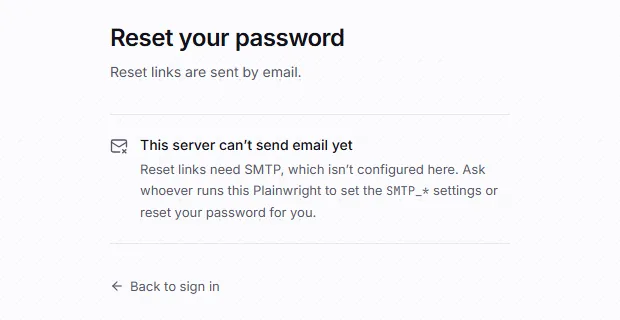
Section titled “Password reset”Password reset only works with SMTP, by design: the reset link is never shown in the app and never written to a log. Without SMTP, the forgot-password page says so.
How reset links behave:
- One-time and short-lived. A link is valid for
PASSWORD_RESET_TTL_MINUTES(default 60) and only once. Requesting a new link cancels older ones. Only a hash of the token is stored. - No account enumeration. The form always answers the same way, and the email is sent in the background, so neither the reply nor its timing reveals whether an account exists.
- Throttled: at most one link a minute and five an hour per account, and 20 requests an hour per client address.
- New password rules: at least 8 characters, at most 72 bytes (the bcrypt limit), and not the
email address or the part before the
@. The same rules apply at registration and when changing a password. - Completing a reset signs out every other session and confirms the email address, so pending invitations attach.
Without SMTP, an operator can still help a locked-out user by having them sign in with Google or GitHub (if configured), since that links to the same email.
Troubleshooting
Section titled “Troubleshooting”| Symptom | Likely cause |
|---|---|
| No Google or GitHub button | Only one of the id and secret is set, or the backend wasn’t recreated after editing .env. GET /api/oauth/providers shows what the server sees. |
Google shows redirect_uri_mismatch, or GitHub says the redirect URI doesn’t match the registered callback URL |
The registered callback URL differs from <base>/api/oauth/<provider>/callback. Check scheme, host, port and OAUTH_REDIRECT_BASE. |
| “Sign-in was started in a different browser session” | The sign-in cookie didn’t come back: the callback ran on a different host than /start, or the browser blocks cookies. Use one origin throughout. |
| “Sign-in link expired or is invalid” or “This sign-in link was already used” | The one-time code is older than 2 minutes, or the callback page was reloaded. Start again from the sign-in page. |
| “An account with this email already exists, but its email address hasn’t been confirmed…” | Sign in with the password, confirm the address (or use Forgot password?), then use the provider again. See Confirming email addresses. |
| “Your GitHub account has no verified email address” | Verify an email on GitHub (Settings → Emails). |
| An invited person doesn’t see the project | Their address isn’t confirmed yet. See Confirming email addresses. |
| “Too many attempts — wait a few minutes and try again.” (HTTP 429) | The sign-in or registration throttle. See Rate limits. |
| After an invite the app says “Email isn’t set up on this server”, or no reset or confirmation emails arrive | SMTP isn’t configured on the backend, or the server refused the login. Try Send test email, and check SMTP_PORT (587, not 465) and the app password. |
| Alert emails missing but invitations work | The workers don’t have the SMTP settings, EMAIL_ALERTS_ENABLED=false, or the project has no alert addresses. |
Next steps
Section titled “Next steps”- Security model: how sign-in tokens, roles and secrets are protected.
- Team and roles: inviting people and what each role can do.
- Alerts: Slack, Discord, webhooks and email: set up run alerts.