
Crawler, templates and imports
You don’t have to start from a blank page. Plainwright has three ways to get a set of tests quickly; you review everything before it’s created.
| Way | Starts from | AI cost |
|---|---|---|
| AI Crawler | your live site, a PDF (a spec, a manual) or an OpenAPI spec | one AI call per crawl |
| Templates | 26 ready-made tests for common flows | none |
| Imports | a Jira, Linear or GitHub issue, a Figma design or a Notion page | one AI call per import |
Every test records where it came from in its source field: manual, crawler, template, jira, linear,
github, figma or notion. source_ref holds the template key or the link to the original item.
AI Crawler
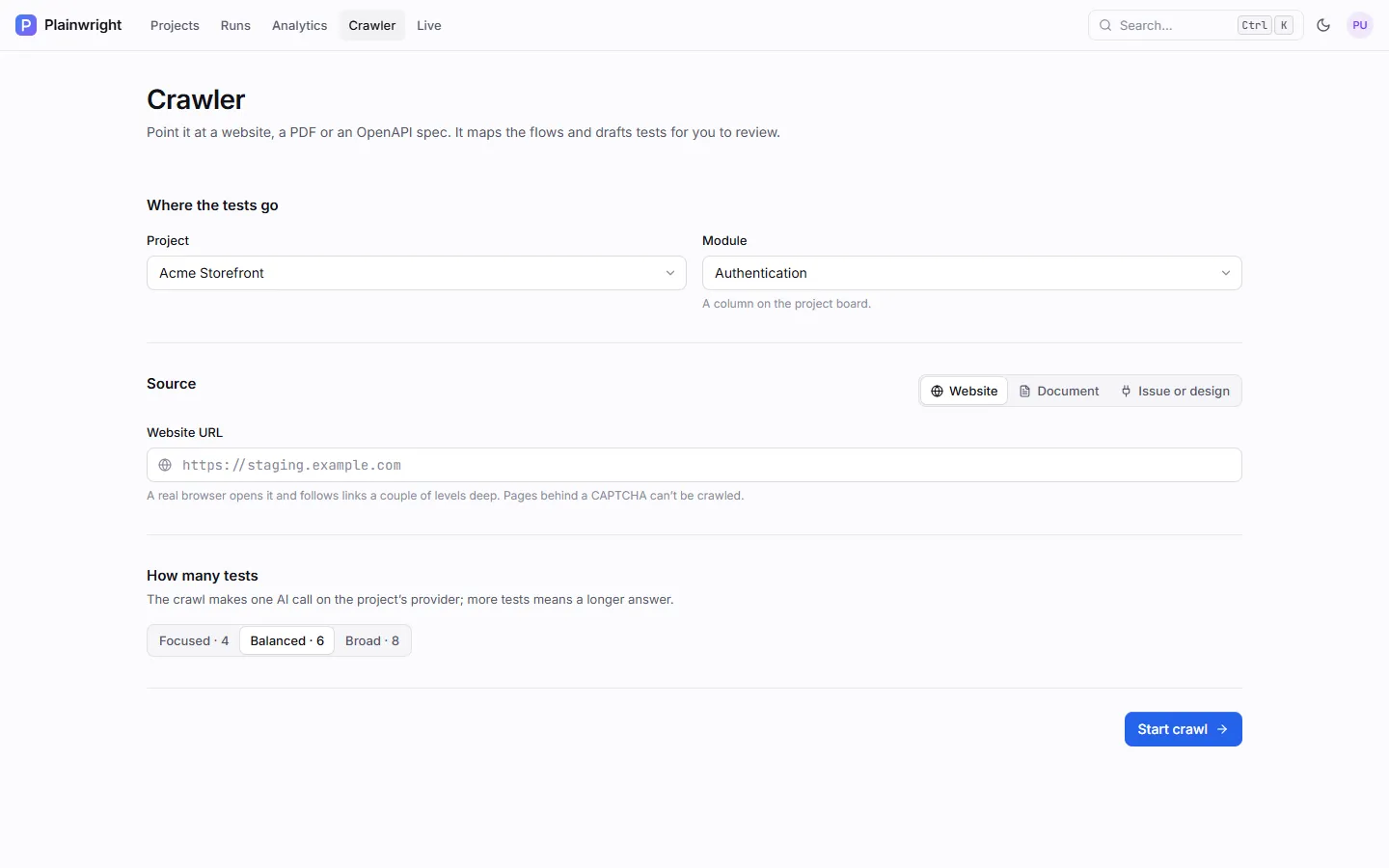
Section titled “AI Crawler”The Crawler reads a source, maps the flows it finds, and drafts plain-English tests for you to pick from.
-
Open Crawler in the top navigation.
-
Under Where the tests go, pick the Project and the Module (board column) for the new tests.
-
Under Source, choose one:
- Website: enter a URL, such as your staging site.
- Document: drop a
.pdf,.json,.yamlor.ymlfile, up to 10 MB. PDFs are read as text; JSON and YAML files are read as OpenAPI or Swagger specs. - Issue or design: draft tests from a connected tool (see Imports).
-
Under How many tests, choose Focused · 4, Balanced · 6 or Broad · 8.
-
Click Start crawl. A live log shows the pages visited and elements found. Click Stop to cancel: the crawl ends before its next page, skips the AI call and creates nothing. Leaving the page mid-crawl cancels it too.
-
Review the drafted tests. Each shows a name, a one-line description, a complexity (Simple, Medium or Complex) and the flow it covers; open one to read its steps. Untick the ones you don’t want, check the module, and click Create N tests.
What the Crawler reads
Section titled “What the Crawler reads”| Source | What is read | Limits |
|---|---|---|
| Website | A real Chromium browser opens the URL, reads its accessibility snapshot, then visits same-origin links found on that page. | CRAWLER_MAX_PAGES pages in total (default 5); text capped at CRAWLER_MAX_CONTENT_CHARS (default 8,000) |
| The text of the first pages | up to 4 × CRAWLER_MAX_PAGES pages (20 by default); same text cap; 10 MB |
|
| OpenAPI / Swagger | One line per endpoint: method, path and summary | same text cap; 10 MB |
The crawl is one AI call on the project’s AI provider, made only when you click Start crawl and never after the crawl was stopped. Creating the selected tests makes no AI call: their planned steps are the drafted lines.
The URL you crawl and every link the crawler follows pass the same
outbound-request guard as tests. A refused URL (such as
localhost or a cloud-metadata address) answers “This URL can’t be crawled: …” before the browser opens it.
Crawler settings
Section titled “Crawler settings”| Setting | Default | Description |
|---|---|---|
CRAWLER_MAX_PAGES |
5 |
Pages visited per website crawl, including the first. PDFs read up to four times as many pages. |
CRAWLER_MAX_CONTENT_CHARS |
8000 |
Characters of page, document or spec text sent to the AI. Higher values cost more tokens. |
With the API
Section titled “With the API”# 1. Analyse a source (one AI call). source_type is url, pdf or swagger; strictness is strict, balanced or loose.curl -s -X POST "$PW/api/crawler/analyze" -H "Authorization: Bearer $TOKEN" \ -F project_id=PROJECT_ID -F source_type=url -F url=https://staging.example.com -F strictness=balanced
# For a document: -F source_type=swagger -F file=@./openapi.yaml
# 2. Create the suggestions you want (no AI call)curl -s -X POST "$PW/api/crawler/create" \ -H "Authorization: Bearer $TOKEN" -H "Content-Type: application/json" \ -d '{"module_id": "MODULE_ID", "suggestions": [{"name": "Search returns results", "natural_language": "Open the home page..."}]}'analyze returns {source, count, suggestions}, each suggestion with name, description, complexity, flow and
natural_language. create returns {created, names}.
To follow or stop a crawl, pass a crawl_id of your choice (letters, digits, - and _) to analyze. The first
account to use an id owns it, and only that account can use it:
| Call | What it does |
|---|---|
GET /api/crawler/stream/{crawl_id} |
Server-sent events with the crawl’s log and counters, ending with {"type": "done"}. |
POST /api/crawler/cancel/{crawl_id} |
Stops the crawl before its next page and skips the AI call. Returns {"cancelled": true}; 404 for an id that isn’t yours; 503 while Redis is unreachable. |
A cancelled analyze answers 409 Crawl cancelled, and its stream ends with {"type": "done", "cancelled": true}.
Templates
Section titled “Templates”Templates are ready-made tests with a few blanks to fill in. They make no AI call and are a good way to get a project’s first tests running.
-
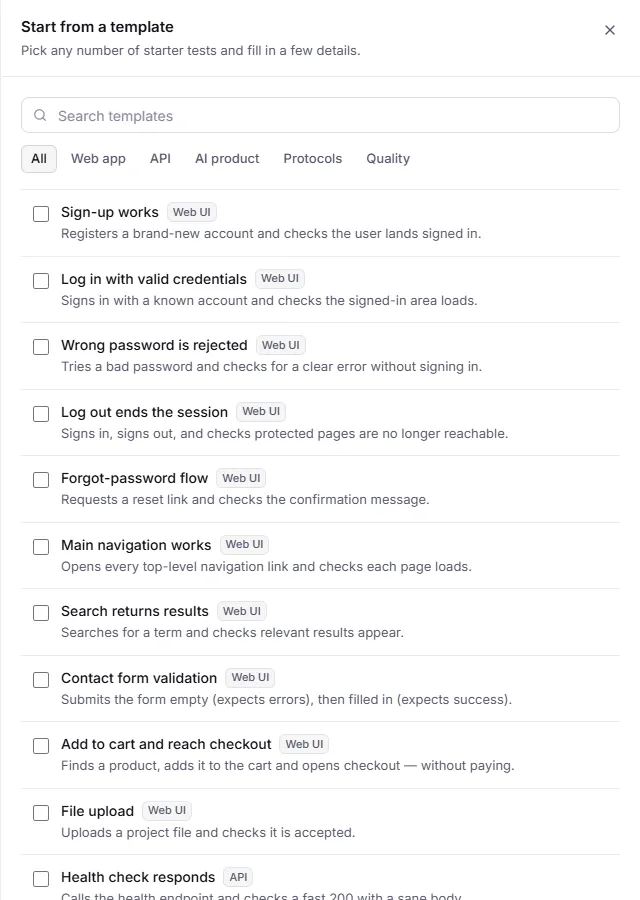
On the board, click New test in a module, then From a template.
-
Search, or filter by category: Web app, API, AI product, Protocols or Quality.
-
Tick the templates you want and fill in their fields, such as the login page path or a product name. Required fields are marked.
-
Click Add N tests. All of them are created in the module, or none are if a field is invalid.
The first-run setup wizard (Onboarding) offers the same templates.
Templates for web apps
Section titled “Templates for web apps”| Template | Kind | What it checks | Fields |
|---|---|---|---|
| Sign-up works | Web UI | A new account can register and lands signed in | sign-up page |
| Log in with valid credentials | Web UI | A known account can sign in | login page, email, password |
| Wrong password is rejected | Web UI | A bad password shows an error and doesn’t sign in | login page, email |
| Log out ends the session | Web UI | Logging out works and the back button doesn’t restore the session | login page, email, password |
| Forgot-password flow | Web UI | The reset request confirms that a link was sent | login page, email |
| Main navigation works | Web UI | Every top-level navigation link loads a page | none |
| Search returns results | Web UI | A search shows relevant results | search term |
| Contact form validation | Web UI | Empty submit shows errors; a filled form succeeds | contact page |
| Add to cart and reach checkout | Web UI | A product reaches checkout, without paying | product |
| File upload | Web UI | A project file uploads | upload page, file name |
| Health check responds | API | A fast 200 from the health endpoint | health path, API base URL |
| CRUD lifecycle | API | Create, read, update, delete, then 404 | resource path, API base URL, Authorization header |
| Protected endpoint needs auth | API | No or bad token gets 401/403 without leaking data | protected path, API base URL |
| Invalid input is rejected | API | Malformed payloads get 4xx, never 5xx | endpoint path, API base URL |
| Accessibility (WCAG AA) | Site quality | axe-core WCAG 2 A/AA audit | pages |
| Core Web Vitals budget | Site quality | LCP, CLS and blocking time within budget | pages, LCP budget |
| Broken links & SEO basics | Site quality | Broken links and missing SEO basics | pages |
The AI product and Protocols categories cover conversation, red-team, eval, RAG, MCP and A2A tests; see Testing AI products.
Credential fields default to placeholders such as {{secrets.TEST_USER_EMAIL}} and {{secrets.TEST_USER_PASSWORD}}.
Add secrets with those names in Settings → Secrets, or type another placeholder. Placeholders are kept as they
are, never filled in with values. Empty optional fields are left out of the test’s config, so the defaults apply.
With the API
Section titled “With the API”# List templates (optionally ?kind=ui or ?category=Web%20app)curl -s "$PW/api/templates/?kind=ui" -H "Authorization: Bearer $TOKEN"
# Create tests from templates (up to 30 per call; editor role)curl -s -X POST "$PW/api/templates/apply" \ -H "Authorization: Bearer $TOKEN" -H "Content-Type: application/json" \ -d '{ "module_id": "MODULE_ID", "items": [ {"key": "ui.login", "vars": {"login_path": "/login"}}, {"key": "ui.search", "vars": {"query": "running shoes"}, "name": "Search finds running shoes"}, {"key": "quality.a11y", "vars": {"pages": "/\n/pricing"}} ] }'Each template has a key (such as ui.login, api.crud or quality.links_seo) and declares its variables; the
list endpoint returns both. The created tests have source: "template" and source_ref set to the key.
Import from Jira, Linear, GitHub, Figma or Notion
Section titled “Import from Jira, Linear, GitHub, Figma or Notion”Turn the work you already describe elsewhere into tests: a bug report, a user story, a design or a spec page.
-
Connect the tool in Settings → Integrations. See Jira, Linear and GitHub and Figma and Notion imports.
-
On the board, click New test, then Import (or use Crawler → Issue or design).
-
Pick the source and enter a reference:
Source Reference Jira an issue key ( PW-123), an issue URL or a JQL queryLinear an issue ID ( ENG-123) or URLGitHub an issue or pull request number ( #123) or URLFigma a design link; include node-idto import one frame instead of the whole fileNotion a page link; share the page with your Notion integration first -
Plainwright fetches the item and makes one AI call to draft tests (5 by default). Review the drafts, choose the module and click Add N tests.
Before the fetched text reaches the AI, any value from the project’s secrets vault is masked. The project’s URL is
added as context so the drafted steps fit the app under test. Imported tests are Web UI tests with source set to
the tool and source_ref set to the item’s link, so you can trace each test back to its story.
With the API, POST /api/connectors/preview takes {project_id, kind, ref, count} (count 1–10) and returns the
source and the suggestions; create them with POST /api/crawler/create as shown above.