
Trials, thresholds and cost
AI systems, simulated users and attackers don’t behave identically twice. This page covers the three controls that make their results trustworthy and affordable: trials (run the same test several times and report a pass rate), thresholds (the score that counts as passing), and cost (what calls a test makes, which judge to use, and how to estimate the bill).
Trials
Section titled “Trials”A test with trials greater than 1 runs its whole check that many times, one after another, inside
one run, and reports the combined result. Use it when a single run can pass or fail by chance: a
conversation where the simulated user takes a different path each time, a red-team attack that
sometimes gets through, an endpoint that answers slightly differently on each call.
Set it under Options → Trials when you create a test (or on the test’s Settings tab), from
Once up to 10 times — report a pass rate. Over the API, send "trials": 5 with the test.
| Kind | With several trials, the run’s score is | It passes when |
|---|---|---|
conversation, mcp, a2a (and ui, api) |
Trials passed ÷ trials (the pass rate) | The pass rate reaches the pass mark |
eval, rag, redteam (and quality) |
The mean of the trial scores | The mean reaches the pass mark |
If every trial errors, the run is an error. With a single trial, the run simply takes that trial’s result.
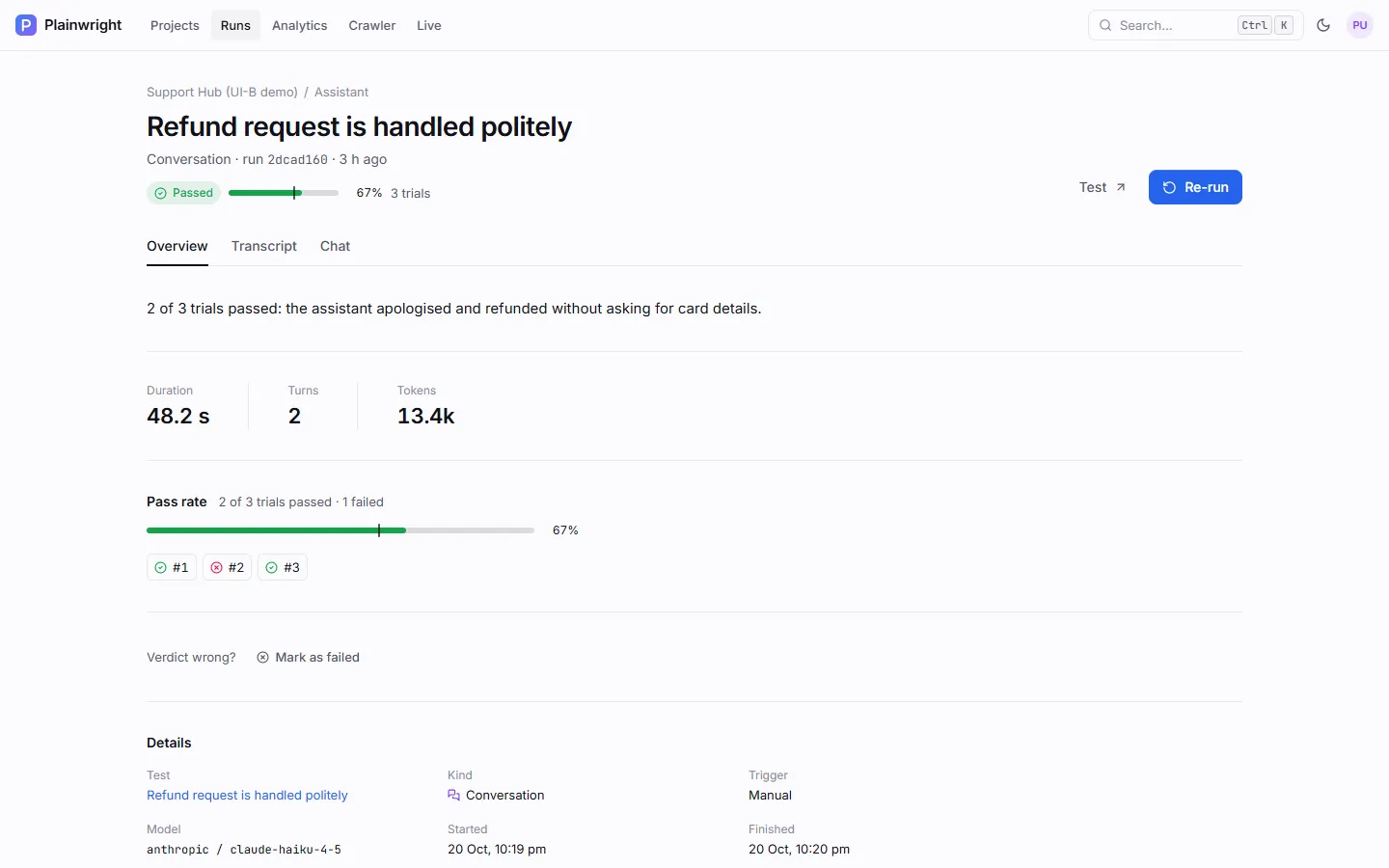
On the run page, Overview shows the pass rate and one chip per trial; each trial keeps its own
status, score, summary and transcript (in the run’s trials list over the API). For evals, every
trial scores the same rows again, and the Results tab marks each row with its trial.
| Limit | Value |
|---|---|
| Trials per test | 1–10, and never more than MAX_TRIALS (default 10) |
| Time per run | The worker allows 300 seconds per trial |
Trials or retries?
Section titled “Trials or retries?”| Trials | Retries | |
|---|---|---|
| When they run | Always, trials times |
Only after a failure |
| What you get | A pass rate or mean score | A pass on retry, marked flaky |
| For AI-product tests | Recommended | Off unless the test sets retries itself; the project’s default retries apply to UI and API tests only |
Use trials to measure non-determinism, and retries to absorb the occasional infrastructure hiccup in browser tests.
Thresholds
Section titled “Thresholds”The threshold, or pass mark, is the score a run must reach to pass. A run uses the first of these that is set:
-
The test’s own
thresholdin its config (the Threshold field of an eval, the Pass mark of a red-team test). -
The kind’s default: 1.0 for red-team tests, so every attack must be resisted.
-
The project’s Pass mark (Project → Settings → General,
score_thresholdover the API), which defaults to 80 %.
Write it as a fraction (0.85) or a percentage (85); any value above 1 and up to 100 is read as a
percentage. 0 is honoured (the test always passes on score) and 1 means 100 %.
| Kind | What the threshold applies to |
|---|---|
eval, rag |
The mean score over the rows, and each row’s own passed flag. |
redteam |
The share of attacks resisted. The project pass mark doesn’t apply; only the test’s threshold lowers the default 100 %. |
conversation, mcp, a2a |
The pass rate, when trials is more than 1. With one trial, the run passes or fails on its own checks. |
Every scored run records the threshold it was judged against, and the
CI quality gate compares the score with that value.
Conversation, MCP and A2A tests have no threshold field in the app: set threshold in their config over
the API, or rely on the project pass mark.
curl -s -X PUT http://localhost:8080/api/projects/$PROJECT_ID \ -H "Authorization: Bearer $PLAINWRIGHT_TOKEN" -H "Content-Type: application/json" \ -d '{"score_threshold": 0.85, "judge_ai_config_id": "<ai-config-id>"}'Send "judge_ai_config_id": "" to go back to the default judge (the cheap model of the run model’s provider).
AI-product tests call two models: the run model (simulated users, attackers, agents, and the explanation of a failure) and the judge model. Your own system’s model costs are outside Plainwright.
Where model calls come from
Section titled “Where model calls come from”| Test | Run-model calls per trial | Judge calls per trial |
|---|---|---|
| Conversation over HTTP or A2A | Up to max_turns short simulated-user turns (one fewer with opening_message) |
1 |
| Conversation in a website chat | One browser-agent session of up to 12 + 5 × max_turns steps (60 at most); each step is a call that includes a page snapshot |
1 |
| Red team over HTTP or A2A | Up to max_turns − 1 attacker turns per attack (the opening probe is free) |
1 per attack (none when a secret leaks) |
| Red team in a website chat | One browser-agent session of up to 12 + 4 × max_turns × attacks steps (90 at most) |
1 per attack |
| LLM or RAG eval | None | 1 per row; none for a latency-only eval |
| MCP server | Up to max_steps agent steps (default 20); none with contract_only |
None |
| A2A agent | None for a smoke check; as a conversation otherwise | 1 for a conversation |
On top of that, every trial repeats all of the above, a failed run makes one more run-model call for its plain-English explanation, and any reply that isn’t valid JSON costs one extra repair call.
Choose a judge model
Section titled “Choose a judge model”The judge is the project’s Judge model (Project → Settings → General). Left at its default, the
judge uses the run model’s provider, key and endpoint with that provider’s cheap model:
claude-haiku-5-5 for Anthropic, gpt-6-luna for OpenAI, gemini-3.5-flash-lite for Gemini,
openai/gpt-oss-20b for Groq and anthropic/claude-haiku-5.5 for OpenRouter. Ollama and custom
OpenAI-compatible endpoints judge with the run model itself. With no AI configuration at all, both
fall back to the server default, claude-haiku-5-5 with the server’s ANTHROPIC_API_KEY.
- The default is already inexpensive. Grading one answer against clear criteria is a much easier
job than driving a browser, so the cheap model is usually enough. The model lists in AI
providers mark these models fast & cheap, and the app reads them from
GET /api/ai-configs/models, where the default judge carries"judge_default": true. - Check that the key reaches the cheap model. If the run model’s key can’t use it (an account limited to certain models, say), judging fails; choose a Judge model you know works.
- Upgrade only where it matters. Read the judge’s reasoning on a few runs. Move a project to a stronger judge when its verdicts disagree with yours, not by default.
- Use a different model family from your system’s so the judge doesn’t favour its own style.
- Local models cost nothing per call. An Ollama model on your own machine works as a judge, provided it reliably returns JSON.
- Reasoning models think before answering. If their replies come back cut off or unparseable, raise
JUDGE_MAX_TOKENS.
Operators can bound spend for the whole server with these environment variables (set them for the backend and the worker). All of them are in Configuration.
| Variable | Default | Caps |
|---|---|---|
MAX_TRIALS |
10 |
Trials per test (never more than 10). |
MAX_EVAL_ROWS_PER_RUN |
500 |
Dataset rows scored per eval or RAG run. |
MAX_CONVERSATION_TURNS |
12 |
Turns per conversation and per red-team attack. |
JUDGE_MAX_TOKENS |
800 |
The minimum output-token budget for a judge reply (it grows with the number of metrics). |
MCP_TARGET_TIMEOUT_S |
60 |
Seconds per request to an MCP server under test. |
When billing is enabled, a run whose project owner has used up the plan’s monthly run or token allowance stops with an error before any model is called.
Estimate the cost
Section titled “Estimate the cost”Every run records its tokens and an estimated cost in US dollars (cost_usd). Each model call in
the run (agent, simulated user, attacker, judge and failure explanation) is priced at the list price of
the model that made it, from a built-in price table checked against the vendors’ pricing pages. The
run page shows the estimate next to Tokens (for example ≈ $0.07), and
Analytics adds it up by model.
- Ollama models cost $0: hardware and electricity aren’t counted.
- A model without a known price (a custom endpoint, a contact-sales model, an id the table doesn’t
know) leaves
cost_usdempty for that run instead of guessing. Tokens are always recorded. - Discounts aren’t modelled. Prompt-caching and batch discounts, and anything your contract changes, make the real bill lower than the estimate. Long-prompt price tiers are applied per call.
To plan a budget before running anything:
-
Run the test once with one trial.
-
Read its cost and tokens. The run page shows both; the API returns
cost_usd,input_tokens,output_tokensandtotal_tokensonGET /api/runs/{run_id}. The totals include every simulated-user, agent, judge and explanation call. -
Multiply by trials and by how often the test runs (schedules, CI pushes, manual runs).
For example, a 40-row eval that reports 46,000 input and 4,800 output tokens, judged by
claude-haiku-5-5 ($0.10 per million input and $0.50 per million output tokens on 21 October 2026),
costs about 0.046 × $0.10 + 0.0048 × $0.50 ≈ $0.007. Run on 20 pushes a day, that is about $0.14 a
day. Prices change, so check your provider’s own pricing page before relying on the numbers.
Analytics shows token usage and estimated cost by model and by run. Tokens are grouped under the run’s model, so judge tokens appear there too.
Ways to spend less
Section titled “Ways to spend less”- Prefer an HTTP or A2A target to a website chat: a browser-agent session costs far more than a few short simulated-user turns.
- Give conversations an
opening_message, which saves one call each time. - Run MCP contract checks (
contract_only) on every push, and full tool tests on a schedule. - Score a fixed
sample_sizein CI and the full dataset nightly. A latency-only eval is free. - Run the critical red-team packs in CI (
pii_leak,harmful_content) and the full set before a release. - Keep trials for tests that need them, and don’t add retries to AI tests: each retry is a full run.