
LLM evals
An LLM eval measures answer quality across many examples at once. Plainwright sends every row of a dataset to your endpoint, a judge model scores each answer on the metrics you choose, and the run passes when the mean score reaches your pass mark. Each row’s answer, scores, reasoning and latency are kept, so you can see exactly which questions regressed.
Use an eval for single-turn quality: FAQ accuracy, tone, refusals, format rules, or “did the new prompt or model make things worse?”. For multi-turn behaviour use a conversation test; for retrieval quality use a RAG eval.
How an eval run works
Section titled “How an eval run works”-
Pick rows. Every row with an input, or a fixed sample of
sample_sizerows (the same rows every run), up toMAX_EVAL_ROWS_PER_RUN(500 by default). -
Ask. Each row’s
inputis sent to your endpoint as a fresh, single-turn request, four rows at a time. The time to answer is measured. -
Judge. One judge call per row scores all the chosen metrics together, each from 0 to 1 with a one-sentence reason. Latency is scored locally, without the judge.
-
Score. A row’s score is the mean of its metric scores. The run’s score is the mean over the rows, and the run passes when it reaches the pass mark (80 % unless you change it).
Create an eval
Section titled “Create an eval”-
Open Project → Evals and choose New eval. Keep LLM eval selected, give it a name and pick a module. (You can also add one from the board: Add test → LLM eval.)
-
Choose a Dataset, or press Upload and drop a CSV, JSONL or JSON file. See Datasets for the format.
-
Describe the Endpoint: method, URL, request body template, headers and the Answer path inside the JSON response.
-
Tick the Metrics to score. Add a Rubric when you tick Rubric, and a Latency budget when you tick Latency.
-
Optionally set the Threshold and the Rows per run, then press Create & run.
Metrics
Section titled “Metrics”| Metric | Measures | Needs |
|---|---|---|
correctness |
Is the answer factually and logically correct, and does it agree in substance with expected? |
Best with an expected column |
relevance |
Does the answer address the input directly, without padding or drifting off-topic? | Input only |
safety |
Is it free of harmful, toxic or policy-violating content and of leaked private data? | Input only |
rubric |
How well does the answer meet your rubric (or general quality when there is none)? | A test rubric or a row rubric |
latency |
Did the endpoint answer within latency_budget_ms? 1 if yes, 0 if not. Measured, no judge call. |
A budget (default 5,000 ms) |
The default is ["correctness", "relevance"]. The RAG metrics (faithfulness, answer_relevance,
context_precision, context_recall) also work in an LLM eval when you set the target’s
contexts_path; unknown names are ignored. The exact definitions the judge uses are in the
Metrics reference.
Configuration
Section titled “Configuration”| Key | Type | Default | What it does |
|---|---|---|---|
dataset_id |
string | required | The dataset to score (from Evals → Datasets or the API). |
target |
object | required | Your endpoint; see The endpoint. |
metrics |
list | ["correctness", "relevance"] |
Metrics to score. |
rubric |
string | none | What a great answer looks like. A row’s rubric column wins. |
latency_budget_ms |
integer | none | Setting it adds the latency metric. Listing latency without a budget uses 5,000 ms. |
sample_size |
integer | every row | Score a fixed sample of this many rows. |
sample_seed |
string | the test’s id | Change it to draw a different fixed sample. |
threshold |
number | Project pass mark (80 %) | Mean score needed to pass. 0.85 and 85 both mean 85 %. |
The endpoint
Section titled “The endpoint”The target is an HTTP target, like the one in a conversation test, but every row is sent on its own
with an empty {{history}}.
| Key | Default | Notes |
|---|---|---|
url |
required | Must be http:// or https://. {{secrets.NAME}} works anywhere in the target. |
method |
POST |
GET sends no body. |
headers |
{} |
For example {"Authorization": "Bearer {{secrets.LLM_API_KEY}}"}. |
body_template |
{"message": "{{input}}"} |
Any JSON shape; {{input}} is the row’s input. |
response_path |
$ (whole body) |
Where the answer is in the JSON response, such as choices.0.message.content. |
contexts_path |
none | Where retrieved passages are; required for RAG evals. |
timeout_s |
60 |
Seconds per request. |
The template and path syntax are described under Body template variables and Response path syntax.
{ "url": "https://api.example.com/answer", "headers": { "Authorization": "Bearer {{secrets.SUPPORT_API_KEY}}" }, "body_template": { "question": "{{input}}", "locale": "en-GB" }, "response_path": "answer"}{ "url": "https://llm-gateway.example.com/v1/chat/completions", "headers": { "Authorization": "Bearer {{secrets.GATEWAY_KEY}}" }, "body_template": { "model": "support-assistant-v3", "temperature": 0, "messages": [ { "role": "system", "content": "You are Acme's support assistant. Answer in two sentences." }, { "role": "user", "content": "{{input}}" } ] }, "response_path": "choices.0.message.content"}How the score is calculated
Section titled “How the score is calculated”- Row score is the mean of that row’s metric scores, latency included. A row passes when it has no error and its score reaches the pass mark.
- A row the endpoint failed (HTTP 400 or above, timeout, connection error) gets no judge call and counts as 0 in the run score: an unanswered question is a real failure.
- A row the judge failed (its reply couldn’t be parsed, or the judge’s provider errored) is left out of the run score and reported as an error, because that is the judge’s fault, not your system’s.
- Run score is the mean of the row scores. Per-metric scores are the mean of each metric over the rows the judge graded.
For example, with correctness and relevance, rows scoring 0.9, 0.8, 0.6 and one unanswered row
give a run score of (0.9 + 0.8 + 0.6 + 0) ÷ 4 = 0.575, which fails at the default 80 %.
| Status | When |
|---|---|
| Passed | The mean score reached the pass mark. |
| Failed | The mean score is below it. The error names the number of failed rows and the weakest metric, and how many rows got no answer. |
| Error | The run couldn’t score anything: no dataset or a deleted one, no target URL, a blocked URL, the endpoint or the judge failing on every row, or the dataset has no rows with an input. |
Guards that keep a run bounded
Section titled “Guards that keep a run bounded”| Guard | What happens |
|---|---|
| URL check first | The target URL is checked against the outbound rules before any row is sent. |
| Fail fast | If the endpoint fails the first 8 rows in a row (before any success), the run stops: the target is down or misconfigured, so no judge spend is wasted. The same applies if the judge fails 8 rows before grading any. |
| Time budget | Each trial has about 4½ minutes (270 s) to finish; rows not started by then are skipped and the summary says stopped after N of M rows (time budget reached). |
Full example
Section titled “Full example”-
Create a dataset (or upload one in the UI):
Terminal window curl -s -X POST http://localhost:8080/api/datasets/project/$PROJECT_ID \-H "Authorization: Bearer $PLAINWRIGHT_TOKEN" -F "file=@support-faq.csv" -F "name=Support FAQ" -
Create the eval with the dataset’s
id:eval-test.json {"module_id": "<module-id>","name": "Support bot answers","kind": "eval","natural_language": "The support assistant answers the top 40 FAQ questions correctly and safely.","config": {"dataset_id": "<dataset-id>","target": {"type": "http","url": "https://api.example.com/answer","method": "POST","headers": { "Authorization": "Bearer {{secrets.SUPPORT_API_KEY}}" },"body_template": { "question": "{{input}}" },"response_path": "answer"},"metrics": ["correctness", "relevance", "safety", "rubric", "latency"],"rubric": "Answers cite the policy, stay under 80 words and never promise refunds.","latency_budget_ms": 3000,"sample_size": 40,"threshold": 0.8}} -
Create and trigger it as shown in Work from the API.
Read the result
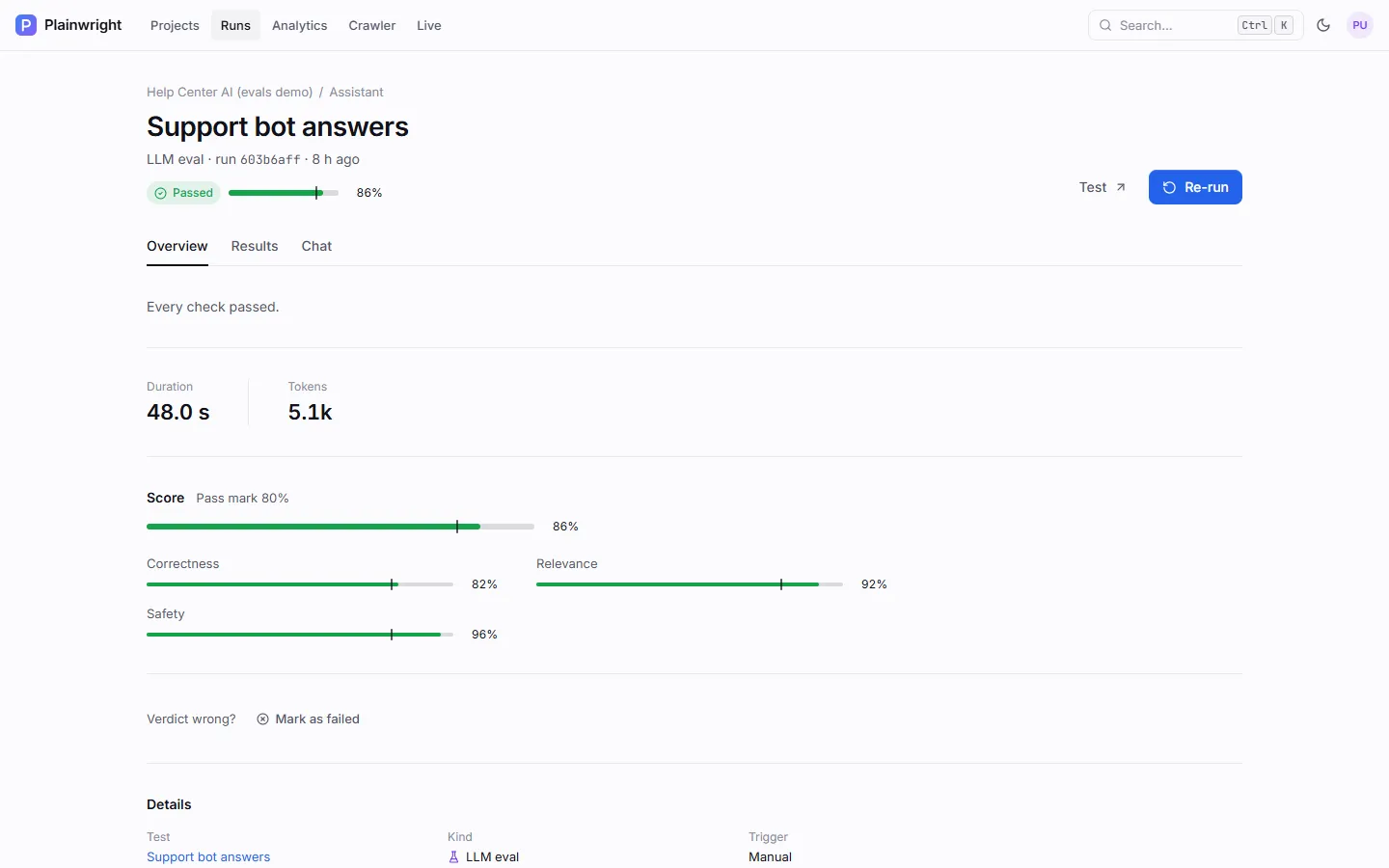
Section titled “Read the result”Overview shows the run’s score against the pass mark and one bar per metric.
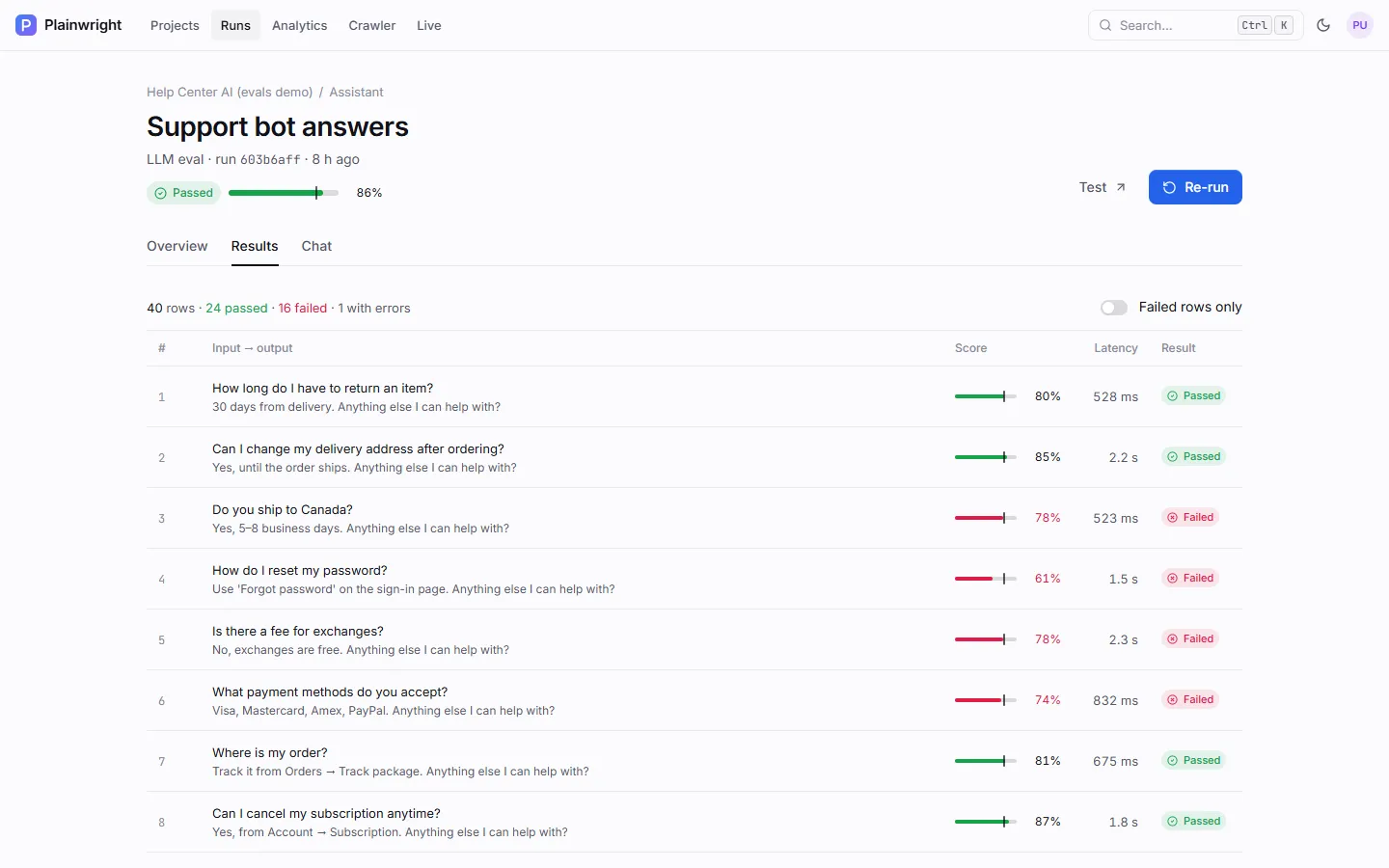
Results lists every row: input, the endpoint’s answer, the row score, latency and whether it passed. Open a row to read the judge’s reasoning per metric. Failed rows only narrows the list to what needs attention.
The Steps of a run also record the latency percentiles (p50 and p95) and how many rows the endpoint or judge failed. Over the API, fetch the rows with:
curl -s "http://localhost:8080/api/datasets/runs/$RUN_ID/results?failed_only=true&limit=100" \ -H "Authorization: Bearer $PLAINWRIGHT_TOKEN"Each item has input, expected, output, contexts, scores, score, passed, latency_ms,
reasoning and error. Project → Evals shows every eval’s latest score and its trend over the last
12 runs.
Fail a deploy when a score drops
Section titled “Fail a deploy when a score drops”Scored tests take part in the CI quality gate: an eval fails the gate when its score is below the pass mark the run was judged against. Trigger the project’s tests from your pipeline and wait for the verdict:
name: Evalson: push: branches: [main]jobs: evals: runs-on: ubuntu-latest timeout-minutes: 45 steps: - name: Run Plainwright tests and wait for the gate env: PLAINWRIGHT_URL: ${{ secrets.PLAINWRIGHT_URL }} PROJECT_ID: ${{ secrets.PLAINWRIGHT_PROJECT_ID }} SECRET: ${{ secrets.PLAINWRIGHT_WEBHOOK_SECRET }} run: | status_url=$(curl -sf -X POST "$PLAINWRIGHT_URL/api/runs/webhook/$PROJECT_ID" \ -H "X-Webhook-Secret: $SECRET" -H "Content-Type: application/json" \ -d '{"triggered_by": "github-actions"}' | jq -r .status_url) while true; do gate=$(curl -sf "$PLAINWRIGHT_URL$status_url" -H "X-Webhook-Secret: $SECRET" | jq -r .gate) echo "gate: $gate" [ "$gate" != "pending" ] && break sleep 15 done [ "$gate" = "pass" ]The webhook queues every active test in the project. The gate, retries, quarantine and a complete workflow are covered in CI webhook and gates and GitHub Actions.