
Billing (optional)
Self-hosted installs don’t need billing, and it’s off by default. With
BILLING_ENABLED=false there are no plans and no limits, and the server never contacts Stripe.
Settings → Billing only shows this month’s usage, for information:
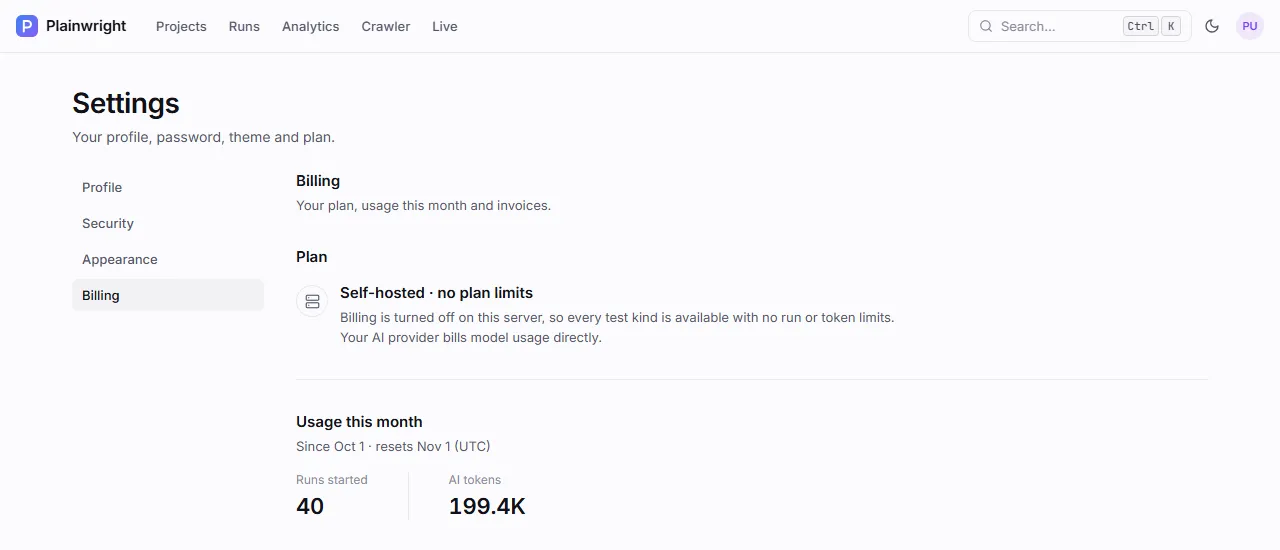
Turn billing on only if you run Plainwright as a paid service for other people. It adds monthly plans with run and token allowances, enforced before any AI spend, and hands checkout, payment methods, invoices and cancellation to Stripe.
How plans and usage work
Section titled “How plans and usage work”- Each user has a plan. Without a subscription, or when it’s no longer active, that’s Free.
A subscription in
active,trialingorpast_duekeeps its paid plan (past_duewhile Stripe retries the payment). - The project owner pays. Usage counts every run started in projects the user owns, whoever triggered it, plus the AI tokens those runs used, including on-demand helpers such as AI root cause and run chat.
- Usage resets monthly, on the 1st of each calendar month (UTC), not on the Stripe billing date.
- Limits are checked before a run spends anything. When the owner’s run or token allowance
is used up, a new run ends straight away with status
errorand a message like “Monthly run limit reached for the Free plan (200 runs). Upgrade in Settings → Billing, or wait until the allowance resets on Nov 1.” The check happens in the worker, before the first AI call.
The plans are defined in PLAN_CATALOG in
backend/app/services/billing.py:
| Plan | Display price | Runs per month | AI tokens per month |
|---|---|---|---|
| Free | $0 | 200 | 2,000,000 |
| Pro | $29 | 2,000 | 25,000,000 |
| Team | $99 | 10,000 | 100,000,000 |
The prices shown in the app are for display only: what Stripe charges comes from the prices you
create there. To change the allowances, the names or the display prices, edit PLAN_CATALOG and
rebuild the backend and workers.
Set up Stripe
Section titled “Set up Stripe”-
Create the prices. In the Stripe dashboard, create a product for each paid plan (Pro and Team) with a recurring monthly price. Copy each price id (
price_…). -
Add a webhook endpoint at
https://<your-domain>/api/billing/webhookthat sends these events:checkout.session.completedcustomer.subscription.createdcustomer.subscription.updatedcustomer.subscription.deletedinvoice.payment_failed
Copy the endpoint’s signing secret (
whsec_…). -
Turn on the customer portal in Stripe’s billing settings, allowing plan changes, payment method updates and cancellation. Manage billing in the app opens it.
-
Configure Plainwright. Set these on the backend, and
BILLING_ENABLED=trueon the workers too, because workers enforce the quota:.env BILLING_ENABLED=trueSTRIPE_SECRET_KEY=sk_live_…STRIPE_WEBHOOK_SECRET=whsec_…STRIPE_PRICE_PRO=price_…STRIPE_PRICE_TEAM=price_…APP_BASE_URL=https://plainwright.example.comCheckout returns people to
<APP_BASE_URL>/settings/billing, soAPP_BASE_URLmust be the public URL. -
Apply and test. Run
docker compose up -d, open Settings → Billing, and choose a paid plan with a Stripe test card in test mode. After checkout, the app shows a confirmation and refreshes the plan once Stripe’s webhook arrives, usually within seconds.
What happens in Stripe
Section titled “What happens in Stripe”| Action in the app | What Plainwright does |
|---|---|
| Choose Pro / Choose Team | Creates a Stripe customer the first time (email, name, user id in metadata), then a Checkout session in subscription mode. Promotion codes are allowed. Refused with 409 if the user already has a paid subscription; plan changes go through the portal instead. |
| Manage billing | Opens a Stripe customer-portal session for the user’s customer. |
| Webhook events | Verified against STRIPE_WEBHOOK_SECRET (signatures older than 5 minutes are rejected), then mapped onto the user’s subscription: plan from the price id, status, and the current period’s end. A cancelled subscription drops back to Free; a failed payment marks it past_due. |
Stripe errors reach users as a generic “Stripe request failed — try again shortly” (card errors show Stripe’s own message), and the secret key is never included in a response or log.
| Endpoint | Auth | Purpose |
|---|---|---|
GET /api/billing/status |
Signed in | Plan, status, usage this month, limits and the plan list. enabled: false on self-hosted installs. |
POST /api/billing/checkout |
Signed in | Body {"plan": "pro"} or "team". Returns {"url": …} to redirect to Stripe Checkout. |
POST /api/billing/portal |
Signed in | Returns {"url": …} for the Stripe customer portal. |
POST /api/billing/webhook |
Stripe signature | Stripe’s webhook target. No bearer token. |
With billing off, checkout and portal answer 404 Billing is not enabled on this server. The
API overview links to the full request and response schemas.
Next steps
Section titled “Next steps”- Configuration: the billing settings.
- Trials, thresholds and cost: keeping AI spend per run down.
- Monitoring: token and cost metrics for the whole server.