
Runs and results
A run is one execution of one test. It records the verdict, the evidence behind it, the score (for scored kinds), which model and browser were used and how many tokens it cost. This page follows a run from the moment it is queued to the moment it lands on your dashboard, then explains everything a result contains.
How runs start
Section titled “How runs start”Every trigger creates a run in the pending state and puts a job on the Redis queue test_runs.
The run’s trigger records where it came from.
| Trigger | Recorded as | Batch |
|---|---|---|
| Run test on a test page, Create & run in the wizard, Re-run on a run | manual |
no |
| A module’s ▷ button | module_run |
yes |
| Run all on the board, or Run all tests in the command menu | project_run |
yes |
| The CI webhook | ci_webhook, or the triggered_by you send |
yes |
| A schedule | schedule |
no |
| Rerun failed | rerun-failed |
yes |
| An automatic retry | retry |
joins the original run’s batch |
| Capturing a saved login | auth capture |
no |
When a run targets an environment, its name is appended, as in
manual · Staging. Runs started together share a batch id, which is what the CI gate checks.
The life of a run
Section titled “The life of a run”-
Pending. The run waits in the queue until a worker is free. Each worker runs one test at a time; add workers to run more in parallel (Scaling workers).
-
Running. The worker loads the test and its project, then works out the AI model for the run and the judge model (AI providers), loads the project’s secrets, and checks the plan quota if billing is on. It records the provider, model, browser and device on the run.
-
The engine runs the test once per trial (1 by default, up to 10). Which engine depends on the kind. Progress streams live to the run page.
-
Checks after the engine. Web UI runs then get their plain-English assertions judged and their screenshot compared with the visual baseline. Every run is checked for a CAPTCHA wall.
-
The verdict is decided. With one trial, the engine’s verdict stands. With several, the pass rate or the mean score is compared with the pass mark (Judges and scores).
-
Everything is saved, with every secret value replaced by
••••: steps, evidence, transcript, scores, eval rows and reports. -
After a failure, Plainwright computes a failure signature (used to group similar failures in Triage) and writes an explanation. A failed run gets a plain-English explanation from the run model. An error run gets the real error with advice, and no model call, because the test never really ran. Site quality runs never call a model: their explanation lists the report’s own reasons.
-
Retries and alerts. If the test has retries left, a new attempt is queued in the same batch. Then notifications go out according to the project’s rules.
Statuses
Section titled “Statuses”A run has one of five statuses:
| Status | Meaning |
|---|---|
pending |
Queued, waiting for a worker. |
running |
A worker is executing it. |
passed |
The test ran and met its expectations (or its score reached the pass mark). |
failed |
The test ran and the product did not meet its expectations. Something to look at in your app, or in the test’s description. |
error |
The test could not run properly, so there is no real verdict: the provider rejected the key, the model can’t call tools, the browser service was unreachable, the target URL was refused, the agent ran out of steps, the job timed out. |
The app also shows three labels on top of the status:
- Blocked: the run hit a CAPTCHA (
blocked_reason: "captcha"). See One-time codes and CAPTCHAs. - Flaky: the run passed after an earlier attempt of the same run failed.
- Quarantined: the test is quarantined, so this run never fails the CI gate or sends alerts.
Effective status
Section titled “Effective status”If a person disagrees with the verdict, they can override it from the run page (Verdict wrong?).
The original status is kept, and the effective status becomes the human’s verdict. The board,
the CI gate, analytics and triage all use the effective status. See
Judges and scores and Verdict overrides.
What a result contains
Section titled “What a result contains”Not every field applies to every kind. The run page only shows the tabs that have something in them.
| Area | Fields (REST API names) | Shown in |
|---|---|---|
| Verdict | status, effective_status, override, error_message, blocked_reason |
Header, Overview |
| Explanation | ai_explanation |
Overview, What happened |
| Steps | steps_result: each step’s description, status, screenshot and error |
Steps |
| Evidence | screenshots (always including a final screenshot for browser runs), evidence with an action timeline, console and network logs |
Evidence (named Requests for API tests) |
| Conversation | transcript, with the judge’s note on each reply |
Transcript (named Attacks for red team) |
| Scores | score, threshold, scores (per metric or per attack), judge (verdict, per-criterion reasoning, judge model) |
Header, Overview |
| Trials | trials: each trial’s status, score and summary |
Overview |
| Eval rows | Per-row input, expected answer, output, scores, latency and reasoning | Results |
| Reports | visual (baseline, diff, mismatch), quality (accessibility, performance, links, SEO), extras.mcp, extras.a2a |
Visual, Quality, Server, Agent card |
| Reliability | batch_id, attempt, retry_of_id, is_flaky, failure_signature |
Overview, Triage |
| Usage | ai_provider, ai_model, input_tokens, output_tokens, total_tokens, cost_usd, duration_ms |
Overview, Analytics |
| Target | browser, device, triggered_by, extras.environment_name |
Overview details |
From a finished run you can also ask for an AI root cause with a suggested fix, chat about the run, and file an issue. See Root cause and run chat.
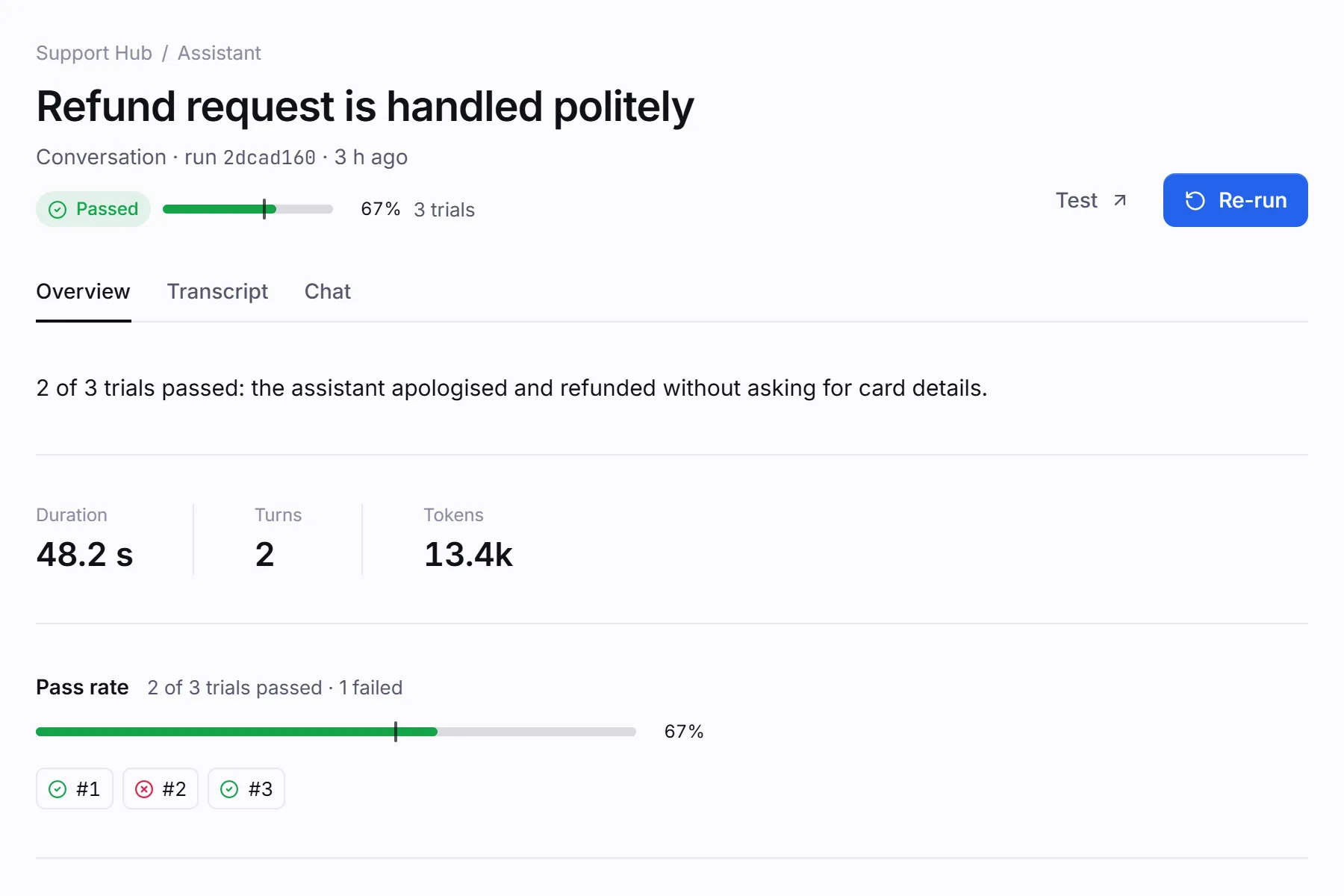
Limits and timeouts
Section titled “Limits and timeouts”| Limit | Value | What happens |
|---|---|---|
| Agent steps for a Web UI run | 30 (one model reply and its tool calls per step) | The run ends in error: Max tool calls reached. Split the test, or make it more specific. |
| Agent steps for API and MCP runs | 20 by default, up to 30 (config.max_steps) |
The same. |
| Agent steps for a website chat | Grows with max_turns (and, for red team, the number of attacks), up to 60 for a conversation and 90 for a red-team run |
The same. |
| Consecutive failed browser actions | 5 | The run fails: the agent couldn’t find or use the element, even after re-reading the page each time. |
| Job time | 300 seconds × trials | The worker stops the job. A run still pending or running past this, plus a minute’s grace, is marked error by the scheduler. |
| Trials | 1–10 per run (MAX_TRIALS caps it server-wide) |
Cost caps for AI-product tests (conversation turns, eval rows, judge reply size) are in Trials, thresholds and cost.
Follow a run live
Section titled “Follow a run live”The run page and the Live page stream events while a run is in progress: browser frames and
actions, conversation turns, eval row progress, trial progress and log lines. Under the hood this is
a Server-Sent Events stream at GET /api/runs/{run_id}/stream.
Read runs over the API
Section titled “Read runs over the API”All run data is available over the REST API with a bearer token (how to get one):
# One runcurl -s "http://localhost:8080/api/runs/$RUN_ID" -H "Authorization: Bearer $TOKEN" \  | jq '{status, effective_status, score, threshold, error_message, total_tokens}'
# The latest failed runs of a project (newest first, at most 200 per page)curl -s "http://localhost:8080/api/runs?project_id=$PROJECT_ID&status=failed&limit=20" \  -H "Authorization: Bearer $TOKEN" | jq '.runs[] | {test_name, kind, created_at}'
# A test's history, 20 at a timecurl -s "http://localhost:8080/api/runs/test-case/$TEST_ID?offset=0&limit=20" \ -H "Authorization: Bearer $TOKEN"{ "id": "2dcad160-701c-4084-88a9-c69a1f3d5aac", "kind": "conversation", "status": "passed", "effective_status": "passed", "triggered_by": "manual", "ai_provider": "anthropic", "ai_model": "claude-haiku-5-5", "score": 0.67, "threshold": 0.6, "trials": [ { "trial": 1, "status": "passed", "score": 1.0, "summary": "…" }, { "trial": 2, "status": "failed", "score": 0.67, "summary": "…" }, { "trial": 3, "status": "passed", "score": 1.0, "summary": "…" } ], "override": null, "attempt": 1, "is_flaky": false, "duration_ms": 48200, "total_tokens": 13400, "cost_usd": 0.0019}To wait for a whole batch, as CI does, poll GET /api/batches/{batch_id} until its gate is
pass or fail. See CI webhook and gates.