
Site quality checks
A site quality test (kind quality) opens your pages in a real browser and runs four scripted checks:
| Check | What it measures | Fails the run when |
|---|---|---|
| Accessibility | An axe-core 4.12.1 audit against WCAG rules | any critical or serious violation is found |
| Performance | Largest contentful paint, layout shift, blocking time and more, from the browser’s own timing APIs | a metric is over its budget |
| Links | Every link on the page, requested from the server | a link is broken (404, 410, 5xx, dead host, timeout) |
| SEO | Title, meta description, headings, canonical, language, viewport, Open Graph, image alt text | a title, meta description or <h1> is missing |
No AI model is involved, so quality tests are deterministic and free to run as often as you like: on every deploy, on a schedule, or on every pull request preview.
Create a quality test
Section titled “Create a quality test”-
On the project board, click New test in a module and choose Site quality.
-
Name the test. The Notes field is optional; it is shown on reports but doesn’t change what runs.
-
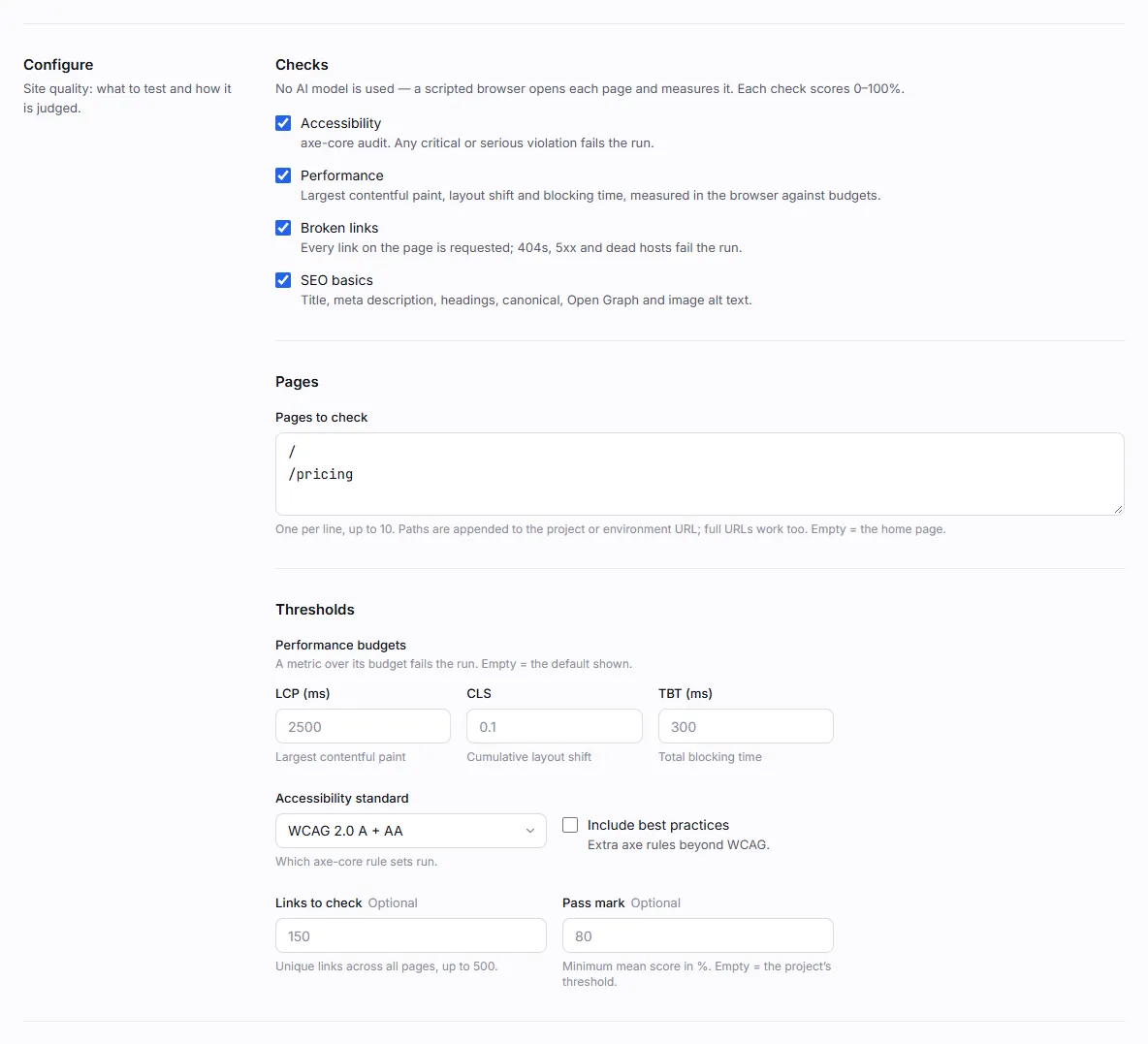
Under Configure, pick the Checks to run and list the Pages to check, one per line. Paths such as
/pricingare appended to the project or environment URL; full URLs work too. Leave it empty to check the home page. -
Optionally adjust the Thresholds: performance budgets, the accessibility standard, how many links to check and the pass mark.
-
Click Create & run.
Configuration
Section titled “Configuration”{ "checks": ["a11y", "performance", "links", "seo"], "pages": ["/", "/pricing", "https://docs.example.com/"], "budgets": { "lcp_ms": 2500, "cls": 0.1, "tbt_ms": 300 }, "max_links": 150, "a11y_tags": ["wcag2a", "wcag2aa"], "threshold": 0.8}| Key | Default | Description |
|---|---|---|
checks |
all four | Any of a11y, performance, links, seo. |
pages |
["/"] |
Up to 10 paths or absolute URLs. |
budgets |
lcp_ms 2500, cls 0.1, tbt_ms 300 |
Performance budgets. See Performance. Set a default budget to null to turn it off. |
max_links |
150 |
Unique links checked across all pages, 1–500. |
a11y_tags |
["wcag2a", "wcag2aa"] |
Which axe-core rule tags run. |
threshold |
project pass mark (0.8) | Minimum mean score, 0–1. Values above 1 are read as a percentage. |
The Accessibility standard menu in the app sets a11y_tags for you:
| Option | Tags |
|---|---|
| WCAG 2.0 A + AA | wcag2a, wcag2aa |
| WCAG 2.1 A + AA | adds wcag21a, wcag21aa |
| WCAG 2.2 A + AA | adds wcag22aa |
| Include best practices | adds best-practice |
How a quality run works
Section titled “How a quality run works”One browser session visits each page in order. For every page it:
- opens the page. A page that answers HTTP 400 or above fails, and its checks are skipped;
- takes a screenshot for the evidence;
- measures performance first, before anything else loads the CPU;
- reads the SEO facts;
- collects the page’s links;
- injects axe-core and runs the accessibility audit.
After the last page, the worker checks the collected links. Each check gets a score from 0 to 1, and the run’s score is the mean of the check scores.
The run passes only if no check failed, every page opened, and the mean score is at least the threshold. The
threshold comes from the test’s threshold, else the project’s pass mark (Settings → General), else 0.8.
Accessibility
Section titled “Accessibility”axe-core runs inside the page with the selected tags. Violations are grouped by impact:
| Impact | Score penalty per violated rule | Fails the check |
|---|---|---|
| Critical | 0.25 | yes |
| Serious | 0.15 | yes |
| Moderate | 0.05 | no |
| Minor | 0.02 | no |
The page score starts at 1 and loses the penalty for each violated rule. In the report, each violation shows the
rule, how many elements are affected, example selectors and HTML, a fix summary and a link to the rule’s guide. The
guide becomes a link only when it is an https page on Deque University (where axe-core’s guides live); anything
else is shown as plain text, so a page under test can’t plant a link in your report.
Performance
Section titled “Performance”Metrics come from the browser’s performance APIs after the page’s load event, not from Lighthouse.
| Budget key | Metric |
|---|---|
lcp_ms |
Largest contentful paint (ms) |
cls |
Cumulative layout shift (largest session window, ignoring shifts right after input) |
tbt_ms |
Total blocking time, approximated as the sum of long-task time over 50 ms after first contentful paint |
fcp_ms |
First contentful paint (ms) |
ttfb_ms |
Time to first byte (ms) |
load_ms |
Load event end (ms) |
requests |
Number of requests, including the page itself |
transfer_kb |
Transferred size in KB |
Only lcp_ms, cls and tbt_ms have budgets by default; add any other key to budget it. A metric over budget fails
the check. Each metric scores 1 within budget and falls linearly to 0 at twice the budget. A metric the browser
can’t measure is reported as not measured and doesn’t count against the page.
Every <a href> on the checked pages is collected (up to 2,000 per page), de-duplicated, and requested from the
worker: HEAD first, then GET when the server refuses HEAD. Redirects are followed by hand, up to 5 hops, and
every hop passes the same address checks as API tests.
| Verdict | Meaning | Counts as broken |
|---|---|---|
| OK | Final status below 400 | no |
| Broken | 404, 410, 5xx, other 4xx, DNS or connection errors, timeouts, redirect loops | yes |
| Restricted | 401, 403, 429 or 999: usually a login wall or bot protection | no |
| Skipped | mailto:, tel:, javascript: and other non-web links, or a blocked internal address |
no |
| Unchecked | Over max_links, or the 90-second link budget ran out |
no |
Links are checked 8 at a time with an 8-second timeout each. The score is OK links divided by OK plus broken links.
In the report, only http and https addresses are clickable.
The SEO check reads the rendered page. Errors fail the check; warnings only lower the score.
| Rule | Weight | Severity |
|---|---|---|
Has a <title> |
2 | error |
| Title is 10–60 characters | 1 | warning |
| Has a meta description | 2 | error |
| Description is 50–160 characters | 1 | warning |
Has an <h1> |
2 | error |
Has only one <h1> |
1 | warning |
<html> has a lang attribute |
1 | warning |
| Has a canonical link | 1 | warning |
Not marked noindex |
1 | warning |
| Has a viewport meta tag | 1 | warning |
| Has Open Graph title, description and image | 1 | warning |
Every <img> has an alt attribute |
1 | warning |
The score is the weight of the rules that pass divided by the total weight. noindex is only a warning because
staging sites are often marked noindex on purpose.
The report
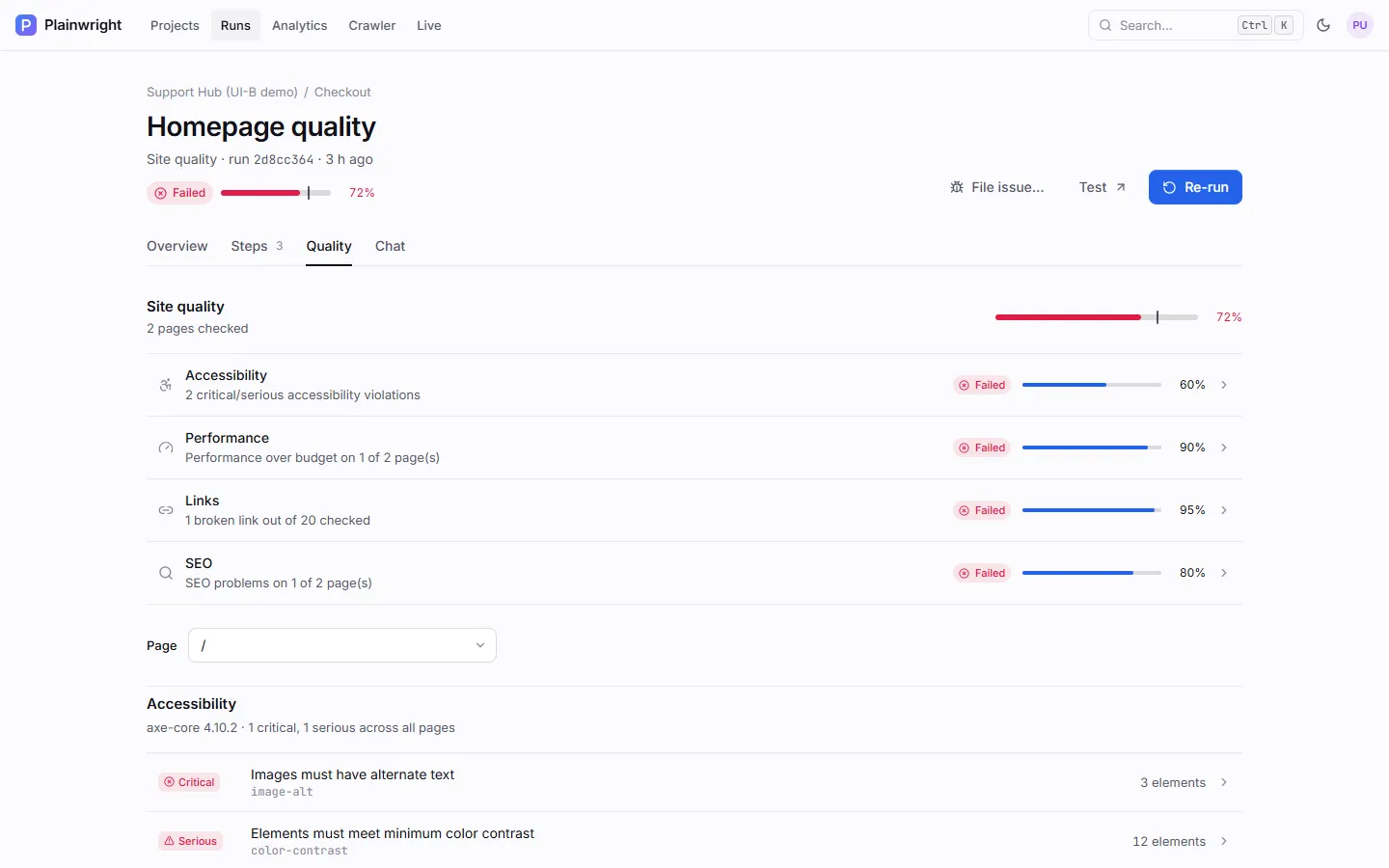
Section titled “The report”The run’s Quality tab shows the overall score against the threshold, one row per check with its status and score, and a page switcher. Click a check to jump to its section: each accessibility violation opens in a side panel; the performance table compares each metric with its budget; the links section lists broken, restricted and skipped links with the page they were found on; SEO issues are grouped by severity.
Gotchas
Section titled “Gotchas”- Pages are checked signed out. Quality tests don’t use saved logins. Check public pages, or pages your test environment serves without a session.
- Strict Content Security Policy. The checks run scripts in the page through the browser. A CSP that blocks
unsafe-evalcan stop them; the check is then reported as could not run and the run fails. - Link checks have no cookies. They run from the worker, not the browser, so links behind a login show as restricted. TLS certificates are verified, so links to a self-signed staging host show as broken.
- Browser and device. A quality run uses the run’s browser and viewport. The app runs quality tests in
Chromium at desktop size. To check a mobile viewport, trigger the run through the API with
device=iphone(see Browsers and devices).
Templates
Section titled “Templates”New test → From a template has three quality starters: Accessibility (WCAG AA), Core Web Vitals budget and Broken links & SEO basics. See Crawler, templates and imports.